
GridView nested GridView in asp net :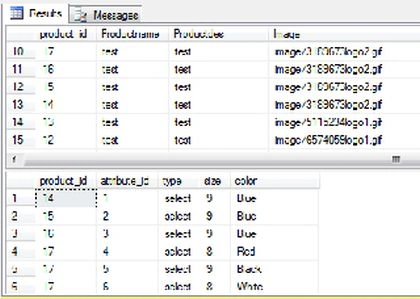
-- CSS
<style type="text/css">
.Grid td
{
background-color: #eee;
color: black;
font-size: 10pt;
line-height:200%
}
.Grid th
{
background-color: #6f6e6e;
color: White;
font-size: 10pt;
line-height:200%
}
.ChildGrid td
{
background-color: white !important;
color: black;
font-size: 10pt;
line-height:200%
}
.ChildGrid th
{
background-color: #890000 !important;
color: White;
font-size: 10pt;
line-height:200%
}
</style>
<script type="text/javascript" src="http://ajax.googleapis.com/ajax/libs/jquery/1.8.3/jquery.min.js"></script>
<script type="text/javascript">
$("[src*=plus]").live("click", function () {
$(this).closest("tr").after("<tr><td></td><td colspan = '999'>" + $(this).next().html() + "</td></tr>")
$(this).attr("src", "../image/minus.png");
});
$("[src*=minus]").live("click", function () {
$(this).attr("src", "../image/plus.png");
$(this).closest("tr").next().remove();
});
</script>
Aspx
<div align="center" style="border: 1px solid silver">
<asp:gridview id="grdPro" runat="server" autogeneratecolumns="false" cssclass="Grid"
datakeynames="product_id" onrowdatabound="grdPro_RowDataBound" allowpaging="True"
onpageindexchanging="grdPro_PageIndexChanging">
<Columns>
<asp:TemplateField>
<ItemTemplate>
<img alt = "" style="cursor: pointer" src="../image/plus.png" temp_src="../image/plus.png" />
--Panel Style Display None
<asp:Panel ID="pnlOrders" runat="server" Style="display: none">
--Nested Grid
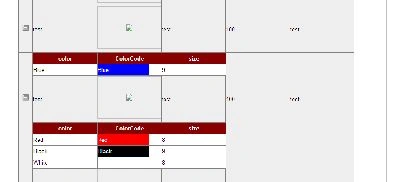
<asp:GridView ID="grdSubPro" runat="server"
AutoGenerateColumns="false" CssClass = "ChildGrid">
<Columns>
<asp:BoundField ItemStyle-Width="150px"
DataField="color" HeaderText="color" />
<asp:TemplateField ItemStyle-Width="150px"
HeaderText="ColorCode">
<ItemTemplate>
<asp:Label ID="lblColorCode" Width="120px"
Text='<%#Eval("color") %>' ForeColor="White"
BackColor='<%#System.Drawing.ColorTranslator.
FromHtml(Eval("color").ToString()) %>' runat="server">
</asp:Label>
</ItemTemplate>
</asp:TemplateField>
<asp:BoundField ItemStyle-Width="150px"
DataField="size" HeaderText="size" />
</Columns>
</asp:GridView>
</asp:Panel>
</ItemTemplate>
</asp:TemplateField>
<asp:BoundField ItemStyle-Width="150px"
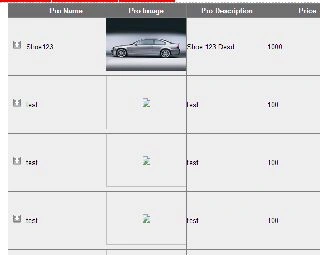
DataField="Productname" HeaderText="Pro-Name" />
<asp:TemplateField HeaderText="Pro-Image">
<ItemTemplate>
<asp:Image ID="imgProImage" runat="server" Width="150px" Height="100px"
ImageUrl='<%#string.Format("~/{0}",Eval("Image")) %>' />
</ItemTemplate>
</asp:TemplateField>
<asp:BoundField ItemStyle-Width="150px"
DataField="Productdes" HeaderText="Pro-Description" />
<asp:BoundField ItemStyle-Width="150px"
DataField="Price" HeaderText="Price" />
<asp:BoundField ItemStyle-Width="150px"
DataField="Brandname" HeaderText="Brandname"/>
</Columns>
</asp:gridview>
</div>
Aspx.cs
protected void Page_Load(object sender, EventArgs e)
{
if (!IsPostBack)
{
grdProductView();
}
}
public void
grdProductView()
{
Select = "Select * From Product_Master";
da = new SqlDataAdapter(Select, Conn);
da.Fill(ds);
grdPro.DataSource = ds;
grdPro.DataBind();
}
protected void
grdPro_RowDataBound(object sender,
GridViewRowEventArgs e)
{
if (e.Row.RowType == DataControlRowType.DataRow)
{
string ProID = grdPro.DataKeys[e.Row.RowIndex].Value.ToString();
GridView gvSub = e.Row.FindControl("grdSubPro") as GridView;
Label lblColorcode = e.Row.FindControl("lblColorCode") as Label;
string select1;
DataSet ds1 = new DataSet();
select1 = "Select * From test1 where product_id="+ProID+"";
da = new SqlDataAdapter(select1, Conn);
da.Fill(ds1);
gvSub.DataSource = ds1;
gvSub.DataBind();
}
}
protected void grdPro_PageIndexChanging(object sender, GridViewPageEventArgs e)
{
grdPro.PageIndex = e.NewPageIndex;
grdProductView();
}

Join the conversation! Your thoughts help the community grow.