

Here is a tool
developed in C# Windows Application which allows you to search on google
based on your query
which you give in textbox.
The layout of this tool is :
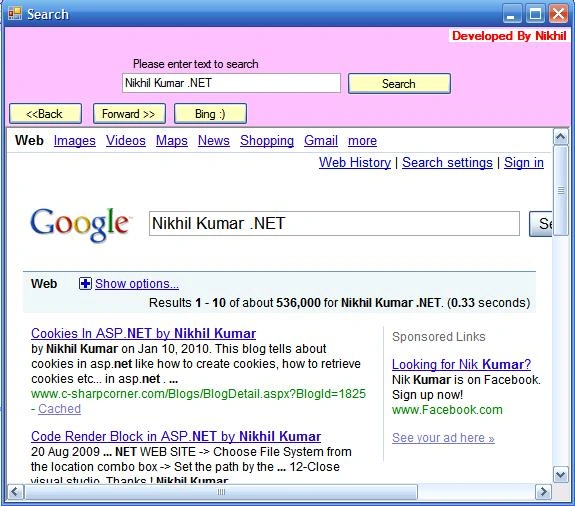
Coding:
The coding is almost simple
C#
using System;
using
System.Collections.Generic;
using
System.ComponentModel;
using
System.Data;
using
System.Drawing;
using
System.Text;
using
System.Windows.Forms;
using System.IO;
namespace SearchTool
{
public partial class Form1 : Form
{
public
Form1()
{
InitializeComponent();
}
private
void button1_Click(object
sender, EventArgs e)
{
if
(queryBox.Text.Trim().Length==0)
{
label1.Text = "Please enter text to search";
return;
}
else
{
string
nikhilkumar = "http://www.google.com/search?q="
+ queryBox.Text;
webBrowser1.Navigate(nikhilkumar);
}
}
private
void button2_Click(object
sender, EventArgs e)
{
webBrowser1.GoBack();
}
private
void button3_Click(object
sender, EventArgs e)
{
webBrowser1.GoForward();
}
private
void button4_Click(object
sender, EventArgs e){
webBrowser1.GoSearch();
}
}
}
VB.NET
- Imports System
- Imports System.Collections.Generic
- Imports System.ComponentModel
- Imports System.Data
- Imports System.Drawing
- Imports System.Text
- Imports System.Windows.Forms
- Imports System.IO
- Namespace SearchTool
- Public Partial Class Form1
- Inherits Form
- Public Sub New()
-
InitializeComponent()
- End Sub
-
- Private Sub
button1_Click(ByVal sender As Object, ByVal e As EventArgs)
- If
queryBox.Text.Trim().Length = 0 Then
-
label1.Text = "Please enter text to search"
-
Exit Sub
- Else
-
Dim nikhilkumar As String = "http://www.google.com/search?q="
& queryBox.Text
-
webBrowser1.Navigate(nikhilkumar)
- End If
- End Sub
-
- Private Sub
button2_Click(ByVal sender As Object, ByVal e As EventArgs)
-
webBrowser1.GoBack()
- End Sub
-
- Private Sub
button3_Click(ByVal sender As Object, ByVal e As EventArgs)
-
-
webBrowser1.GoForward()
- End Sub
-
- Private Sub
button4_Click(ByVal sender As Object, ByVal e As EventArgs)
- webBrowser1.GoSearch()
- End Sub
- End Class
- End Namespace
Here when you enter any word in Textbox and click on the Search Button the esult will come in the
WebBroswerControl based on the query which you enter in the textbox
Back and Forward Buttons are used used to back and forward you search J
Thanks !
Mahesh ChandPosted Jan 20, 2010, 9:59 AM
1. You may want to fix code formatting. Here are a few ways to do. You can copy code direct from Visual Studio and paste in the editor. If format it not right, try copying code from Visual Studio to Word doc, and then copy in the editor. If that does not work, use the editor to fix the formatting. I just did yours. 2. Also try to not have bold text in articles.