

Prerequisites
Xamarin.Forms
Xamarin.Forms is a cross-platform UI toolkit, which allows us to efficiently create native user interface layouts, which can be shared across iOS, Android, Windows Phone, Windows Store and Universal Windows Platform apps.
Xamarin.Forms supports five distinct Application platforms.
- iOS for the programs, which run on iPhone, iPad and iPod Touch.
- Android for the programs, which runs on Android phones and tablets.
- The Universal Windows Platform (UWP) for Applications, which runs under Windows 10 or Windows 10 Mobile.
- The Windows Runtime API of Windows 8.1.
- The Windows Runtime API of Windows Phone 8.1.
There are four main control groups, which are used to create the user interface of Xamarin.Forms Application, which are.
- Pages Xamarin.Forms pages represents a cross-platform mobile Application screens.
- Layouts Xamarin.Forms layouts are the containers used to compose the views into the logical structures.
- Views Xamarin.Forms views are the controls displayed on the user interface, such as labels, buttons and text entry boxes.
- Cells Xamarin.Forms cells are specialized elements used for the items in a list and describe how each item in a list should be drawn.
Xamarin.Forms is best for.
- Data entry apps.
- Prototypes and proofs-of-concept.
- Apps, which require little platform-specific functionality.
- Apps, where the code sharing is more important than custom UI
Now, let's get started with the steps, given below.
Create a Project
Open Visual Studio 2015 and click File -> New -> Project Option for New Xamarin.Forms app.
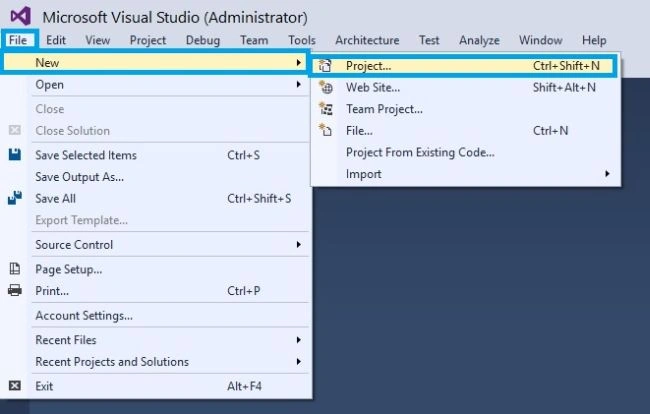
Giving the Project Name
New Project Window will open. You can select an Installed -> Template -> C# -> Cross-Platform Cordova apps -> Blank App (Xamarin.Forms Portable).
Type the project name XamarinForms and click OK button.

Afterwards, we create the project. Our solution should resemble the following.

This is the app class. In XamarinForms project, this code is responsible to draw the text, which we had seen on the screen. In a project created by Visual Studio, the App class is defined in the App.cs file.
- using System;
- using System.Collections.Generic;
- using System.Linq;
- using System.Text;
- using Xamarin.Forms;
- namespace XamarinForms
- {
- public class App: Application {
- public App() {
- // The root page of your application
- MainPage = new ContentPage {
- Content = new StackLayout {
- VerticalOptions = LayoutOptions.Center,
- Children = {
- new Label {
- HorizontalTextAlignment = TextAlignment.Center,
- Text = "Welcome to Xamarin Forms!"
- }
- }
- }
- };
- }
- protected override void OnStart() {
- // Handle when your app starts
- }
- protected override void OnSleep() {
- // Handle when your app sleeps
- }
- protected override void OnResume() {
- // Handle when your app resumes
- }
- }
- }
Now, we are ready to run our project. Thus, click Android 4.4 API 19 to run the Application.

Output

We can also run our app in Android, iOS and Windows device emulators. To see them all, choose any platform from the platform list on the Standard toolbar.

Conclusion
I hope you understood how to create Xamarin.Forms app, using Visual Studio and run it.
Join the conversation! Your thoughts help the community grow.