

What is AngularJS?
- AngularJS is a JavaScript framework, which is used to add the functionally into our HTML single page Application.
- AngularJS is developed by Google and the first version was launched in 2012.
- AngularJS is very easy to implement.
- Using AngularJS, we can create responsive webpages.
There are two options of using AngularJS, listed below.
- We can use cdn link to add AngularJs into our project.
<script src = "https://ajax.googleapis.com/ajax/libs/angularjs/1.3.3/angular.min.js"></script>
This link is directly written in the head section of our HTML document.
Example
- <!DOCTYPE html>
- <html>
- <head>
- <title></title>
- <script src="http://ajax.googleapis.com/ajax/libs/angularjs/1.4.8/angular.min.js"></script>
- </head>
- <body>
- </body>
- </html>
- Download AngularJS file and then add in your project.
We can download AngularJS file from here.
AngularJS ng-directives
- ng-app : This directive is used to define Angular JS applications.
- ng-model :This directive is used to bind the value of HTML controls to the Application data.
- ng-bind :This directive binds the Application data to HTML view.
Example
- <!DOCTYPE html>
- <html>
- <script src="http://ajax.googleapis.com/ajax/libs/angularjs/1.4.8/angular.min.js"></script>
- <body>
- <div ng-app="">
- <input type="text" ng-model="name">
- <h1>hello Mr.<span ng-bind="name"></span></h1>
- </div>
- </body>
- </html>

What is AngularJS Expression?
- AngularJS expression is used to bind the Application data.
- Expression behaves the same as ng-bind.
- AngularJS Expression is written in the double braces {{expression}}
Example
- <!DOCTYPE html>
- <html>
- <script src="http://ajax.googleapis.com/ajax/libs/angularjs/1.4.8/angular.min.js"></script>
- <body>
- <div ng-app="">
- <input type="text" ng-model="name">
- <h1>hello Mr.{{name}}</h1>
- </div>
- </body>
- </html>

Some other examples of AngularJS expression are given below:
Example
- <!DOCTYPE html>
- <html>
- <script src="http://ajax.googleapis.com/ajax/libs/angularjs/1.4.8/angular.min.js"></script>
- <body>
- <div ng-app="">
- <input type="text" ng-model="firstname">
- <input type="text" ng-model="lastname">
- <h1>hello Mr.{{firstname+" "+lastname}}</h1>
- </div>
- </body>
- </html>
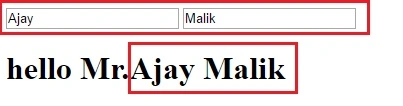
We can directly write the mathematical expression into the AngularJS expression.
Example
- <!DOCTYPE html>
- <html>
- <script src="http://ajax.googleapis.com/ajax/libs/angularjs/1.4.8/angular.min.js"></script>
- <body>
- <div ng-app="">
- <h1>sum of 5 and 6 is: {{5+6}}</h1>
- </div>
- </body>
- </html>

How to change CSS property using AngularJs.
We can also change the CSS property using AngularJS, which is very easy.
We can also change the CSS property using AngularJS, which is very easy.
Example
- <!DOCTYPE html>
- <html>
- <script src="http://ajax.googleapis.com/ajax/libs/angularjs/1.4.8/angular.min.js"></script>
- <body>
- <div ng-app="">
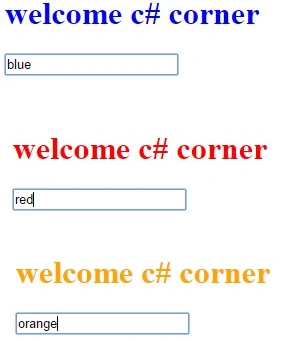
- <h1 style="color:{{acol}}">welcome c# corner</h1>
- <input ng-model="acol">
- </div>
- </body>
- </html>
AngularJS numbers
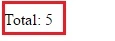
AngularJS number is used to hold the numbers and for the mathematical operations.
- <!DOCTYPE html>
- <html>
- <script src="http://ajax.googleapis.com/ajax/libs/angularjs/1.4.8/angular.min.js"></script>
- <body>
- <div ng-app="" ng-init="q=1;c=5">
- <p>Total: <span ng-bind="q * c"></span></p>
- </div>
- </body>
- </html>
AngularJS Strings
AngularJS Strings are used to store the character value.
AngularJS Strings are used to store the character value.
Example
- <!DOCTYPE html>
- <html>
- <script src="http://ajax.googleapis.com/ajax/libs/angularjs/1.4.8/angular.min.js"></script>
- <body>
- <div ng-app="" ng-init="firstName='Ajay';lastName='Malik'">
- <h2>Welcome Mr.{{ firstName + " " + lastName }}</h2>
- </div>
- </body>
- </html>

AngularJS Objects
AngularJS Objects are used to store multiple values in a single name.
Example
- <!DOCTYPE html>
- <html>
- <script src="http://ajax.googleapis.com/ajax/libs/angularjs/1.4.8/angular.min.js"></script>
- <body>
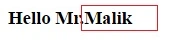
- <div ng-app="" ng-init="person={firstName:'Ajay',lastName:'Malik'}">
- <h3>Hello Mr.{{ person.lastName }}</h3>
- </div>
- </body>
- </html>
AngularJS Arrays
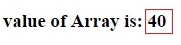
AngularJS arrays are used to store a sequence or multiple values.
Example
- <!DOCTYPE html>
- <html>
- <script src="http://ajax.googleapis.com/ajax/libs/angularjs/1.4.8/angular.min.js"></script>
- <body>
- <div ng-app="" ng-init="arr=[10,20,30,40,50]">
- <h3> value of Array is: {{arr[3]}}</h3>
- </div>
- </body>
- </html>
Ajay MalikPosted Jul 21, 2016, 12:05 AM
Tq
VenkatPosted Jul 20, 2016, 7:36 AM
Great article please post follow up article on angular js and it would be to good attached with asp.net Mvc
Sagar ShindePosted Jul 20, 2016, 6:43 AM
Nice article
Ajay MalikPosted Jul 20, 2016, 4:24 AM
Tq
Saurabh SarkarPosted Jul 20, 2016, 3:33 AM
Nice
Ajay MalikPosted Jul 20, 2016, 3:12 AM
Tq
kalu singh raoPosted Jul 20, 2016, 3:01 AM
Sir good one