

Often we need to check the no. of rows per table in SQL Server. Suppose your database is huge and you need a report no. of rows per table, then this blog will help you to find out the same.
We can achieve the same in the following ways:
Option 1: Using predefined tables sys.tables, sys.partitions, sys.allocation_units
- SELECT
- t.NAME AS TableName,
- p.[Rows],
- i.name as indexName,
- sum(a.total_pages) as TotalPages
- FROM
- sys.tables t
- INNER JOIN
- sys.indexes i ON t.OBJECT_ID = i.object_id
- INNER JOIN
- sys.partitions p ON i.object_id = p.OBJECT_ID AND i.index_id = p.index_id
- INNER JOIN
- sys.allocation_units a ON p.partition_id = a.container_id
- WHERE
- t.NAME NOT LIKE 'dt%' AND
- i.OBJECT_ID > 255 AND
- i.index_id <= 1
- GROUP BY
- t.NAME, i.object_id, i.index_id, i.name, p.[Rows]
- ORDER BY
- object_name(i.object_id)
- sp_MSForEachTable 'DECLARE @t AS VARCHAR(MAX);
- SELECT @t = CAST(COUNT(1) as VARCHAR(MAX))
- + CHAR(9) + CHAR(9) + ''?'' FROM ? ; PRINT @t'
Option 3: Using sysobjects, sysindexes
- SELECT
- sysobjects.Name
- , sysindexes.Rows
- , sysindexes.IndId
- FROM
- sysobjects
- INNER JOIN sysindexes
- ON sysobjects.id = sysindexes.id
- WHERE
- sysobjects.type = 'U'
- AND sysindexes.IndId < 2
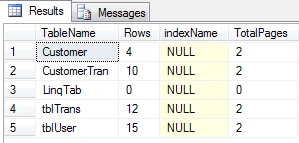
Figure 1: Displays no of Rows per table
Hope this blog helps you to find out no. of rows per table in SQL Server.
Happy Coding!!
Join the conversation! Your thoughts help the community grow.