

Introduction
Here, I used some date time function to find out the week's start and end date simultaneously.
List of date time functions
- DATEADD()
- DATEPART()
- GETDATE()
- CAST()
DATEADD()
It returns a particular date with the particular number interval added to a particular date part of the date.
DATEPART()
DATEPART () function returns the integer value of particular datepart of the passed date.
This function returns the int value. Datepart(datepart, date) takes the datepart and date i.e. 2 parameters.
Datepart is a part of date, e.g. day, month, year.
GETDATE()
Returns the current database system timestamp as a datetime value. This value is derived from the operating system of the computer on which the instance of SQL Server is running.
CAST()
Converts an expression of one data type to another.
Week_Start_Date select statement
SELECT DATEADD(DAY, 2 - DATEPART(WEEKDAY, GETDATE()), CAST(GETDATE() AS DATE)) [Week_Start_Date]

Divide Week_Start_Date select statement
select DATEPART(WEEKDAY, GETDATE())
select CAST(GETDATE() AS DATE)
SELECT  DATEADD(DAY, 2 - 5, '2017-04-06') [Week_Start_Date]
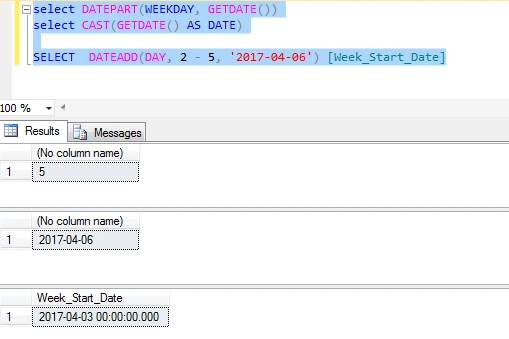
Week_End_Date select statement
Select DATEADD(DAY, 8 - DATEPART(WEEKDAY, GETDATE()), CAST(GETDATE() AS DATE)) [Week_End_Date]

Divide Week_End_Date select statement
select DATEPART(WEEKDAY, GETDATE())
select CAST(GETDATE() AS DATE)
SELECT  DATEADD(DAY, 8 - 5, '2017-04-06') [Week_End_Date]
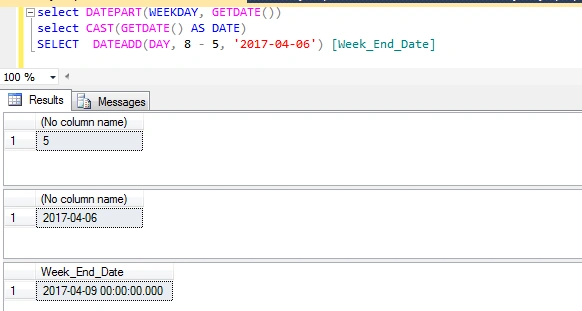
Full query for week start date & week end date
SELECT  DATEADD(DAY, 2 - DATEPART(WEEKDAY, GETDATE()), CAST(GETDATE() AS DATE)) [Week_Start_Date],
DATEADD(DAY, 8 - DATEPART(WEEKDAY, GETDATE()), CAST(GETDATE() AS DATE)) [Week_End_Date]
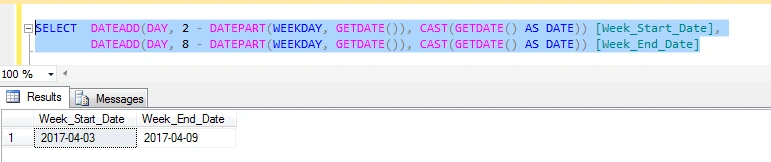
Summary
- Date time function in SQL Server.
- To use Date time function, we can find out week start date and week end date.
Jeff ModenPosted Dec 16, 2020, 2:55 PM
Heh... lordy... the comments on this forum absolutely slaughtered any formatting attempts.
Jeff ModenPosted Dec 16, 2020, 2:54 PM
Your code seems to have a problem but I may be misinterpreting the goal of the code and so I'm asking (especially since you make no mention of DATEFIRST nor what claim should be the first weekday by name of the week). Here's the code I used with explanations that follow that. SET DATEFIRST 7; --7=Sunday but the code returns Week_StartDate as Monday, 14 Dec 2020 SELECT DATEADD(DAY, 2 - DATEPART(WEEKDAY, '16 Dec 2020'), CAST('16 Dec 2020' AS DATE)) [Week_Start_Date] ,DATEADD(DAY, 8 - DATEPART(WEEKDAY, '16 Dec 2020'), CAST('16 Dec 2020' AS DATE)) [Week_End_Date] ; SET DATEFIRST 1; --1=Monday but the code returns Week_StartDate as Tuesday, 15 Dec 2020 SELECT DATEADD(DAY, 2 - DATEPART(WEEKDAY, '16 Dec 2020'), CAST('16 Dec 2020' AS DATE)) [Week_Start_Date] ,DATEADD(DAY, 8 - DATEPART(WEEKDAY, '16 Dec 2020'), CAST('16 Dec 2020' AS DATE)) [Week_End_Date] ; I changed all occurrences of GETDATE() to a fixed date of Wednesday, "16 Dec 2020" and ran it with DATEFIRST set to 7 (Sunday), I was expecting to return a week start date of Sunday, 13 Dec 2020 but, instead, it returned Monday, 14 December 2020. Then, I changed the DATEFIRST setting to 1 (Monday) and was expecting the code to return Monday, 14 Dec 2020 but, instead, it returned Tuesday, 15 December 2020. So, what is the intention of the code? I'll also state that the worldwide community of this WIKI, whatever the intention of the code is, is MUST be able to withstand a change in the DATEFIRST system setting and yours does not appear to do so. You just can't bank on it always being set to "7" even in the U.S.A. where it is frequently set to "1" (especially for ISO standard days) and other settings to accommodate requirements for various companies.