

In this blog, we will discuss how we can get the primary column name of any table programmatically. However, we can see the primary column name by just right-clicking on a table and seeing the design view. But when we have dynamically created a table and set the primary key, then we do not know the primary column name. So in this article, we discuss that.
In my database, I have only one table named Employee, and you can see in the below image the primary key column is EmployeeId.
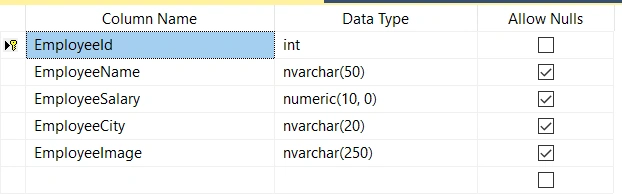
Here we use INFORMATION_SCHEMA.TABLE_CONSTRAINTS and INFORMATION_SCHEMA.CONSTRAINT_COLUMN_USAGE view, so first, we get what's inside that view.
Run the following queries to get the output of both views.
INFORMATION_SCHEMA.TABLE_CONSTRAINTS
select * from INFORMATION_SCHEMA.TABLE_CONSTRAINTS
Output

INFORMATION_SCHEMA.CONSTRAINT_COLUMN_USAGE
select * from INFORMATION_SCHEMA.CONSTRAINT_COLUMN_USAGE
Output

How to get Primary Key Column Name Programmatically?
Here are a few lines of SQL query using which we can get the primary column name.
select C.COLUMN_NAME FROM
INFORMATION_SCHEMA.TABLE_CONSTRAINTS T
JOIN INFORMATION_SCHEMA.CONSTRAINT_COLUMN_USAGE C
ON C.CONSTRAINT_NAME=T.CONSTRAINT_NAME
WHERE
C.TABLE_NAME='Employee'
and T.CONSTRAINT_TYPE='PRIMARY KEY'
Output
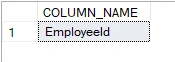
Explanation
- Here we join these two views, TABLE_CONSTRAINTS And CONSTRAINT_COLUMN_USAGE on CONSTRAINT_NAME.
- Then select those records where CONSTRAINT_COLUMN_USAGE.TABLE_NAME is Employee and TABLE_CONSTRAINTS.CONSTRAINT_TYPE is the Primary Key.
- And then, select CONSTRAINT_COLUMN_USAGE. COLUMN_NAME.
So that is just two or three lines of SQL query for getting the primary column name of any table. I hope you find some useful information in this article. If you find this helpful, kindly share it with your friends.
Join the conversation! Your thoughts help the community grow.