

Add below action in page
- public ActionResult GetDetails()
- {
- var data = DB.tblStuds.ToList();
- return PartialView(data);
- }
Add partial view for this action. RightClick on above Action > add View > Enter ViewName Same as action name > tick Create Partial View
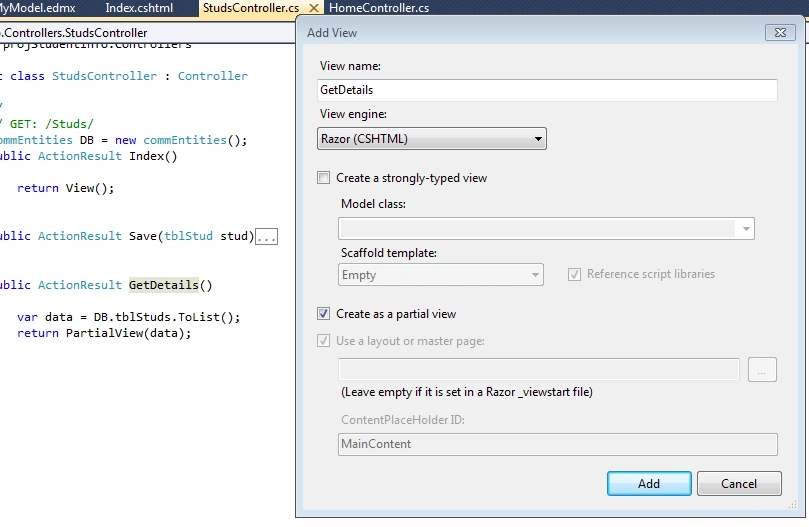
Now we have index.cshtml where we have Show Data Button for which I have ajax call for getting stud details.
Index.cshtml
- @model projStudentInfo.Models.tblStud
- @ {
- ViewBag.Title = "Index";
- Layout = "~/Views/Shared/_Layout.cshtml";
- }
- < h2 >
- Student Info < /h2>
- @using (Html.BeginForm("Save", "Studs", FormMethod.Post))
- {
- <table>
- <tr>
- <td>
- Name
- </td >
- < td > @Html.TextBoxFor(c = > c.stud_name)
- < /td>
- </tr >
- < tr >
- < td >
- Age
- < /td>
- <td>@Html.TextBoxFor(c => c.stud_age)
- </td >
- < /tr>
- <tr>
- <td>
- <input type="submit" name="submit" value="Save" / >
- < /td>
- <td>
- <input type="button" name="submit" value="Show Data" id="btnShow" / >
- < /td>
- </tr >
- < /table>
- }
- <div id="dvShow"></div >
- < script >
- /* we have ajax call for calling GetDetails which will return html data in vHtml variable */
- $(document).ready(function() {
- $("#btnShow").click(function() {
- $.ajax({
- url: '@Url.Action("GetDetails","Studs")',
- type: 'post',
- success: function(vHtml) {
- $("#dvShow").html("");
- $("#dvShow").html(vHtml);
- }
- });
- });
- });
- < /script>
- GetDetails.cshtml (partialview)
- @model IEnumerable<projStudentInfo.Models.tblStud>
- <table border="0" cellpadding="0" cellspacing="0" id="tblStud">
- <thead>
- <tr>
- <th>
- Id
- </th >
- < th >
- Student Name
- < /th>
- <th>
- Age
- </th >
- < /tr>
- </thead >
- @foreach(var item in Model)
- {
- < tr >
- < td > @item.studid
- < /td>
- <td>@item.stud_name
- </td >
- < td > @item.stud_age
- < /td>
- </tr >
- }
- < /table>
- <style>
- #tblStud td {padding:5px;}
- #tblStud th {background:#aea;}
- </style >
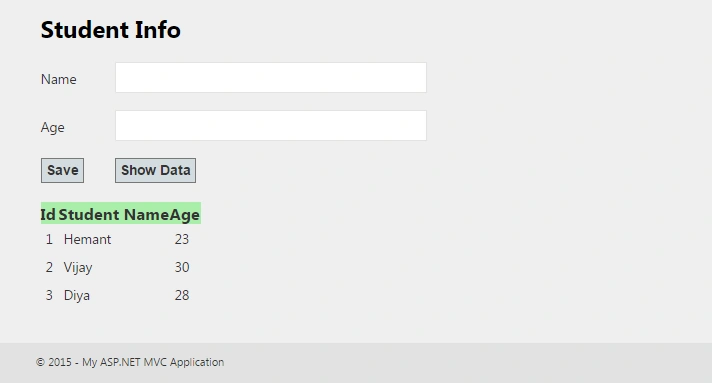
Final Screen
Join the conversation! Your thoughts help the community grow.