
Today, we learn about the Finger Scanner in C#. I know, lots of articles are out there. I have no deep knowledge in Finger Scanner. This is my first project in the company. I am nervous, because we have no good knowledge and no team leader (TL) helped me because this type of project in a company is just like a wonder.
Requirements
- Digital Persona U.are.U. 4500 Fingerprint Scanner
This device can be purchased online or through the market. This device is not too costly. I have an SDK for connectivity with the devices. You can download this SDK from the official Website, http://www.crossmatch.com. This device supports multiple language like .NET, Java, C#, ActiveX/COM, C/C++, JPOS/OPOS . In this article, I am using Windows Application with C#.
Namespace of this dll is DPUruNet. When you use this dll, you get a lot of classes and functions.
Get the Reader Name of using DPUruNet.
- private static ReaderCollection _readers;
- private static string ReaderName = string.Empty;
- public static string ReturnListofFingerCapture()
- {
- _readers = ReaderCollection.GetReaders();
- foreach (Reader reader in _readers)
- {
- // we pass here reader serail No on Reader Name...
- ReaderName= Reader.Description.SerialNumber;
- }
- return ReaderName;
- }
1. DPCtlUruNet.DLL
2. DPUruNet.DLL
Afterwards, add the two DLL reference. You get the reader Name with some more details.
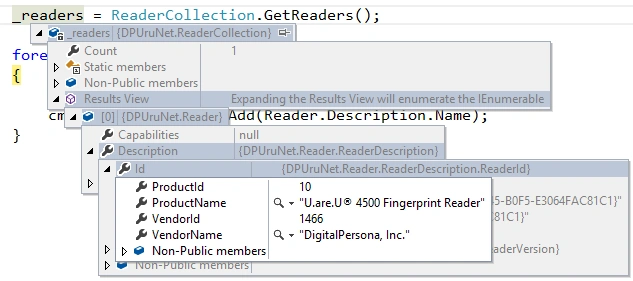
The image, shown above, displays the details of Product Name, ProductID,VendorID and Vendor Name. After Image check, there is one doubt in the mind i.e. where is the reader name? Don't worry, in the next image, the reader name is shown.

I hope you got some idea about the Finger Scanner. In the next article, we will capture the finger image and compare among fingers. If you have any query, please free feel to drop your message in the comment box.
The image, shown above, displays the details of Product Name, ProductID,VendorID and Vendor Name. After Image check, there is one doubt in the mind i.e. where is the reader name? Don't worry, in the next image, the reader name is shown.
I hope you got some idea about the Finger Scanner. In the next article, we will capture the finger image and compare among fingers. If you have any query, please free feel to drop your message in the comment box.
venkat raoPosted Jun 7, 2024, 1:22 PM
Can you please provide the complete code of capturing ?
ManliverPosted Dec 9, 2019, 11:47 AM
It has an example of how the view that makes the calls to the different methods would look.
victor gastelumPosted Sep 25, 2019, 1:00 AM
We are the rest of the series?
Mario FigueroaPosted Jun 5, 2019, 10:15 PM
Line 07 of the code throws me the error message: Unable to load DLL file 'dpfpdd.dll': Unable to find the specified module. (Exception from HRESULT: 0x8007007E)
Shaun YongPosted Apr 18, 2019, 9:48 PM
I could not find your next article on finger print, and do you still have the sample file?
SubashPosted Sep 7, 2016, 9:02 AM
Nice sir
Bikesh SrivastavaPosted Aug 2, 2016, 10:06 AM
Good explanation