

Let us see a practical implementation for the FindAll() method in LINQ. We will create a list of numbers and out of this list we will try to display numbers greater than 100 as output. Let us see how we can achieve the same using FindAll() method in LINQ.
Write the following code in a console application.
- using System;
- usingSystem.Collections.Generic;
- usingSystem.Linq;
- usingSystem.Text;
- usingSystem.Threading.Tasks;
- namespaceFindAllMethod
- {
- class Program
- {
- static void Main(string[] args)
- {
- List<int>mylist = new List<int>();
- mylist.Add(30);
- mylist.Add(400);
- mylist.Add(300);
- mylist.Add(90);
- mylist.Add(190);
- mylist.Add(787);
- mylist.Add(12);
- List<int> _Lst = mylist.FindAll(a => a > 100 ? true : false);
- foreach (varnum in _Lst)
- {
- Console.WriteLine(num);
- }
- Console.ReadLine();
- }
- }
- }
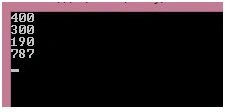
So we have the numbers greater than 100 as the output. I hope this post is useful to developers.
Dao HuPosted Dec 22, 2016, 9:40 AM
static void Main(string[] args) { List<int> mylist = new List<int>(); mylist.Add(30); mylist.Add(400); mylist.Add(300); mylist.Add(90); mylist.Add(190); mylist.Add(787); mylist.Add(12); List<int> _Lst = mylist.FindAll(FuncCompare);//also can like this foreach (var num in _Lst) { Console.WriteLine(num); } Console.ReadLine(); } public static bool FuncCompare(int a) { if (a>100) { return true; } return false; }
Jasbeer SinghPosted Dec 21, 2016, 3:31 AM
Good one as example of FindAll()