

JQuery provides us the feature to find the element by a selector, JQuery object or element. Now we discuss all the three elements by example:
Syntax:
.find(selector)
.find(jQuery object)
.find(element)
.Find(selector)- Here we check the elements that they are matching the selector or not.
<html>
<head>
<script
src="http://code.jquery.com/jquery-1.7.2.min.js"></script>
</head>
<body>
<ul
class="List1">
<li
class="Item1">(a)</li>
<li
class="Item2">(b)
<ul
class="List2">
<li class="SubItem1">1)</li>
<li class="SubItem2">2)
<ul
class="List3">
<li
class="SubList1">One</li>
<li
class="SubList2">Two</li>
<li
class="SubList3">Three</li>
</ul>
</li>
<li class="SubItem3">3)</li>
</ul>
</li>
<li
class="Item3">(c)</li>
</ul>
<script>
$('li.Item2').find('li').css('color',
'Blue');</script>
</body>
</html>
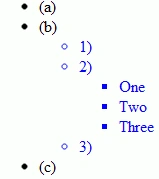
In the next example we search all the <p> tag and <span> elements in the <div> tag and change its color.
<html>
<head>
<script
src="http://code.jquery.com/jquery-1.7.2.min.js"></script>
</head>
<body>
<div><p>Hii</p>My
Name is Mahak Gupta</div>
<div>I
Love <span>ASP.NET</span>.</p>
<script>
$("div").find("p").css('color',
'Brown');
$("div").find("span").css('color',
'Blue');
</script>
</body>
</html>
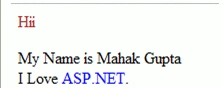
If we want to search all the <span> elements in our program by the code.
<html>
<head>
<script
src="http://code.jquery.com/jquery-1.7.2.min.js"></script>
</head>
<body>
<p><span>Hii</span>,My
Name is Mahak</p>
<p>How
are you??? <span>I'm
Fine</span>.</p>
<div>I
Love <span>Asp.net</span>
</div>
<script>
var x = $('span');
$("p").find(x).css('color',
'Blue');
</script>
</body>
</html>
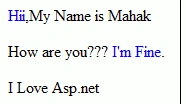
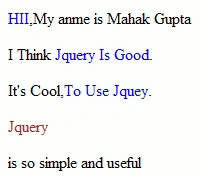
Now we take another example of .find method in jquery, Here we use this method by class.
<html>
<head>
<title>the
title</title>
<script
type="text/javascript"
src="/jquery/jquery-1.7.2.min.js"></script>
<script
type="text/javascript"
language="javascript">
$(document).ready(function
() {
$("p").find("span").addClass("changeforecolor");
});
<style>
.changeforecolor{ color:blue; }
</style>
</head>
<body>
<div>
<p><span class="changeforecolor">HII</span>,My anme is Mahak Gupta</p>
<p>I Think <span class="changeforecolor">JQUery Is Good</span>.</p>
<p>Its Cool<span class="changeforecolor">,To Use Jquey</span>.</p>
</div>
</body>
</html>
Join the conversation! Your thoughts help the community grow.