

Introduction
Here we are fetching LinkedIn data like Username, Email, and other fields using JavaScript SDK. We can also fetch any company-specific data like company job updates/posts, total likes, comments, and a number of views along with a lot of metadata we can fetch which I have shown below.
Here we have 2 workarounds.
- Configuration of LinkedIn developer API
- Javascript Code to fetch records
Configuration of LinkedIn developer API
In order to fetch records, first, we need to create developer API in LinkedIn which will act as token/identity while fetching data from other LinkedIn accounts.
So to create API, navigate to https://linkedin.com/developer/apps, and click on 'Create Application'.
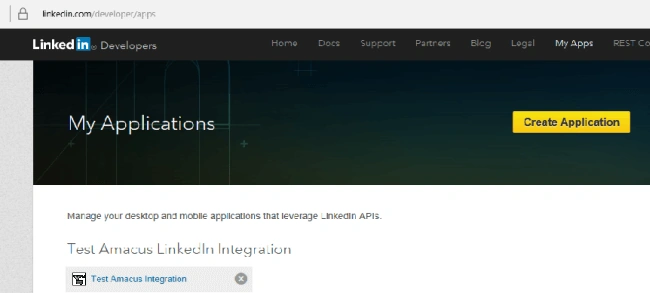 After navigating, fill in details like name, description, and other required fields and then submit.
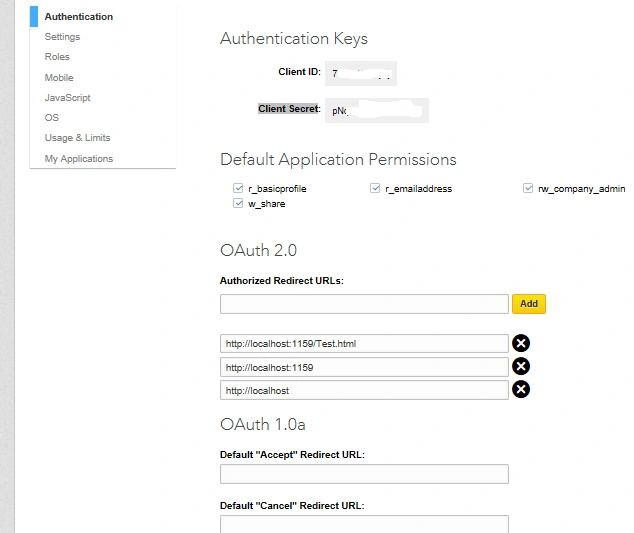
As we submit, it will create Client ID and Client Secret shown below, which we will be using in our code while communicating to fetch records from other LinkedIn account.
 Note
We need to provide localhost Url here under Oauth 2.0. I am using my localhost, but you can probably use other production URLs under Oauth 2.0 where your app is configured. It will make your API consider the Url as trusted which fetching records.
Note
We need to provide localhost Url here under Oauth 2.0. I am using my localhost, but you can probably use other production URLs under Oauth 2.0 where your app is configured. It will make your API consider the Url as trusted which fetching records.
Javascript Code to fetch records
For getting user details like first name, last name,User image can be written as,
- <script type="text/javascript" src="https://platform.linkedin.com/in.js">
- api_key: XXXXXXX //Client ID
- onLoad: OnLinkedInFrameworkLoad //Method that will be called on page load
- authorize: true
- </script>
- <script type="text/javascript">
- function OnLinkedInFrameworkLoad() {
- IN.Event.on(IN, "auth", OnLinkedInAuth);
- }
- function OnLinkedInAuth() {
- IN.API.Profile("me").result(ShowProfileData);
- }
- function ShowProfileData(profiles) {
- var member = profiles.values[0];
- var id = member.id;
- var firstName = member.firstName;
- var lastName = member.lastName;
- var photo = member.pictureUrl;
- var headline = member.headline;
- //use information captured above
- var stringToBind = "<p>First Name: " + firstName + " <p/><p> Last Name: " + lastName + "<p/><p>User ID: " + id + " and Head Line Provided: " + headline + "<p/>"
- document.getElementById('profiles').innerHTML = stringToBind;
- }
- </script>
Kindly note we need to include 'https://platform.linkedin.com/in.js' as src under script type as it will act on this Javascript SDK provided by Linkedin.
In the same way we can also fetch records of any organization with the companyid as keyword.
- <head>
- <script type="text/javascript" src="https://platform.linkedin.com/in.js">
- api_key: XXXXXXX ////Client ID
- onLoad: onLinkedInLoad
- authorize: true
- </script>
- </head>
- <body>
- <div id="displayUpdates"></div>
- <script type="text/javascript">
- function onLinkedInLoad() {
- IN.Event.on(IN, "auth", onLinkedInAuth);
- console.log("On auth");
- }
- function onLinkedInAuth() {
- var cpnyID = XXXXX; //the Company ID for which we want updates
- IN.API.Raw("/companies/" + cpnyID + "/updates?event-type=status-update&start=0&count=10&format=json").result(displayCompanyUpdates);
- console.log("After auth");
- }
- function displayCompanyUpdates(result) {
- var div = document.getElementById("displayUpdates");
- var el = "<ul>";
- var resValues = result.values;
- for (var i in resValues) {
- var share = resValues[i].updateContent.companyStatusUpdate.share;
- var isContent = share.content;
- var isTitled = isContent,
- isLinked = isContent,
- isDescription = isContent,
- isThumbnail = isContent,
- isComment = isContent;
- if (isTitled) {
- var title = isContent.title;
- } else {
- var title = "News headline";
- }
- var comment = share.comment;
- if (isLinked) {
- var link = isContent.shortenedUrl;
- } else {
- var link = "#";
- }
- if (isDescription) {
- var description = isContent.description;
- } else {
- var description = "No description";
- }
- /*
- if (isThumbnailz) {
- var thumbnailUrl = isContent.thumbnailUrl;
- } else {
- var thumbnailUrl = "http://placehold.it/60x60";
- }
- */
- if (share) {
- var content = "<a target='_blank' href=" + link + ">" + comment + "</a><br>";
- //el += "<li><img src='" + thumbnailUrl + "' alt=''>" + content + "</li>";
- el += "<li><div>" + content + "</div></li>";
- }
- console.log(share);
- }
- el += "</ul>";
- document.getElementById("displayUpdates").innerHTML = el;
- }
- </script>
- </body>
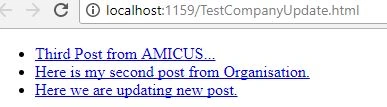
We can get multiple metadata while fetching records for any any organization. We can get company updates as shown below.
Kindly let me know if you have any issues.
Salman AzizPosted Jan 19, 2022, 11:59 AM
I think your personal post cannot be fetched according to the new update of LinkedIn. Now by using above method you can only fetch posts from your company page. Can you please suggest if any other way you know. Thanks
Kiran GirasePosted Jun 24, 2021, 7:03 AM
Hi Suman Kumar, can we get LinkedIn data using the first name last name, and mobile number?
Patel AkashPosted Jul 4, 2019, 12:57 AM
Uncaught (in promise) TypeError: Could not instantiate tag for 'login': Cannot read property 'on' of null in console
FP poragPosted Apr 26, 2019, 10:26 AM
It's not working right now brother ... Why?? Error is: Cannot read property 'then' of undefined at Object.authorize (in.js:18) Solution please...
AbdeldjallilPosted Oct 25, 2018, 10:59 AM
I have the same error "Member does not have permission to get company." "status": 403, knowing that my page url it's well under OAUTH 2.0, i want to know if somene did succeed to fix this issue
Shambu JowseyPosted Jun 15, 2018, 5:58 AM
I just see "on auth" logged then nothing happens - no requests etc
Shambu JowseyPosted Jun 15, 2018, 5:53 AM
Have the code exactly like yours but the 2nd two methods never get called? what do i have to change??
Shambu JowseyPosted May 31, 2018, 9:36 AM
- also if i change the line: ***IN.Event.on(IN, "auth", onLinkedInAuth);**** to: ****IN.Event.on(IN, "auth", onLinkedInAuth());*** (added brackets after method call) - i get respnse: "Member does not have permission to get company." - so not authorized at this point but maybe calling it too early(i saw "after auth" logged before "on auth")
Shambu JowseyPosted May 31, 2018, 9:05 AM
Hi, im using the second js example and its not hitting the displaycompanyupdates() method, last thing logged was "on auth" and looks like succesfull call to "https://www.linkedin.com/uas/js/userspace?v=1.0.304-1429&apiKey=*************&onLoad=onLinkedInLoad&authorize=true&secure=1&" - cant seem to track down whats going wrong. - it dosent look like anything is passed into the method for the "results" parameter.
Sudesha NPosted May 24, 2018, 2:01 AM
I'm also getting "errorCode": 0, "message": "Member does not have permission to get company." error. Where should I add website/page URL under OAUTH 2.0? Can send some screenshot of it?
Kaloyan ChanchevPosted May 17, 2018, 3:38 AM
how to fix this? "errorCode": 0, "message": "Member does not have permission to get company."
Shambu JowseyPosted May 16, 2018, 8:49 AM
Is this still working for dispaying a companies posts?