

There are many ways to integrate the Facebook by Oauth like "RegisterFacebookClient". But I have some issues with this method, as I get isSuccussfull=false all the time. With this, I have to integrate Facbook easily. I hope this will help others too.
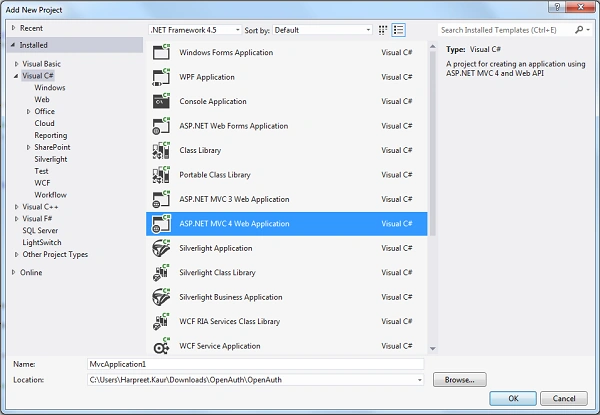
Firstly, create a New ASp.Net MVC 4 Web Application project in Visual Studio 2012 and select "Internet Application".
Before creating a .NET MVC application, we have to register the domain name that will be used for the web site at the Facebook development site: https://developers.facebook.com/apps. After this, we will have an "App ID" and "App Secret".
Create New App
1. Click on the Add a New App.
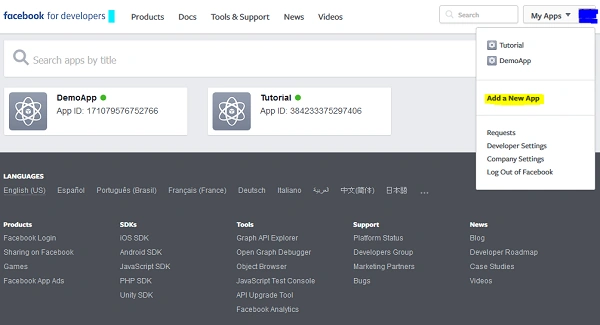
2. Then Enter the Display name like "Demo" and Contact Email. After this click on "Create App ID".

Then your app is created. Now you have to set the basic settings of the App. Then select "Platform" and click on "Web". Now you have to enter your "Site URL".

Then go to the App Review menu and make your app live. After making your app live, a popup will be displayed on the screen in which you have to select the category of your app like "Pages" to make your app public. So, it will become available to everyone.
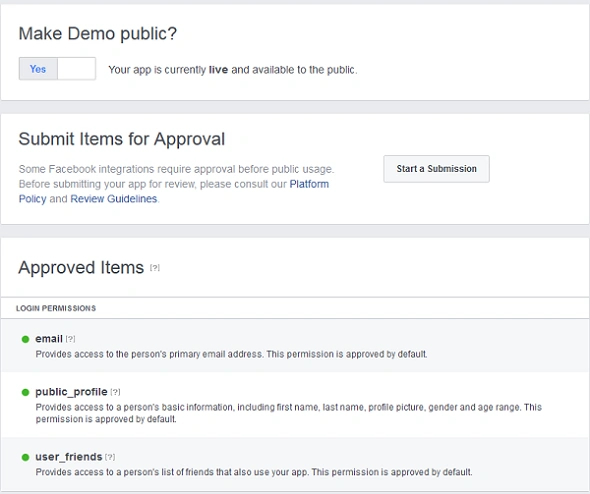
Now your app is ready to integrate.
I have registered my class named as "FacebookScopedClient.cs" for Facebook. Write a one line code in AuthConfig.cs
Here is the code for FacebookScopedClient.cs class which has inherited IAuthenticationClient Interface.
- OAuthWebSecurity.RegisterClient(new FacebookScopedClient("YourAppId", "YourSecretId"), "Facebook", null);
- public class FacebookScopedClient : IAuthenticationClient
- {
- private string appId;
- private string appSecret;
- private const string baseUrl = "https://www.facebook.com/dialog/oauth?client_id=";
- public const string graphApiToken = "https://graph.facebook.com/oauth/access_token?";
- public const string graphApiMe = "https://graph.facebook.com/me?";
- private static string GetHTML(string URL)
- {
- string connectionString = URL;
- try
- {
- System.Net.HttpWebRequest myRequest = (HttpWebRequest)WebRequest.Create(connectionString);
- myRequest.Credentials = CredentialCache.DefaultCredentials;
- //// Get the response
- WebResponse webResponse = myRequest.GetResponse();
- Stream respStream = webResponse.GetResponseStream();
- ////
- StreamReader ioStream = new StreamReader(respStream);
- string pageContent = ioStream.ReadToEnd();
- //// Close streams
- ioStream.Close();
- respStream.Close();
- return pageContent;
- }
- catch (WebException ex)
- {
- StreamReader reader = new StreamReader(ex.Response.GetResponseStream());
- string line;
- StringBuilder result = new StringBuilder();
- while ((line = reader.ReadLine()) != null)
- {
- result.Append(line);
- }
- }
- catch (Exception)
- {
- }
- return null;
- }
- private IDictionary<string, string> GetUserData(string accessCode, string redirectURI)
- {
- string value = "";
- string token = GetHTML(graphApiToken + "client_id=" + appId + "&redirect_uri=" +
- HttpUtility.UrlEncode(redirectURI) + "&client_secret=" +
- appSecret + "&code=" + accessCode);
- if (token == null || token == "")
- {
- return null;
- }
- if (token != null || token != "")
- {
- if (token.IndexOf("access_token") > -1)
- {
- string[] arrtoken = token.Replace("\''", "").Split(':');
- string[] arrval = arrtoken[1].ToString().Split(',');
- value = arrval[0].ToString().Replace("\"", "");
- }
- }
- string data = GetHTML(graphApiMe + "fields=id,name,email,gender,link&access_token=" + value);
- // this dictionary must contains
- Dictionary<string, string> userData = JsonConvert.DeserializeObject<Dictionary<string, string>>(data);
- return userData;
- }
- public FacebookScopedClient(string appId, string appSecret)
- {
- this.appId = appId;
- this.appSecret = appSecret;
- }
- public string ProviderName
- {
- get { return "Facebook"; }
- }
- public void RequestAuthentication(System.Web.HttpContextBase context, Uri returnUrl)
- {
- string url = baseUrl + appId + "&redirect_uri=" + HttpUtility.UrlEncode(returnUrl.ToString())
- + "&scope=email";
- context.Response.Redirect(url);
- }
- public AuthenticationResult VerifyAuthentication(System.Web.HttpContextBase context)
- {
- string code = context.Request.QueryString["code"];
- string rawUrl = context.Request.Url.OriginalString;
- //From this we need to remove code portion
- rawUrl = Regex.Replace(rawUrl, "&code=[^&]*", "");
- IDictionary<string, string> userData = GetUserData(code, rawUrl);
- if (userData == null)
- return new AuthenticationResult(false, ProviderName, null, null, null);
- string id = userData["id"];
- string username = userData["email"];
- userData.Remove("id");
- userData.Remove("email");
- AuthenticationResult result = new AuthenticationResult(true, ProviderName, id, username, userData);
- return result;
- }
- }
In your Account controller, under ExternalLoginCallback method you will find that the result will give IsSuccessful=true.
Note
There will be no change in the AccountController.
- AuthenticationResult result = OAuthWebSecurity.VerifyAuthentication(Url.Action("ExternalLoginCallback",
- new { ReturnUrl = returnUrl }));
There will be no change in the AccountController.
Former memberPosted Jun 23, 2017, 5:39 AM
Which asp.net mvc version you used here?