

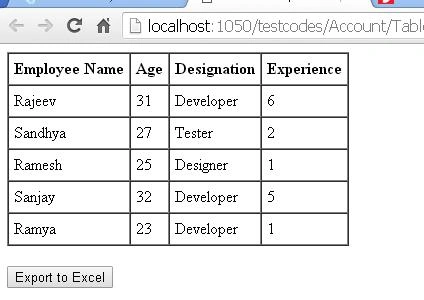
In this blog, we will see how to export an HTML table to an Excel file, using the simple table2excel jQuery plugin. First we, will create the HTML table, which shows employee details and an "Export to Excel" button, as shown below.
- <div>
- <table id="mytable" cellpadding="5" border="1" cellspacing="0">
- <thead>
- <tr>
- <th>
- Employee Name
- </th>
- <th>
- Age
- </th>
- <th>
- Designation
- </th>
- <th>
- Experience
- </th>
- </tr>
- </thead>
- <tbody>
- <tr>
- <td>
- Rajeev
- </td>
- <td>
- 31
- </td>
- <td>
- Developer
- </td>
- <td>
- 6
- </td>
- </tr>
- <tr>
- <td>
- Sandhya
- </td>
- <td>
- 27
- </td>
- <td>
- Tester
- </td>
- <td>
- 2
- </td>
- </tr>
- <tr>
- <td>
- Ramesh
- </td>
- <td>
- 25
- </td>
- <td>
- Designer
- </td>
- <td>
- 1
- </td>
- </tr>
- <tr>
- <td>
- Sanjay
- </td>
- <td>
- 32
- </td>
- <td>
- Developer
- </td>
- <td>
- 5
- </td>
- </tr>
- <tr>
- <td>
- Ramya
- </td>
- <td>
- 23
- </td>
- <td>
- Developer
- </td>
- <td>
- 1
- </td>
- </tr>
- </tbody>
- </table>
- <br />
- <button onclick="exportexcel()">
- Export to Excel</button>
- </div>
Running the page will look as shown below.
Now, we reference the jQuery file and table2excel file in our head section.
Now, we reference the jQuery file and table2excel file in our head section.
- <head runat="server">
- <title>Table 2 Excel</title>
- <script src="jquery.min.1.11.1.js" type="text/javascript"></script>
- <script src="jquery.table2excel.min.js" type="text/javascript"></script>
- </head>
Now, we write our exportexcel() function, as shown below.
- <script type="text/javascript">
- function exportexcel() {
- $("#mytable").table2excel({
- name: "Table2Excel",
- filename: "myFileName",
- fileext: ".xls"
- });
- }
- </script>
In the script given above, the filename is the name of the file downloaded and fileext is the extension of the file to be downloaded, which is XLS.
Now, we will run the page and click on Export to Excel button.
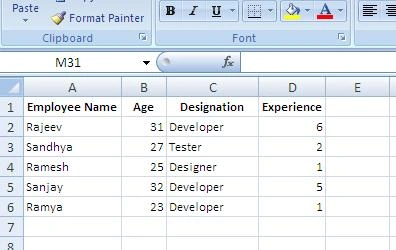
Our Excel file will be downloaded. On opening the file, we can see the data of our table, as shown below.
Our Excel exporting is complete.
Reference
jquery-table2excel
Now, we will run the page and click on Export to Excel button.
Our Excel file will be downloaded. On opening the file, we can see the data of our table, as shown below.
Our Excel exporting is complete.
Reference
jquery-table2excel
Summary
In this blog, we have learned how to export HTML table to an Excel file, using the table2excel jquery plugin. I hope this will be helpful.
In this blog, we have learned how to export HTML table to an Excel file, using the table2excel jquery plugin. I hope this will be helpful.
Anurag GuptaPosted Jun 26, 2023, 6:57 AM
How can I export to excel for only selected rows?
ankur priya darshiPosted May 17, 2019, 7:11 AM
Not working...only getting {table0} in excel....? Any help?
Ro PtssvPosted Mar 10, 2018, 5:30 AM
Can i export 2 tables to one excel
Trung BuiPosted Nov 9, 2017, 10:02 PM
Thank you so much. but it is cant run with IE or Edge. Please help me.
Yogesh SharmaPosted Oct 16, 2017, 11:23 AM
Sir plz help me how to use and install these plugin and how to use these rar files.
shahid jeelaniPosted Aug 7, 2017, 1:38 AM
Sir when i tried to call this plugin i does not work. On inspecting using crome it shows table2excel is not a function......
Durgesh RaiPosted Jun 6, 2017, 10:09 PM
This is not working in IE browser, please help
NehaPosted Dec 29, 2016, 8:58 AM
Nice one..................