

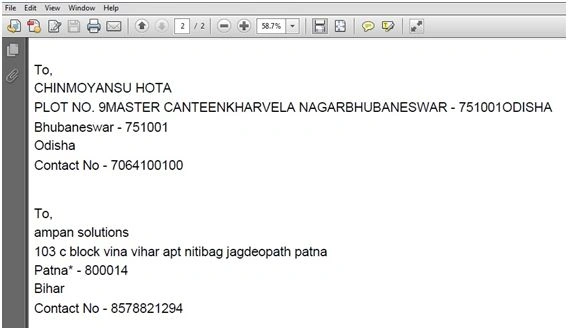
I am using the data from the RadGrid here to export.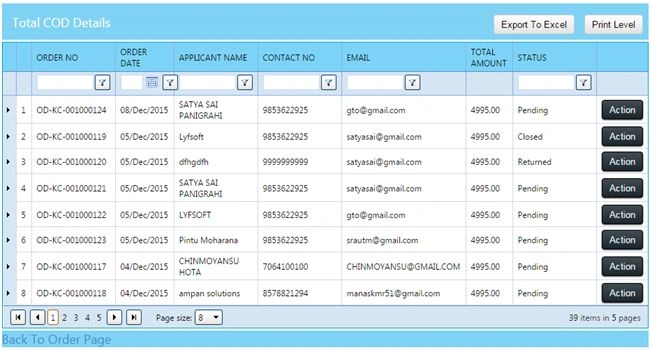
Steps:
Download and add reference to iTextSharp.dll files and others to the project.
Code at the .cs file,
- privatevoidExport_ToPDF_InHtmlFormat()
- {#region--Exporting RadGrid Data in Html format to PDF--
- try {
- string _Name = string.Empty;
- string _ShippingAddress = string.Empty;
- string _CityName = string.Empty;
- string _PinCode = string.Empty;
- string _StateName = string.Empty;
- string _ContactNo = string.Empty;
- // Formatting the body of the Document
- string body = "";
- body = "<html><body style='margin-left:20px;'><img src='http://www.swashconvergence.com/images/logo-kencloud.png'/></body></html>";
- body += "<br />";
- body += "<h1>KenPartner Contact Details</h1>";
- body += "<br />";
- // Looping through the Grid Data
- //RadGridTotalCOD.AllowPaging = false;
- foreach(GridDataItem item inRadGridTotalCOD.MasterTableView.Items)
- {
- // retrieving data from the grid
- _Name = item["ApplicantName"].Text;
- _ShippingAddress = item["ShippingAddress"].Text;
- _CityName = item["CityName"].Text;
- _PinCode = item["Pincode"].Text;
- _StateName = item["StateName"].Text;
- _ContactNo = item["ContactNo"].Text;
- // Configuring the Body of PDF
- body += "<br /><br />";
- body += "<h1>To, </h1>";
- body += "<br /><h1>" + _Name + "</h1> ";
- body += "<br /><h1>" + _ShippingAddress + "</h1> ";
- body += "<br /><h1>" + _CityName + " " + "-" + " " + _PinCode + " " + "</h1>";
- body += "<br /><h1>" + _StateName + "</h1> ";
- body += "<br /><h1>Contact No" + " " + "-" + " " + _ContactNo + "</h1> ";
- body += "<br /><br />";
- }
- // Export ToPDf
- using(StringWritersw = newStringWriter()) {
- using(HtmlTextWriterhtw = newHtmlTextWriter(sw)) {
- htw.Write(body);
- StringReadersr = newStringReader(sw.ToString());
- DocumentpdfDoc = newDocument(PageSize.A2, 10 f, 10 f, 10 f, 0 f);
- HTMLWorkerhtmlparser = newHTMLWorker(pdfDoc);
- PdfWriter.GetInstance(pdfDoc, Response.OutputStream);
- // Open The Pdf
- pdfDoc.Open();
- htmlparser.Parse(sr);
- pdfDoc.Close();
- // Current Date
- stringCurrentDate = DateTime.Now.ToString("dd/MMM/yyyy");
- Response.ContentType = "application/pdf";
- // Give the Dacument Name
- Response.AddHeader("content-disposition", "attachment;filename=MyContact " + CurrentDate + ".pdf");
- Response.Cache.SetCacheability(HttpCacheability.NoCache);
- Response.Write(pdfDoc);
- Response.End();
- }
- }
- } catch (ArgumentNullExceptionExc)
- {
- LblErrorMsg.Text = "Application Error : " + Exc.Message;
- } catch (InvalidCastExceptionExc)
- {
- LblErrorMsg.Text = "Application Error : " + Exc.Message;
- } catch (InvalidOperationExceptionExc)
- {
- LblErrorMsg.Text = "Application Error : " + Exc.Message;
- } catch (FormatExceptionExc)
- {
- LblErrorMsg.Text = "Application Error : " + Exc.Message;
- } catch (ExceptionExc)
- {
- LblErrorMsg.Text = "Application Error : " + Exc.Message;
- }
- #endregion
- }
Santhakumar MunuswamyPosted Jan 13, 2016, 11:04 AM
Thanks for nice share