

Introduction
In this blog, you will learn how to export SharePoint Online list items to a CSV using PnP PowerShell.
Prerequisites
Ensure SharePoint PnP PowerShell Online cmdlets are installed. Click here for more details on how to install.
Steps Involved
Open Notepad.
Copy the below code and save the file as ExportList.ps1.
- ###### Declare and Initialize Variables ######
- $url="https://c986.sharepoint.com/sites/vijai"
- $listName="Test List"
- $currentTime= $(get-date).ToString("yyyyMMddHHmmss")
- $logFilePath=".\log-"+$currentTime+".docx"
- # Fields that has to be retrieved
- $Global:selectProperties=@("Title","Comments","Status");
- ## Start the Transcript
- Start-Transcript -Path $logFilePath
- ## Export List to CSV ##
- function ExportList
- {
- try
- {
- # Get all list items using PnP cmdlet
- $listItems=(Get-PnPListItem -List $listName -Fields $Global:selectProperties).FieldValues
- $outputFilePath=".\results-"+$currentTime+".csv"
- $hashTable=@()
- # Loop through the list items
- foreach($listItem in $listItems)
- {
- $obj=New-Object PSObject
- $listItem.GetEnumerator() | Where-Object { $_.Key -in $Global:selectProperties }| ForEach-Object{ $obj | Add-Member Noteproperty $_.Key $_.Value}
- $hashTable+=$obj;
- $obj=$null;
- }
- $hashtable | export-csv $outputFilePath -NoTypeInformation
- }
- catch [Exception]
- {
- $ErrorMessage = $_.Exception.Message
- Write-Host "Error: $ErrorMessage" -ForegroundColor Red
- }
- }
- ## Connect to SharePoint Online site
- Connect-PnPOnline -Url $url -UseWebLogin
- ## Call the Function
- ExportList
- ## Disconnect the context
- Disconnect-PnPOnline
- ## Stop Transcript
- Stop-Transcript
Open Windows PowerShell and navigate to the location where the file is placed.
Run the following command.
- .\ExportList.ps1
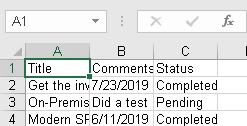
CSV file is generated with all the required details.
Reference
https://docs.microsoft.com/en-us/powershell/module/sharepoint-pnp/get-pnplistitem?view=sharepoint-ps
Summary
Thus, in this blog, you saw how to export SharePoint Online list items to a CSV using PnP PowerShell.
Manoj tambePosted Mar 25, 2021, 10:43 AM
How to export multiple list in single excel using PnP Powershell?
Swapna NethiPosted Aug 10, 2020, 12:47 PM
My list has both Lookup fields and other fields. how do i change the script to make it work for lookup values as well? currently it is displayed as below : Microsoft.SharePoint.Client.FieldUserValue
zaidi sPosted Mar 10, 2020, 3:37 PM
I am very new to windows power shell and have a requirement to export sharepoint list to a csv. I am using the script as is, but what its doing is, the command Connect-PnPOnline -Url $url -UseWebLogin is launching my share point site in a window and just stays there, its not getting to call the function ExportList. if I close the window it just errors out with message error: No connection, please connect first with Connect-PnPOnline. please help