

Introduction
In today's tech world, most of the applications being developed under Logistics, Inventory, Internal Transaction and other domains require day-to-day data in excel files and prefer excel file operations in their applications.
I will be sharing one of the Nuget Package tools which, with very minimal lines of code, will export an excel file for us.
The Tool is Closed XML.

Just write a few lines of code and done! It is developer friendly. If we have used the Open XML, there are a lot of lines of code which are required to export an excel from data. We can create an excel file of 2007/2010 configuration without an Excel application.
To add the closed XML package, we add it directly through the user interface from the Nuget Gallery and also, we can use the Package Manager console to add the package using the below command
PM> Install-Package ClosedXML
Snippet
- DataTable dt = new DataTable();
- dt.Columns.AddRange(new DataColumn[3]
- {
- new DataColumn("Id", typeof(int)), new DataColumn("Name", typeof(string)), new DataColumn("Country", typeof(string))
- });
- dt.Rows.Add(1, "C Sharp corner", "United States");
- dt.Rows.Add(2, "Suraj", "India");
- dt.Rows.Add(3, "Test User", "France");
- dt.Rows.Add(4, "Developer", "Russia"); //Exporting to Excel
- string folderPath = "C:\\Excel\\";
- if (!Directory.Exists(folderPath))
- {
- Directory.CreateDirectory(folderPath);
- }
- //Codes for the Closed XML
- using (XLWorkbook wb = new XLWorkbook())
- {
- wb.Worksheets.Add(dt, "Customers");
- //wb.SaveAs(folderPath + "DataGridViewExport.xlsx");
- string myName = Server.UrlEncode("Test" + "_" + DateTime.Now.ToShortDateString() + ".xlsx");
- MemoryStream stream = GetStream(wb);
- // The method is defined below
- Response.Clear();
- Response.Buffer = true;
- Response.AddHeader("content-disposition", "attachment; filename=" + myName);
- Response.ContentType = "application/vnd.ms-excel";
- Response.BinaryWrite(stream.ToArray());
- Response.End();
- }
- public MemoryStream GetStream(XLWorkbook excelWorkbook)
- {
- MemoryStream fs = new MemoryStream();
- excelWorkbook.SaveAs(fs);
- fs.Position = 0;
- return fs;
- }
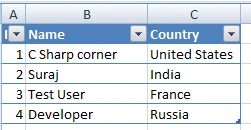
Downloaded file looks like below,
Conclusion
Here, I have shared the code where hard coded values are added, this is not the case every time. We can always use the records from the database and create them as a datatable and then use the Closed XML. This really reduces a lot of code which is used in Open XML package. So, developers try it!! I will be sharing another article where I will show, how to import the same exported excel file using Bulk copy using SQL Bulk copy.
Aakash NandaPosted Nov 10, 2022, 1:29 PM
I am not able to export data using ClosedXML. It is giving error as "unable to set cell value to". Please help.
Abhishek DasPosted Nov 25, 2017, 11:21 PM
I have developed one tool using closedXML for automatic report sending over the email. it is working fine when I open the excel in laptop. but, when the report is opened in mobile,other than first sheet, only few column data are displayed. I have used WPS, but if I use UC browser to see the excel, it is displaying all the data correctly in all the sheets. any suggestion for this abnormality?
RajaPosted Jun 8, 2016, 12:06 AM
Nice