

Introduction
Handling strings efficiently is crucial in any application, especially when dealing with large datasets or performance-sensitive operations. While the traditional Substring method has been a staple in .NET for years, Span<T> offers a more efficient way to manage strings without unnecessary memory allocations. This blog will explore how to leverage Span<T> and Substring to optimize your string manipulation tasks in .NET.
The source code can be downloaded from GitHub.
Understanding Span<T>
Span<T> was introduced in .NET Core 2.1 and C# 7.2 as a high-performance type designed for scenarios where working with slices of memory without copying is essential. Unlike arrays or lists, Span<T> is a stack-only type that provides a safe and efficient way to access and manipulate contiguous regions of arbitrary memory.
Key Features of Span<T>
- Memory Efficiency: Span<T> doesn't allocate new memory when creating a slice, making it more memory-efficient than traditional methods.
- Stack-only: Span<T> is automatically deallocated when it goes out of scope, avoiding heap allocations.
- Safe and Fast: Span<T> offers bounds-checking like arrays, ensuring safety while maintaining high performance, often comparable to unsafe code.
Using Span<T> with Strings
In .NET, strings can be easily sliced using Span<T>, which is particularly useful when parsing or processing large strings.
string input = "Hello, .NET!";
ReadOnlySpan<char> span = input.AsSpan();
ReadOnlySpan<char> slice = span.Slice(7, 4); // ".NET"
Console.WriteLine(slice.ToString()); // Outputs: .NET
When to Use Span<T>?
- Large Strings: When working with large strings where avoiding allocations is critical.
- High-Performance Applications: In scenarios where every microsecond counts, such as game development, real-time systems, or data processing.
- Memory-Constrained Environments: On platforms where memory is limited, Span<T> can help reduce the application's memory footprint.
Understanding Substring
Substring is the traditional method for extracting parts of a string. It’s simple to use and has been part of .NET for many years.
string example = "Hello, .NET!";
string substring = example.Substring(7, 4); // ".NET"
Console.WriteLine(substring); // Outputs: .NET
However, the key limitation of Substring is that it always creates a new string, which can be inefficient when dealing with large or numerous strings.
Choosing between Span<T> and Substring
- Use a Substring when you need a new string that you plan to use independently of the original string.
- Use Span<T> when you need to perform operations on a portion of a string without allocating new memory.
Performance Benefits
One of the primary advantages of using Span<T> over Substring is performance. A substring creates a new string, which involves memory allocation and copying. In contrast, Span<T> simply references a portion of the original string without copying.
Here's a simple benchmarking example using BenchmarkDotNet to compare the performance of Span<T> and Substring when extracting a portion of a string.
using BenchmarkDotNet.Attributes;
namespace SpanVsSubString
{
    [MemoryDiagnoser]
    public class StringManipulationBenchmark
    {
        private const string Data = "This is a sample string for demonstrating Span and Substring performance in .NET.";

        [Benchmark]
        public string UsingSubstring()
        {
            return Data.Substring(10, 6);
        }
        [Benchmark]
        public ReadOnlySpan<char> UsingSpan()
        {
            return Data.AsSpan().Slice(10, 6);
        }
        [Benchmark]
        public string SpanToString()
        {
            return Data.AsSpan().Slice(10, 6).ToString();
        }
    }
}
Explanation
- UsingSubstring: This method uses the Substring method to extract a part of the string.
- UsingSpan: This method uses Span<T> to create a slice of the string.
- SpanToString: This method uses Span<T>, slices the string, and then converts it back to a string using ToString.
To run the benchmark, simply execute the program. BenchmarkDotNet will handle the execution of the benchmarks and provide you with detailed performance metrics.
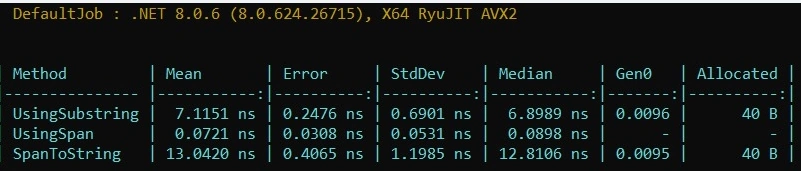
- UsingSubstring: Allocates memory and takes longer because it creates a new string.
- UsingSpan: Very fast and doesn't allocate memory because it simply references a portion of the original string.
- SpanToString: Converts the span back to a string, so it has a similar performance to UsingSubstring in terms of memory allocation.
This benchmark illustrates the significant performance benefit of using Span<T> for scenarios where you don't need to create a new string, highlighting its efficiency in avoiding memory allocations.
Conclusion
Span<T> provides a powerful alternative to Substring, allowing you to manipulate strings efficiently without unnecessary memory allocations. Whether you’re working on performance-critical applications or just looking to optimize your code, understanding when and how to use Span<T> can significantly enhance your .NET development skills.
By adopting Span<T> in scenarios where performance and memory efficiency are paramount, you can write faster, more efficient .NET applications that make the most of modern hardware capabilities.
Happy Coding!
Join the conversation! Your thoughts help the community grow.