

Description:
- We can create our own set of named constants by using enumerations.
- Keyword enum is used to declare enumerations.
Syntax
enum name_of_enum {enumeration list };
Example
- class demo_enum
- {
- enum my_enum
- {
- a, b, c, d, e, f
- };
- public static void Main()
- {
- my_enum i; // declare an enum variable
- for (i = my_enum.a; i < my_enum.f; i++) Console.WriteLine(" {0}", i + " has value of: " + (int) i);
- Console.WriteLine();
- Console.ReadKey();
- }
- }
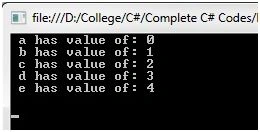
Some Rules for Enum
- Initializing the enum member is not allow,
c = d is not allow- enum Rules
- {
- a, b, c = d, d, e, f
- };
- public static void Main()
- {
- Rules i; // declare an enum variable
- for (i = Rules.a; i < Rules.f; i++) Console.WriteLine(" {0}", i + " has value of: " + (int) i);
- Console.WriteLine();
- Console.ReadKey();
- }
- Another variable declaration with same name is allow, but can’t create using new keyword.
new int e = 100; will get an error - A new expression requires- enum Rules
- {
- a, b, c, d, e, f
- };
- public static void Main()
- {
- int d = 2500; // another variable declared
- // new int e = 100; // error - A new expression requires
- Rules i; // declare an enum variable
- for (i = Rules.a; i < Rules.f; i++)
- {
- Console.WriteLine(" {0}", i + " has value of: " + (int) i);
- Console.WriteLine();
- }
- Console.WriteLine(" variable d has value of: " + d);
- Console.ReadKey();
- }
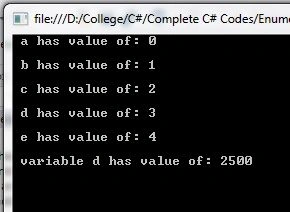
- Value of enum can’t increment directly,
a++; will get an error – can’t change the value of constant- enum Rules
- {
- a, b, c, d, e, f
- };
- public static void Main()
- {
- a++; // error - can not change the value of constant
- Rules i; // declare an enum variable
- for (i = Rules.a; i < Rules.f; i++)
- {
- Console.WriteLine(" {0}", i + " has value of: " + (int) i);
- Console.WriteLine();
- }
- Console.ReadKey();
- }
- Use of enum for initialization of another variable,
- enum Rules
- {
- a, b, c, d, e, f
- };
- public static void Main()
- {
- int z = Convert.ToInt16(Rules.b); //// use enum for use initialization of another variable
- Rules i; // declare an enum variable
- for (i = Rules.a; i < Rules.f; i++)
- {
- Console.WriteLine(" {0}", i + " has value of: " + (int) i);
- Console.WriteLine();
- }
- Console.WriteLine(" variable d has value of: " + z);
- Console.ReadKey();
- }
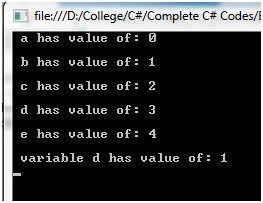
- Size of enum can be decide at the time time of declaration enum,
- enum Rules
- {
- a, b, c, d, e, f
- };
- enum short_values: short
- {
- B1 = 01, B2 = 02
- }
- enum long_values: long
- {
- A1 = 123456789985, A2 = 45678954123
- }
- public static void Main()
- {
- Rules i; // declare an enum variable
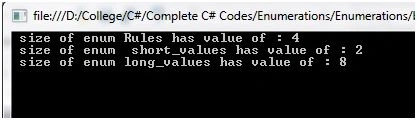
- Console.WriteLine(" size of enum Rules has value of : {0} ", sizeof(Rules));
- Console.WriteLine(" size of enum short_values has value of : {0} ", sizeof(short_values));
- Console.WriteLine(" size of enum long_values has value of : {0} ", sizeof(long_values));
- Console.ReadKey();
- }
Summary
This blog will help fresher candidates to understand enum in depth.
Rupesh KahanePosted Nov 18, 2015, 3:39 AM
Christopher Andrews thank for such great info
Christopher AndrewsPosted Nov 18, 2015, 1:14 AM
Good Stuff. Thanks for sharing. We just checked out www.redfly.io. It is very easy to configure (just one line) with any .net app to track errors. Simple and nice!
Rupesh KahanePosted Nov 2, 2015, 3:36 AM
Thanks Praveen Kumar also
Rupesh KahanePosted Nov 2, 2015, 3:35 AM
Abhishek Arora thanks
Praveen KumarPosted Nov 1, 2015, 12:05 PM
Nice
Abhishek AroraPosted Nov 1, 2015, 11:02 AM
Nice example.....