

In this blog, we are going to learn how to convert a JSON object into C# class.
Conversion
For this example, we are using a fake RESTFul service. This fake RESTFul service is using JSON and will convert it to C# class. To use a fake RESTFul Service, search for “JsonPlaceholder” and open the first link.
Link - https://jsonplaceholder.typicode.com/
Now, we have to find the end points.
Scroll down on the JsonPlaceholder page and you will find the resources.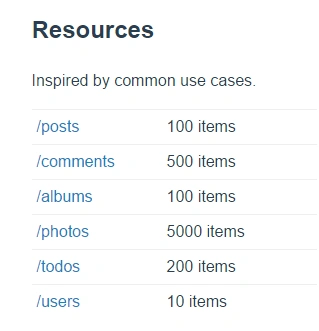
These are all the end points. You can use them in your application. In this example, we are going to use /Posts end point. So, click on the link and you will see JSON result. Then, copy the link of end point.
After hitting the /Post end point, you can see the results shown below. This is a JSON object and we will convert this in C# class.
- [{
- "userId": 1,
- "id": 1,
- "title": "sunt aut facere repellat provident occaecati excepturi optio reprehenderit",
- "body": "quia et suscipit\nsuscipit recusandae consequuntur expedita et cum\nreprehenderit molestiae ut ut quas totam\nnostrum rerum est autem sunt rem eveniet architecto"
- }, {
- "userId": 1,
- "id": 2,
- "title": "qui est esse",
- "body": "est rerum tempore vitae\nsequi sint nihil reprehenderit dolor beatae ea dolores neque\nfugiat blanditiis voluptate porro vel nihil molestiae ut reiciendis\nqui aperiam non debitis possimus qui neque nisi nulla"
- }, {
- "userId": 1,
- "id": 3,
- "title": "ea molestias quasi exercitationem repellat qui ipsa sit aut",
- "body": "et iusto sed quo iure\nvoluptatem occaecati omnis eligendi aut ad\nvoluptatem doloribus vel accusantium quis pariatur\nmolestiae porro eius odio et labore et velit aut"
- }, {
- "userId": 1,
- "id": 4,
- "title": "eum et est occaecati",
- "body": "ullam et saepe reiciendis voluptatem adipisci\nsit amet autem assumenda provident rerum culpa\nquis hic commodi nesciunt rem tenetur doloremque ipsam iure\nquis sunt voluptatem rerum illo velit"
- }, {
- "userId": 1,
- "id": 5,
- "title": "nesciunt quas odio",
- "body": "repudiandae veniam quaerat sunt sed\nalias aut fugiat sit autem sed est\nvoluptatem omnis possimus esse voluptatibus quis\nest aut tenetur dolor neque"
- },
So, we are going to use “Json2csharp”. Open this link and paste your end point here. You will see that this will automatically generate C# class from JSON.
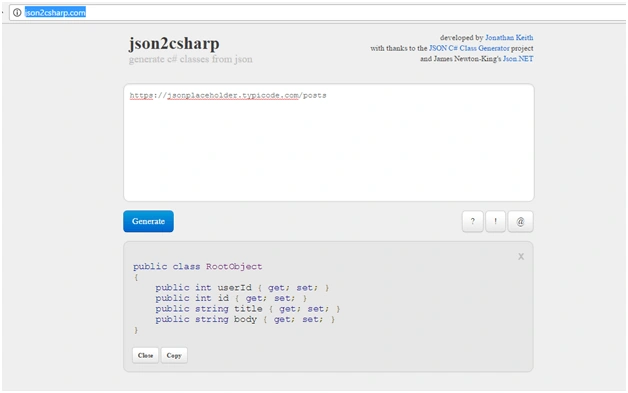
Result
- public class RootObject
- {
- public int userId { get; set; }
- public int id { get; set; }
- public string title { get; set; }
- public string body { get; set; }
- }
So, here you will see that the C# class is automatically generated by the JSON present in the URL.
Meo ThảoPosted Dec 18, 2017, 9:28 PM
Tks for sharing! Welcome
Ankit SharmaPosted Aug 17, 2017, 4:22 AM
Nice share........A very useful URL.....thanks for sharing