

Introduction
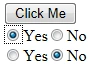
Using a Button and a Div to create radio
button pair (Yes / No) on button click. I described my comment on each line
which helps to understand the view.
Source Code:
- <%@ Page Language="C#" AutoEventWireup="true" CodeBehind="RadioDemo.aspx.cs" Inherits="JavascriptTutorial.RadioDemo"%>
- <!DOCTYPE html PUBLIC "-//W3C//DTD XHTML 1.0 Transitional//EN" "http://www.w3.org/TR/xhtml1/DTD/xhtml1-transitional.dtd">
- <html xmlns="http://www.w3.org/1999/xhtml">
- <head runat="server">
- <title></title>
- <script type="text/javascript">
- /* Getting Id of Div in which radio button will be add*/
- var containerDivClientId = "<%= containerDiv.ClientID %>";
- /*variable count uses for define unique Ids of radio buttons and group name*/
- var count = 100;
- /*This function call by button OnClientClick event and uses for create radio buttons*/
- function dynamicRadioButton()
- {
- /* create a radio button */
- var radioYes = document.createElement("input");
- radioYes.setAttribute("type", "radio");
- /*Set id of new created radio button*/
- radioYes.setAttribute("id", "radioYes" + count);
- /*set unique group name for pair of Yes / No */
- radioYes.setAttribute("name", "Boolean" + count);
- /*creating label for Text to Radio button*/
- var lblYes = document.createElement("lable");
- /*create text node for label Text which display for Radio button*/
- var textYes = document.createTextNode("Yes");
- /*add text to new create lable*/
- lblYes.appendChild(textYes);
- /*add radio button to Div*/
- containerDiv.appendChild(radioYes);
- /*add label text for radio button to Div*/
- containerDiv.appendChild(lblYes);
- /*add space between two radio buttons*/
- var space = document.createElement("span");
- space.setAttribute("innerHTML", " ");
- containerDiv.appendChild(space);
- var radioNo = document.createElement("input");
- radioNo.setAttribute("type", "radio");
- radioNo.setAttribute("id", "radioNo" + count);
- radioNo.setAttribute("name", "Boolean" + count);
- var lblNo = document.createElement("label");
- lblNo.innerHTML = "No";
- containerDiv.appendChild(radioNo);
- containerDiv.appendChild(lblNo);
- /*add new line for new pair of radio buttons*/
- var spaceBr= document.createElement("br");
- containerDiv.appendChild(spaceBr);
- count++;
- return false;
- }
- </script>
- </head>
- <body>
- <form id="form1" runat="server">
- <div>
- <asp:Button ID="btnCreate" runat="server" Text="Click Me" OnClientClick="return dynamicRadioButton();" />
- <div id="containerDiv" runat="server"></div>
- </div>
- </form>
- </body>
- </html>
OUTPUT:
Join the conversation! Your thoughts help the community grow.