

I'm using MVC partial view to dynamically create append/delete view.
Suppose you are creating a employee register page and letting users keep adding to their skillsets, which generally looks like the this:
(or you may visit https://gifyu.com/image/ZcIS to view the animated gif)
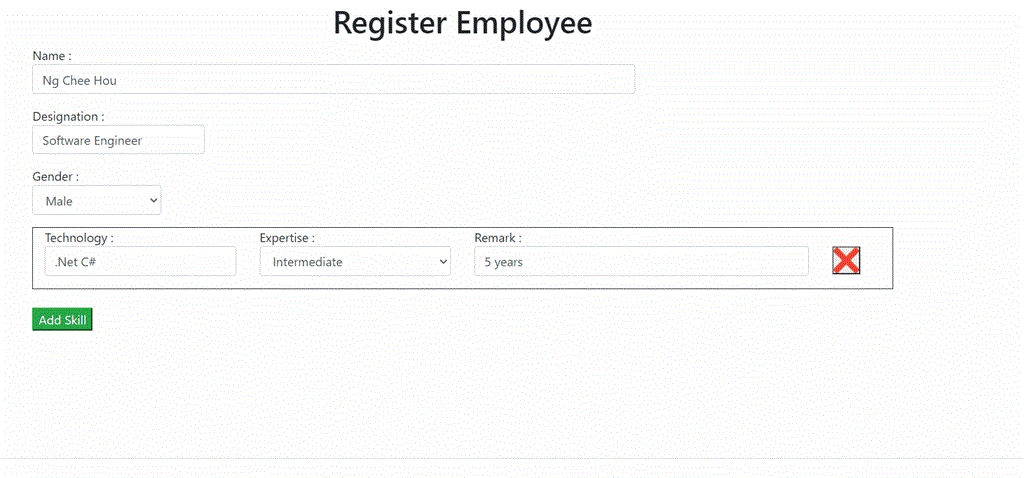
Add View
The workaround is very simple, first we create our partial view for skillset that's going to keep appending in our index page every time the ‘Add Skill’ button is clicked.
This is the code for the partial view _SkillSet.cshtml, just a simple html markup
- @{
- }
- <div id="SkillSetDiv" class="row">
- <div class="action-item col-sm-3 target">
- <div class="form-group">
- Technology :
- <input class="form-control text-box single-line" data-val="true" id="EditorTechnology" type="text" autocomplete="off">
- </div>
- </div>
- <div class="col-sm-3 target">
- <div class="form-group">
- Expertise :
- <select class="form-control " id="DropDownForExpertise" style="width:100%">
- <option value="-1">--- Please Select ---</option>
- <option value="0">Beginer</option>
- <option value="1">Intermediate </option>
- <option value="2">Expert</option>
- </select>
- </div>
- </div>
- <div class="col-sm-5 target">
- <div class="form-group">
- Remark :
- <input class="form-control text-box single-line" data-val="true" id="EditorFoRemark" type="text" autocomplete="off">
- </div>
- </div>
- <div class="col-sm-1 target">
- <a style="visibility:hidden"> Delete :</a> @*just to make the button align *@
- <button id="Btn_DeleteSkillset" type="submit" style="height: 36px; width: 36px; background-image: url('../Content/Images/close.png'); background-size:100%">
- </button>
- </div>
- </div>
Then, include our partial view in our main index page.
Please take note that the partial view is under a div element with class name “SkillSetHeaderClass“, later we will need this to tell the computer keep appending partial view under this div .
- <div class="SkillSetHeaderClass">
- <partial name="_SkillSet.cshtml">
- </div>
- $(document).on('click', '#Btn_AddSkillSet', function (e) {
- $.ajax({
- url: '/Employee/DisplayNewSkillSet',
- success: function (partialView) {
- $('.SkillSetHeaderClass').append(partialView);
- }
- });
- });
- public ActionResult DisplayNewSkillSet()
- {
- return PartialView("_SkillSet");
- }
- success: function (partialView) {
- $('.SkillSetHeaderClass').append(partialView);
Done.
Now you can have a dynamically generated view by using MVC partial view.
Delete View
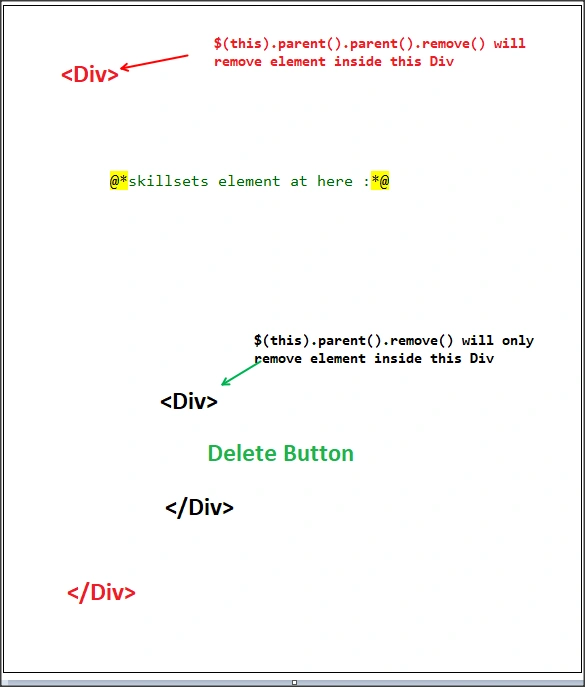
You may also want to delete a particular row of a skillset, so I have added an ‘X’ button for the deletion. The javascript code for delete row is also very simple, just one line
- $(this).parent().remove();
I will include in my next post how we can capture the values from dynamically generated partial view so that we can store it to the database.
Full source code can be download from GitHub.
Join the conversation! Your thoughts help the community grow.