

Amazon MWS supports the management of seller orders for items sold on Amazon.com. Orders received can be downloaded and acknowledged using Amazon MWS. A variety of order report formats and actions are supported to meet specific seller needs.
For example, order reports can be set up for automatic generation following a schedule that's optimized to match seller workflow.
Report API lets you request various reports that help you manage your sales on Amazon.
What you should know about the Amazon MWS Reports API
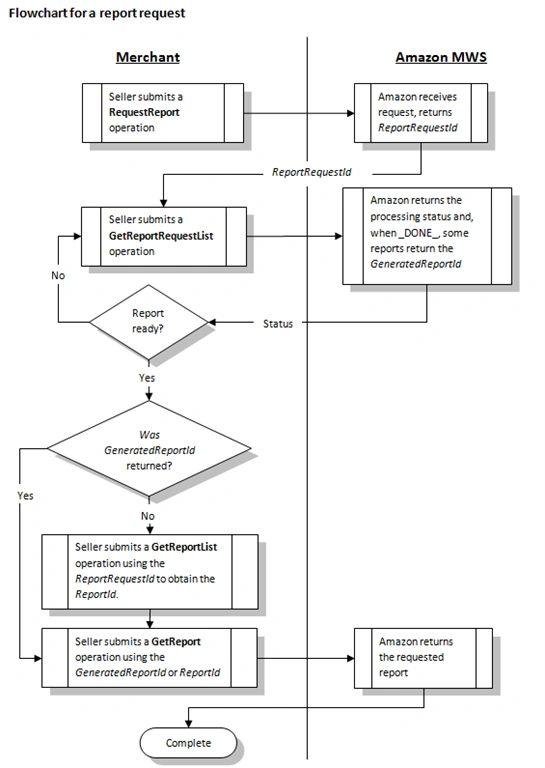
Flowchart of the process for submitting and receiving an on-request report to Amazon,
First, we need to install Amazon MWS c# client library
Once you download client library attach that project with your existing project and write the below code to call Report API.
Call to Request, download and convert the report into a C# class object.
For example, order reports can be set up for automatic generation following a schedule that's optimized to match seller workflow.
Report API lets you request various reports that help you manage your sales on Amazon.
What you should know about the Amazon MWS Reports API
Flowchart of the process for submitting and receiving an on-request report to Amazon,
First, we need to install Amazon MWS c# client library
Once you download client library attach that project with your existing project and write the below code to call Report API.
Call to Request, download and convert the report into a C# class object.
Example to call report:
Note
We should create the report enumuration to use report type globally.
Note
We should create the report enumuration to use report type globally.
- public enum Report_Type
- {
- _GET_FLAT_FILE_OPEN_LISTINGS_DATA_,
- _GET_AMAZON_FULFILLED_SHIPMENTS_DATA_,
- _GET_FLAT_FILE_ACTIONABLE_ORDER_DATA_,
- _GET_FLAT_FILE_ORDER_REPORT_DATA_,
- _GET_FLAT_FILE_ORDERS_DATA_,
- _GET_CONVERGED_FLAT_FILE_ORDER_REPORT_DATA_,
- _GET_FLAT_FILE_PAYMENT_SETTLEMENT_DATA_,
- _GET_PAYMENT_SETTLEMENT_DATA_,
- _GET_MERCHANT_LISTINGS_DATA_,
- _GET_MERCHANT_LISTINGS_DATA_LITE_,
- _GET_MERCHANT_LISTINGS_DATA_LITER_,
- _GET_MERCHANT_CANCELLED_LISTINGS_DATA_,
- _GET_AFN_INVENTORY_DATA_,
- _GET_MERCHANT_LISTINGS_INACTIVE_DATA_,
- _GET_MERCHANT_LISTINGS_DATA_BACK_COMPAT_
- }
Function to send Request. It will call Get_Report_List_Filtered_By (Report type,MarketplaceID)
This function will accept Report type, Number of results of reports, and Seller ID. It returns Highest (latest) report id.
You can sort result by report id as well as request id, it depends on the situation.
Request parameters (All parameters are optional)
- public List < Amazon_Open_Listings > RequestListingReport(Report_Type Report_Type, string "MarketPlaceId") {
- List < Amazon_Open_Listings > list = new List < Amazon_Open_Listings > ();
- try {
- var ReportId = Get_Report_List_Filtered_By(Report_Type, 1000, string "Seller ID");
- if (ReportId != null && ReportId.Count > 0) {
- //Pass most recent report id and download report
- var ReportPath = Download_Report(ReportId[0].ReportId, "Seller ID", "File path where you want to download report");
- //convert report to c# class object
- list.AddRange(Convert_Open_Listings_As_List(ReportPath));
- }
- return list;
- } catch (Exception ex) {
- return null;
- }
- }
You can sort result by report id as well as request id, it depends on the situation.
- public List < ReportInfo > Get_Report_List_Filtered_By(Report_Type "Your report type", int _number_To_Return, string "Your Seller ID") {
- try {
- GetReportListRequest report_List_Request = new GetReportListRequest();
- report_List_Request.Merchant = "Your Seller ID";
- report_List_Request.MaxCount = _number_To_Return;
- // filter by report type also
- TypeList tl = new TypeList();
- tl.Type.Add(Report_Type.ToString());
- report_List_Request.ReportTypeList = tl;
- // Get the response
- GetReportListResponse report_List_Response = ReportClient.GetReportList(report_List_Request);
- GetReportListResult report_List_Result = report_List_Response.GetReportListResult;
- // Hold the report results
- List < ReportInfo > retReport = report_List_Result.ReportInfo;
- // Finally, sort the results to pop the highest report ID to the top
- // Do a default sort by the report ID (most recent first)
- retReport = retReport.OrderBy(x => x.ReportId).Reverse().ToList();
- return retReport;
- } catch (Exception ex) {
- return null;
- }
- }
- ReportRequestIdList
A structured list of ReportRequestIdvalues. If you pass in ReportRequestIdvalues, other query conditions are ignored. - ReportTypeList
A structured list of ReportType enumeration values. - ReportProcessingStatusList
A structured list of report processing statuses by which to filter report requests. - MaxCount
A non-negative integer that represents the maximum number of report requests to return. If you specify a number greater than 100, the request is rejected. - RequestedFromDate
The start of the date range used for selecting the data to report, in ISO 8601 date time format. - RequestedToDate
The end of the date range used for selecting the data to report, in ISO 8601 date time format.
This function accepts report id, seller id and File path where the report will be downloaded.
- public string Download_Report(string _report_ID, string "Seller ID", string BasePath )
- {
- GetReportRequest get_Report = new GetReportRequest();
- get_Report.Merchant = "Seller ID";
- string path = _report_ID + "_" + Guid.NewGuid();
- string thePath = BasePath + "\\" + String.Format("{0}.txt", path);
- get_Report.ReportId = _report_ID;
- get_Report.Report = File.Open(thePath, FileMode.OpenOrCreate, FileAccess.ReadWrite);
- GetReportResponse report_Response = ReportClient.GetReport(get_Report);
- get_Report.Report.Close();
- return thePath;
- }
GetReport
It will returns the contents of a report and the Content-MD5 header for the returned report body.
Request parameters (Required)
ReportId
A unique identifier of the report to download, obtained from the GetReportList operation or the GeneratedReportId of a ReportRequest.
A unique identifier of the report to download, obtained from the GetReportList operation or the GeneratedReportId of a ReportRequest.
This will convert/map our tab-delimited report to C# class model so we can use it as a list of models.
- public List<Amazon_Open_Listings> Convert_Open_Listings_As_List(string reportPath)
- {
- // create the list to hold the open listing
- List<Amazon_Open_Listings> openList = new List<Amazon_Open_Listings>();
- // Check to see if the file exists and parse it if it does
- if (File.Exists(reportPath))
- {
- // Get a stream to the report
- StreamReader reportReader;
- reportReader = File.OpenText(reportPath);
- // read the file into the list line by line
- string line;
- while ((line = reportReader.ReadLine()) != null)
- {
- // Split each line by the tab sequence
- string[] columns = line.Split('\t');
- // Populate the list with Amazon Open listings
- Amazon_Open_Listings listing = new Amazon_Open_Listings();
- listing.SKU = columns[3].ToString();
- listing.FulFilledBy = "MFN";
- listing.Title = columns[0].ToString();
- listing.opendate = columns[6].ToString();
- listing.ASIN = columns[22].ToString();
- listing.Price = columns[4].ToString();
- listing.Qty = columns[5].ToString();
- listing.Recorded = System.DateTime.Now;
- // Add the listing to the list
- openList.Add(listing);
- }
- reportReader.Close();
- }
- if (openList != null && openList.Count > 0)
- return openList.Skip(1).ToList();
- return openList;
- }
Note
Here, we should skip the first line because it contains Headers.
And here is our class/model,
- public partial class Amazon_Open_Listings
- {
- public string SKU { get; set; }
- public string ASIN { get; set; }
- public string ProfileName { get; set; }
- public int ProfileID { get; set; }
- public string FulFilledBy { get; set; }
- public string opendate { get; set; }
- public string productId { get; set; }
- public string Price { get; set; }
- public string Qty { get; set; }
- public string Report_ID { get; set; }
- public System.DateTime Recorded { get; set; }
- public Nullable<decimal> Lowest_Price { get; set; }
- public string Title { get; set; }
- public Nullable<decimal> AmazonSalesRank { get; set; }
- public string FileUrl { get; set; }
- public string Carrier { get; set; }
- public string Service { get; set; }
- public string TrackingNumber { get; set; }
- public decimal ShippingFee { get; set; }
- public string OrderId { get; set; }
- }
asif qwPosted Mar 9, 2020, 9:13 AM
Great work faisal , actually i want to work in feed api of amazon but could not find any helping code , can you guide / refer any code which is example of amazon feed api
Luciano DbPosted Jan 28, 2020, 8:04 AM
Hi, I cannot download your project amazon-mws-v20090101-csclient-2016- client; when I try, a new page tells me that the resource has been moved. How get the updated link? Thanks in advance.
Faisal PathanPosted Jun 23, 2019, 10:11 PM
Please check previous comment for instance, and you can test code on Amazon scratchpad
Mimi OMalleyPosted Jun 23, 2019, 5:10 PM
Hey Faisal - thanks for sharing this.. were you able to test this code to check if it works? For instance, your RequestListingReport function doesn't actually make a report request. Let me know if I'm missing something obvious
Mimi OMalleyPosted May 20, 2019, 12:15 AM
Do you have an example of how to create the ReportClient constructor?
Manuel RazoPosted May 7, 2019, 10:56 AM
Where do you get the ReportClient class or object at function Get_Report_List_Filtered_By?
Faisal PathanPosted Jan 29, 2019, 6:39 AM
You are welcome
Naresh SinghalPosted Jan 29, 2019, 5:33 AM
Thanks Faisal Pathan , Its really helped me well.....
Viknaraj ManogararajahPosted Jul 21, 2018, 10:49 PM
Nice Article, Thank you for sharing