

Display Row_number using Linq Query
1. Add following class
public class Emp
{
public int ID { get; set; }
public string Name { get; set; }
public string City { get; set; }
public Emp(int id, string name, string city)
{
this.ID = id;
this.Name = name;
this.City = city;
}
}
2. Creating List
protected List<Emp> GetEmpList()
{
List<Emp> lEmp = new List<Emp>();
Emp oemp = new Emp(1234, "Devesh Omar", "GZB");
lEmp.Add(oemp);
oemp = new Emp(1234, "ROLI", "GZB");
lEmp.Add(oemp);
oemp = new Emp(1235, "ROLI", "MainPuri");
lEmp.Add(oemp);
return lEmp;
}
3. Linq Query
List<Emp> Lstemp = GetEmpList();
int Srno = 0;
var columns = from t in Lstemp
orderby t.Name
select new
{
Row_number=++Srno,
EmpID = t.ID,
Name = t.Name,
City = t.City
};
3. Linq Query
List<Emp> Lstemp = GetEmpList();
int Srno = 0;
var columns = from t in Lstemp
orderby t.Name
select new
{
Row_number=++Srno,
EmpID = t.ID,
Name = t.Name,
City = t.City
};
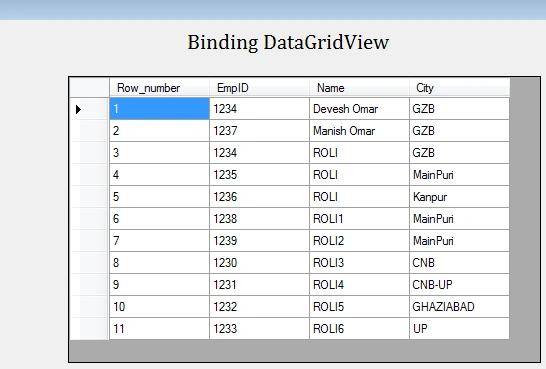
4. using Row_number=++Srno it will display row number in output
Mehul PrajapatiPosted Jun 9, 2019, 1:53 AM
Also try this: Lstemp.Select((x, i) => new { Row_number= i+ 1 EmpID = t.ID, Name = t.Name, City = t.City }).ToList();
Mehul PrajapatiPosted Jun 9, 2019, 1:18 AM
Not working throw error "An expression tree may not contain an assignment operator is coming".Try this: Lstemp.GroupBy(t=>t.ID).SelectMany(g => g.Select((x, i) => new { Row_number= i+ 1 EmpID = t.ID, Name = t.Name, City = t.City })).ToList();
Stefvanus KusyantoPosted Nov 12, 2018, 12:47 AM
Haii.. I want to ask... How to get row number by column City, I mean it's numbering foreach by column City. When GZB will count 1,2,3, then when Main Puri will count 1,2,3, and another
sanchita sarkarPosted Sep 14, 2018, 7:35 AM
Syntax error ---"An expression tree may not contain an assignment operator is coming"
Shuvo SarkerPosted Dec 15, 2014, 5:19 AM
small but good work.keep going...
Mukesh Kumar TiwariPosted Nov 24, 2014, 9:31 AM
nice....