

Snap shot of digital clock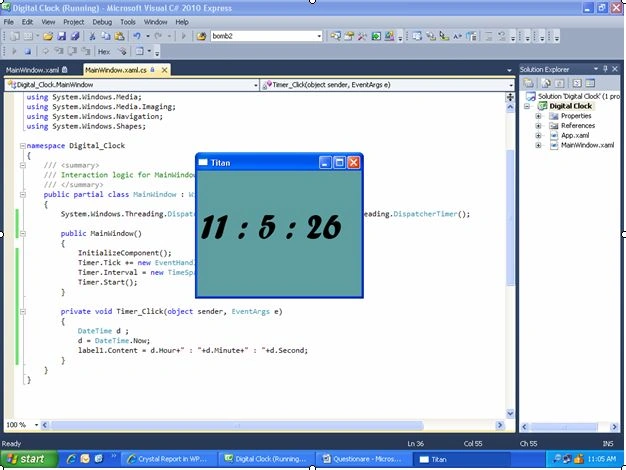
XAML Code
<Window x:Class="Digital_Clock.MainWindow"
xmlns="http://schemas.microsoft.com/winfx/2006/xaml/presentation"
xmlns:x="http://schemas.microsoft.com/winfx/2006/xaml"
Title="Titan" Height="300" Width="400" Background="CadetBlue">
<Grid>
<Label Height="148" HorizontalAlignment="Left" Margin="0,46,0,0" Name="label1" VerticalAlignment="Top" Width="378" FontSize="60" FontFamily="Forte" />
</Grid>
</Window>
- Use a lable / textblock / textbox etc… to print date.
- And create timer n write code in timer
Cs code
using System;
using System.Collections.Generic;
using System.Linq;
using System.Text;
using System.Windows;
using System.Windows.Controls;
using System.Windows.Data;
using System.Windows.Documents;
using System.Windows.Input;
using System.Windows.Media;
using System.Windows.Media.Imaging;
using System.Windows.Navigation;
using System.Windows.Shapes;
namespace Digital_Clock
{
/// <summary>
/// Interaction logic for MainWindow.xaml
/// </summary>
public partial class MainWindow : Window
{
System.Windows.Threading.DispatcherTimer Timer = new System.Windows.Threading.DispatcherTimer();
public MainWindow()
{
InitializeComponent();
Timer.Tick += new EventHandler(Timer_Click);
Timer.Interval = new TimeSpan(0, 0, 1);
Timer.Start();
}
private void Timer_Click(object sender, EventArgs e)
{
DateTime d;
d = DateTime.Now;
label1.Content = d.Hour + " : " + d.Minute + " : " + d.Second;
}
}
}
Join the conversation! Your thoughts help the community grow.