

Look at given point:
- RowCommand is one of the event to Gridveiw.
- This event fires whenever an action performed(Ex: button is clicked ) on Gridveiw control.
- To perform any operations with rowcommand in Gridveiw we need to use a property known as “commandname”.
- CommandName property is used to a button control.
Example: commandname=”abc”.
- In the above line abc is commandname.
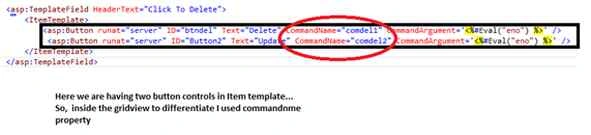
- Utilization of a commandname in itemtemplate for button is shown below.

- Now why commandname?
Observe the following snippet:
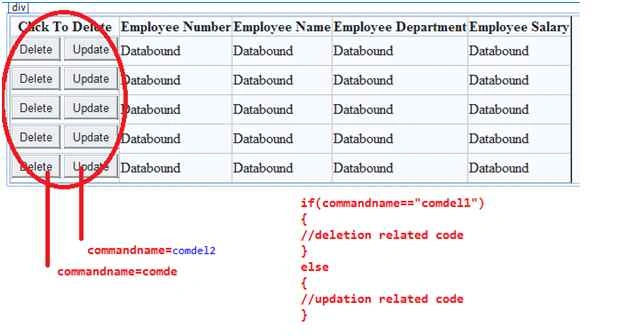
For the above code we will get the following design:
Code:
- using System;
- using System.Collections.Generic;
- using System.Linq;
- using System.Web;
- using System.Web.UI;
- using System.Web.UI.WebControls;
- using System.Data.SqlClient;
- using System.Data;
- namespace WebApplication1
- {
- public partial class WebForm2 : System.Web.UI.Page
- {
- SqlConnection con = new SqlConnection("server=.;database=abc;trusted_connection=true");
- protected void Page_Load(object sender, EventArgs e)
- {
- if (!IsPostBack)
- {
- bind();
- }
- }
- public void bind()
- {
- SqlCommand cmd = new SqlCommand("select * from employee", con);
- SqlDataAdapter da = new SqlDataAdapter(cmd);
- DataSet ds = new DataSet();
- da.Fill(ds, "con");
- GridView1.DataSource = ds;
- GridView1.DataBind();
- }
- protected void GridView1_RowCommand(object sender, GridViewCommandEventArgs e)
- {
- if (e.CommandName == "comdel")
- {
- int l = Convert.ToInt32(e.CommandArgument);
- con.Open();
- SqlCommand cmd = new SqlCommand("delete from employee where eno=@a", con);
- cmd.Parameters.AddWithValue("@a", l);
- int i = cmd.ExecuteNonQuery();
- if (i == 1)
- {
- Response.Write("Record deleted");
- bind();
- }
- else
- {
- Response.Write("Recodrd not deleted...");
- }
- Page_Load(sender, e);
- }
- }
- }
- }
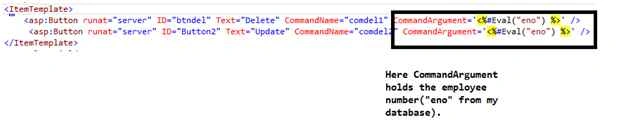
In the above code I used the following line in rowcommand event.
- if (e.CommandName == "comdel")
- {
- int l = Convert.ToInt32(e.CommandArgument);
- …..
- …
- …
- }
If still any doubts plzz feel free to ask.
Thank you.
ParthaPosted Nov 29, 2019, 12:24 AM
How to find the row no on which the delete button was clicked?
Sreekanth ReddyPosted Jun 18, 2015, 12:39 AM
Thank you.
Santhakumar MunuswamyPosted Jun 17, 2015, 3:44 PM
Nice one