

In my previous article http://www.c-sharpcorner.com/UploadFile/c5c6e2/populate-a-treeview-dynamically/ we have discussed how to populate a TreeView control in C#. In this blog, we will learn how to manage the Hierarchical data in a single Table and Populate the TreeView Dynamically.
Table Definition
CREATE
TABLE [TV_DYNAMIC](
[ID] [int] NOT
NULL,
[NODEDESC] [varchar](10)
COLLATE SQL_Latin1_General_CP1_CI_AS
NULL,
[NODELEVEL] [int] NULL,
PRIMARY
KEY CLUSTERED
(
[ID]
ASC
)WITH
(PAD_INDEX =
OFF,
IGNORE_DUP_KEY = OFF)
ON [PRIMARY]
)
ON [PRIMARY]
Insert some Hierarchical Data
Insert
into TV_DYNAMIC (ID, NODEDESC, NODELEVEL) Values (1, 'A', 0)
Insert into TV_DYNAMIC (ID, NODEDESC, NODELEVEL) Values (2, 'B', 1)
Insert into TV_DYNAMIC (ID, NODEDESC, NODELEVEL) Values (3, 'C', 0)
Insert into TV_DYNAMIC (ID, NODEDESC, NODELEVEL) Values (4, 'D', 2)
Insert into TV_DYNAMIC (ID, NODEDESC, NODELEVEL) Values (5, 'E', 6)
Insert into TV_DYNAMIC (ID, NODEDESC, NODELEVEL) Values (6, 'F', 0)
Insert into TV_DYNAMIC (ID, NODEDESC, NODELEVEL) Values (7, 'G', 3)
Insert into TV_DYNAMIC (ID, NODEDESC, NODELEVEL) Values (8, 'H', 6)
Code Snippet
using System;
using System.Collections.Generic;using System.ComponentModel;
using System.Data;
using System.Data.SqlClient;
using System.Drawing;
using System.Linq;
using System.Text;
using System.Windows.Forms;
using System.Configuration;
namespace TreeviewDynamic
{
public partial class Form1 : Form
{
SqlConnection conn;
TreeNode parentNode = null;
public Form1()
{
InitializeComponent();
}
private void Form1_Load(object sender, EventArgs e)
{
String connectionString;
connectionString = ConfigurationManager.ConnectionStrings["connString"].ConnectionString;
conn = new SqlConnection(connectionString);
String Sequel = "SELECT ID,NODEDESC,NODELEVEL FROM TV_DYNAMIC WHERE NODELEVEL=0";
SqlDataAdapter da = new SqlDataAdapter(Sequel, conn);
DataTable dt = new DataTable();
conn.Open();
da.Fill(dt);
foreach (DataRow dr in dt.Rows)
{
parentNode = Treeview1.Nodes.Add(dr["NODEDESC"].ToString());
PopulateTreeView(Convert.ToInt32(dr["ID"].ToString()), parentNode);
}
Treeview1.LineColor = Color.Red;
Treeview1.ExpandAll();
//Treeview1.ShowLines = false;
//Treeview1.CheckBoxes = true;
//Treeview1.ShowPlusMinus = false;
//Treeview1.ShowRootLines = false;
}
private void PopulateTreeView(int parentId, TreeNode parentNode)
{String Seqchildc = "SELECT ID,NODEDESC,NODELEVEL FROM TV_DYNAMIC WHERE NODELEVEL=" + parentId + "";
SqlDataAdapter dachildmnuc = new SqlDataAdapter(Seqchildc, conn);
DataTable dtchildc = new DataTable();
dachildmnuc.Fill(dtchildc);
TreeNode childNode;
foreach (DataRow dr in dtchildc.Rows)
{
if (parentNode == null)
childNode = Treeview1.Nodes.Add(dr["NODEDESC"].ToString());
else
childNode = parentNode.Nodes.Add(dr["NODEDESC"].ToString());
PopulateTreeView(Convert.ToInt32(dr["ID"].ToString()), childNode);
}
}
private void Treeview1_DoubleClick(object sender, EventArgs e)
{MessageBox.Show("You Clicked " + Treeview1.SelectedNode.FullPath.ToString(), "Location",
MessageBoxButtons.OK, MessageBoxIcon.Information);
}private void btn_checkedNodes_Click(object sender, EventArgs e)
{
foreach (TreeNode node in Treeview1.Nodes)
{
if (node.Checked)
{
MessageBox.Show(node.Text);
}
}
}
private void btn_close_Click(object sender, EventArgs e)
{this.Close();
}
}
}
Explanation
connectionString = ConfigurationManager.ConnectionStrings["connString"].ConnectionString;
To use the above snippet add a Reference to System.Configuration namespace from Project -> Add Reference and add the using System.Configuration; to the code.
Some Properties of TreeView Control
Expanding and Collapsing Nodes Programmatically
To Expand and collapse all nodes we use TreeView Methods ExpandAll() and CollapseAll()
Treeview1.ExpandAll(); // To Expand All Nodes
Treeview1.CollapseAll(); // To Collapse Nodes
Specifying Lines to Connect Nodes
The ShowLines property of the Treeview control is used to Specify the Lines to Connect Nodes to show the hierarchical relationship between nodes.
Treeview1.ShowLines = false;
Here Treeview1 is the name of the TreeView control we used. Here we have set the ShowLines property to false indicating that lines does not appear to show hierarchical relation.
Displaying CheckBox next to Nodes
The CheckBoxes property of the Treeview control is used to display Checkboxes next to the nodes by setting,
Treeview1.CheckBoxes = true;
Screen Shot
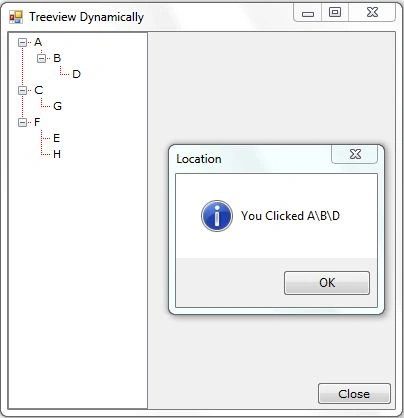
Hope this help you a little using the TreeView Control.
Hasan MahboobPosted Aug 13, 2017, 7:15 AM
After all day googling.....At last.
Munesh SharmaPosted May 25, 2016, 12:38 AM
nice
amit bansalPosted Dec 28, 2013, 12:25 AM
Awesome Code. Thanks for Help.