

Introduction
So, far in one of my previous article, we have learned what is the join, its benefit and then what are the different types of joins available in R to join two data frames in R. If you have missed that article then you learn that from the article link Merging/Joining Two Data Frames In R.
Now, in this blog, we shall learn to join the data frames when the column name in both data frame is different.
Let's start now.
Joining Two Data Frames By Different Column Name
In general, to join two data frames in R, we use the below sentence when the column name in both the data frames are the same based on which we want to join both the data frames.
- #R Data Frame Natural join arguments
- merge(x = <obj1>, y= <obj2>, by = "<Column Name>", all = <FALSE/TRUE>)
As said above the case is not the same always. Hence, sometimes we need to join the data frames even when the column name is different. Here the column name means the key which refers to the column on which we want to merge the data frames. In that case, we use the following syntax.
- #Joining Both Data Frames - Inner Join
- merge(x = <obj1>, y = <obj2>, by.x = "<column name>", by.y = "<column name>", all = <FALSE/TRUE>)
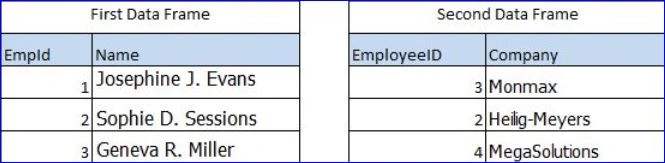
To create the first data frame run the below R script.
- #Creating Employee Data Frame
- dfEmployee <- data.frame(EmpId = c(1, 2, 3),
- Name = c("Josephine J. Evans", "Sophie D. Sessions", "Geneva R. Miller"))
- #Printing Employee Data Frame
- dfEmployee
- #Creating Employee Address Data Frame
- dfEmpAddress <- data.frame(EmployeeID = c(3, 2, 4),
- Company = c("Monmax", "Heilig-Meyers", "MegaSolutions"))
- #Printing above data frame
- dfEmpAddress
Now, we have successfully created both the data frames and will join both using the column name, EmpId & EmployeeID which are the columns of first and second data frame respectively.
Merging Both Data Frames
To merge both the data frames we will run the below R script. Here I have used the natural join to know more about other types of R data frame joins you can follow the above article link. We use comma (,) to pass both column name as key for merging the data frames.
- #Joining Both Data Frames - Inner Join
- merge(x = dfEmployee, y = dfEmpAddress,
- by.x = "EmpId", by.y = "EmployeeID", all = FALSE)
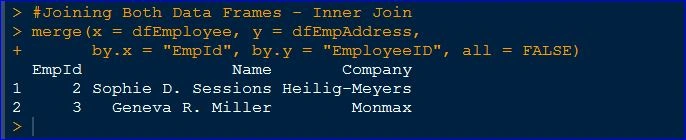
Now we have already joined both the data frame with different column names i.e., EmpId and EmployeeId. It will give the output something like as shown in the image below.
Summary
In this blog, we have learned how to join the two data frames in R when the column names are different. Apart from this we also have just recalled creating the data frame in the form of example practically.
I hope you learned and enjoyed it. I look forward to seeing your feedback.
Join the conversation! Your thoughts help the community grow.