
Setup Node On System
- If you don't have node installed on your system then you can download it from here https://nodejs.org/en/.
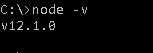
- After installing the node on system , open cmd and type node-v.
- It will give node version like this,
Setup MongoDB On System
- If you don't have mongodb installed on your system then you can download it from here https://www.mongodb.com/download-center/community
- Follow the installation instruction given there.
Setup Our Node Project
- Create a new folder nodecurd
- Change to the folder to nodecurd
- Type npm init to setup node project.
- A package.json file will automatically get added in the project.
- Now type npm install for adding node packages.
- npm install express mongoose body-parser ejs
A little info about the packages,
- express - It is a framework and all the applications will be built on it.
- body-parser - This will fetch FormData from the request.
- mongoose - this will be used for setting connections with a database.
- ejs - This is a view engine. The view engine is responsible for creating HTML from your views.
- Views are usually some kind of mixup of HTML and a programming language.
-
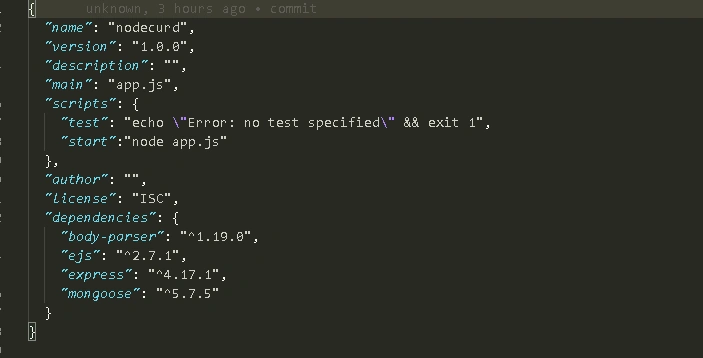
Now open the project in editor and you will see package.json which will be automatically generated
- Then open package.json and write "start" : "app.js" this will be the starting point of the application.
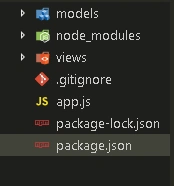
Make 2 folders
- models
- views
*as mentioned above the views will contain .ejs files.which will contain HTML and databindings using ejs.
Models
- The models will contain the collections(table) schema.
- Here we will make a collection named empdata having field name
- const mongoose = require('mongoose');
- const curdSchema= new mongoose.Schema({
- name: String
- })
- module.exports=mongoose.model('empdata',curdSchema)
App.js
- const express= require('express');
- const mongoose = require('mongoose');
- const bodyParser = require('body-parser');
- const curd = require('./models/curd');
- const app =express();
- mongoose.connect('mongodb://localhost:27017/curdDemo')
- .then(()=>console.log('connected')).catch(err=>console.log(err))
- //setting template engine //
- app.set('view engine','ejs');
- //for fetching FORMDATA from coming request //
- app.use(bodyParser.urlencoded({extended:false}))
- //READ DATA
- app.get('/',(req,res)=>{
- curd.find((err,data)=>{
- if(err){
- console.log(err)
- }
- else if(!data){
- res.render('home',{data:{}})
- }
- else{
- res.render('home',{data:data})
- }
- })
- })
- //ADD DATA //
- app.post('/add',(req,res)=>{
- const curds = new curd({
- name: req.body.uname
- })
- curds.save((err,data)=>{
- if(err){
- console.log(err)
- }
- res.redirect('/')
- })
- })
- //EDIT DATA //
- app.get('/edit/:id',(req,res)=>{
- curd.find({_id:req.params.id},(err,data)=>{
- if(err){
- console.log(err)
- }
- console.log('edit data',data)
- res.render('edit',{edata:data})
- })
- })
- //UPDATE DATA //
- app.post('/update',(req,res)=>{
- const upCURD = {
- name : req.body.uname
- }
- curd.update({_id:req.body.id},{$set:upCURD},(err,data)=>{
- if(err){
- console.log('update error',err)
- }
- console.log(data)
- res.redirect('/')
- })
- })
- //DELETE DATA //
- app.get('/delete/:id',(req,res)=>{
- curd.deleteOne({_id:req.params.id},(err,data)=>{
- if(err){
- console.log(err)
- }
- res.redirect('/')
- })
- })
- const port = process.env.PORT || 3000 ;
- app.listen(port,()=>console.log(`server running at ${port}`))
- module.exports=app;
-
Here we import package mongoose,body-parser,express using require() function.
- We also import the model we made in models folder. Using it we can access all mongodb functions for doing data manipulation.
- mongoose.connect() is used for making connection with mongodb. The curdDemo in the connection here is the name of our database.
- We will set the view engine using app.set(). The view engine will tell the express which engine we are using in our project for views.
- app.use() is a middleware which checks every request and response. And the body-parser will look for the FormData in the request which will come.
Views
home.ejs
- <html lang="en">
- <head>
- <meta charset="UTF-8">
- <meta name="viewport" content="width=device-width, initial-scale=1.0">
- <meta http-equiv="X-UA-Compatible" content="ie=edge">
- <title>Document</title>
- </head>
- <body>
- <!-- THE DATA WE SENDING IN FORM WILL BE FETCH FROM REQUEST BY THE NAME WE GIVEN IN TAGS -->
- <h2>Add Data</h2>
- <form action="/add" method="POST">
- <label for="unmae">Enter Name</label>
- <input type="text" name="uname" required><br/>
- <button type="submit">save</button>
- </form>
- <br><br>
- <!-- THIS SECTION WILL ONLY BE SHOWN WHEN data WILL NOT BE EMPTY -->
- <% if (data.length > 0) {%>
- <table>
- <thead>
- <tr><th>Name</th>
- <th>edit</th>
- <th>delete</th>
- </tr>
- </thead>
- <tbody>
- <% data.forEach(function(data, index) { %>
- <tr>
- <td> <%= data.name %> </td>
- <!-- WHEN WE CLICK EDIT THEN WE WILL BE ROUTES TO EDIT PAGE -->
- <!-- THE EDIT ROUTE IS TAKING ID AS A PARAMETER WITH ITSELF -->
- <td><a href="/edit/<%= data._id %>">edit</a></td>
- <!-- DELETE WILL ALSO TAKE ID AS PARAMETER AND WILL REDIRECT TO CURRENT PAGE AFTER DELETING THE DATA -->
- <td><a href="/delete/<%= data._id %>">delete</a></td>
- </tr>
- <% }) %>
- </tbody>
- </table>
- <% } %>
- </body>
- </html>
- <html lang="en">
- <head>
- <meta charset="UTF-8">
- <meta name="viewport" content="width=device-width, initial-scale=1.0">
- <meta http-equiv="X-UA-Compatible" content="ie=edge">
- <title>Document</title>
- </head>
- <body>
- <!-- FORM DATA WILL GOTO APP.POST('/UPDATE') ROUTE WHEN FORM IS SUBMITTED -->
- <h1>Edit Data</h1>
- <form action="/update" method="POST">
- <table>
- <thead>
- <tr><th>Name</th>
- </tr>
- </thead>
- <tbody>
- <tr>
- <td><input type="text" name="uname" value="<%= edata[0].name %>" > </td>
- <td><input type="hidden" name="id" value="<%= edata[0]._id %>"></td>
- <td><input type="submit" value="submit"></td>
- </tr>
- </tbody>
- </table>
- </form>
- </body>
- </html>
Andy SmithPosted Oct 21, 2019, 5:29 AM
Hi Ashwani. Nice article. How does this CURD operation differ from the CRUD operation which is generally used and documented? Thanks