

Step 1: Create 2 tables Department and Employee using below script.
- /****** Object: Table [dbo].[Department] Script Date: 02-12-2015 21:50:00 ******/
- SET
- ANSI_NULLS ON GO
- SET
- QUOTED_IDENTIFIER ON GO CREATE TABLE [dbo].[Department](
- [DeptId] [int] IDENTITY(1, 1) NOT NULL,
- [DeptName] [nvarchar](50) NULL,
- CONSTRAINT [PK_Department] PRIMARY KEY CLUSTERED ([DeptId] ASC) WITH (
- PAD_INDEX = OFF, STATISTICS_NORECOMPUTE = OFF,
- IGNORE_DUP_KEY = OFF, ALLOW_ROW_LOCKS = ON,
- ALLOW_PAGE_LOCKS = ON
- ) ON [PRIMARY]
- ) ON [PRIMARY] GO
- /****** Object: Table [dbo].[Employee] Script Date: 02-12-2015 21:50:24 ******/
- SET
- ANSI_NULLS ON GO
- SET
- QUOTED_IDENTIFIER ON GO CREATE TABLE [dbo].[Employee](
- [EmpId] [int] IDENTITY(1, 1) NOT NULL,
- [EmpFirstName] [nvarchar](50) NULL,
- [EmpLastName] [nvarchar](50) NULL,
- [DeptId] [int] NULL,
- CONSTRAINT [PK_Employee] PRIMARY KEY CLUSTERED ([EmpId] ASC) WITH (
- PAD_INDEX = OFF, STATISTICS_NORECOMPUTE = OFF,
- IGNORE_DUP_KEY = OFF, ALLOW_ROW_LOCKS = ON,
- ALLOW_PAGE_LOCKS = ON
- ) ON [PRIMARY]
- ) ON [PRIMARY] GO
Step 2: Run below script to create sample stored procedure using that we will create crystal report.
- SET ANSI_NULLS ON
- GO
- SET QUOTED_IDENTIFIER ON
- GO
- -- =============================================
- -- Author: <Author,,Ankur>
- -- Create date: <Create Date,02-12-2015,>
- -- Description: <Description,,>
- -- =============================================
- CREATE PROCEDURE EmpDetails
- AS
- BEGIN
- -- SET NOCOUNT ON added to prevent extra result sets from
- -- interfering with SELECT statements.
- SET NOCOUNT ON;
- -- Insert statements for procedure here
- SELECT e.EmpFirstName, e.EmpLastName, d.DeptName
- FROM Department d INNER JOIN
- Employee e ON d.DeptId = e.DeptId
- END
- GO
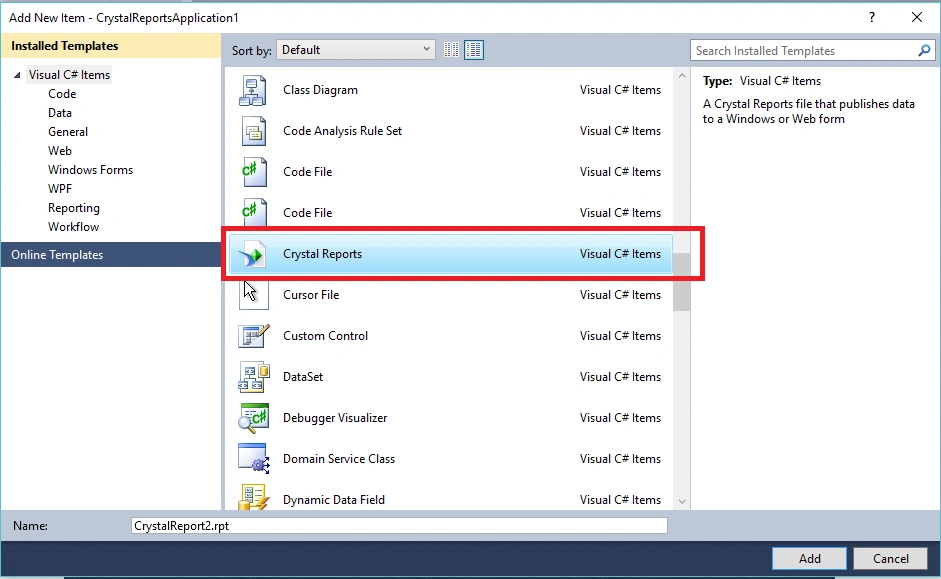
Step 3: Add new Crystal Report in your project,
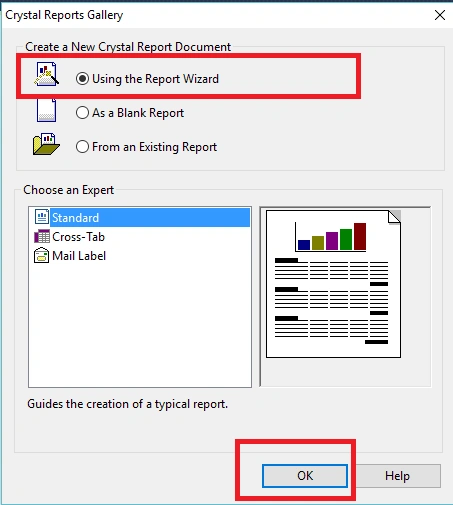
Step 4: Next step, select 'using the report' wizard and click 'Ok',
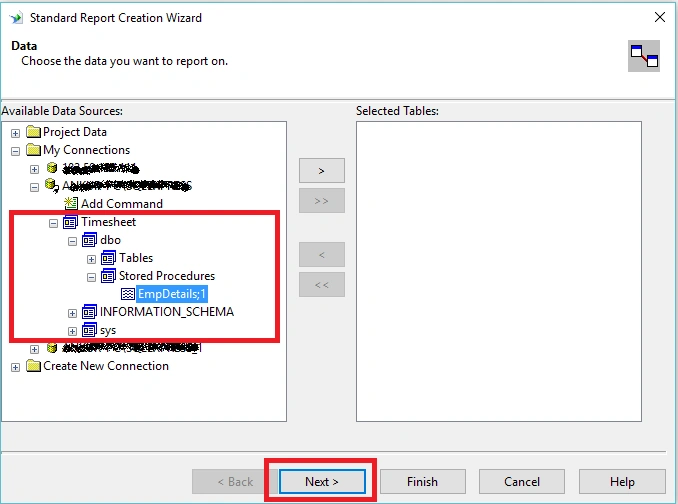
Step 5: Connect to SQL database and Select your Stored Procedure 'EmployeeDetails, and click 'Next'.
Step 5: Connect to SQL database and Select your Stored Procedure 'EmployeeDetails, and click 'Next'.
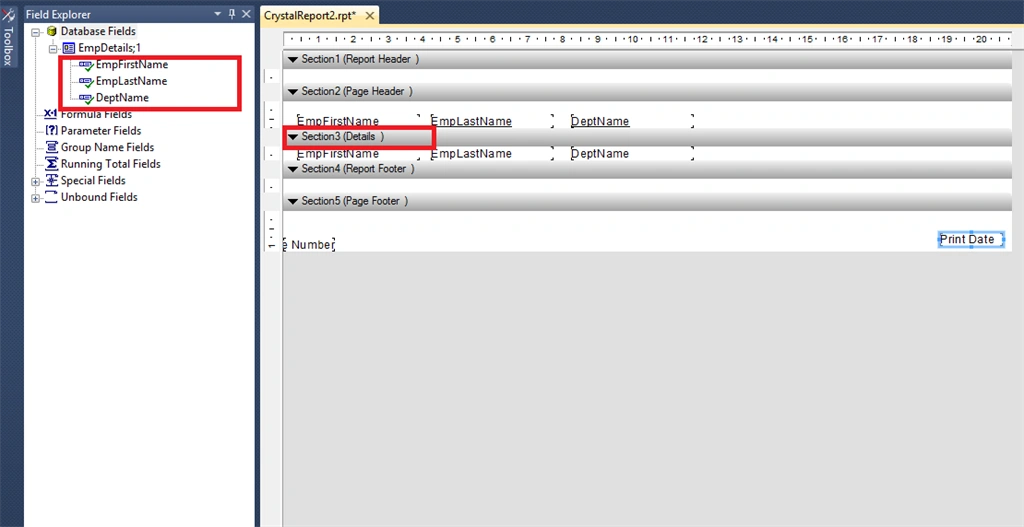
Step 6: Drag and drop Fields from Field Explorer to Report Details Section as shown in below screen.
Step 7: Now save and check report by clicking main report preview.
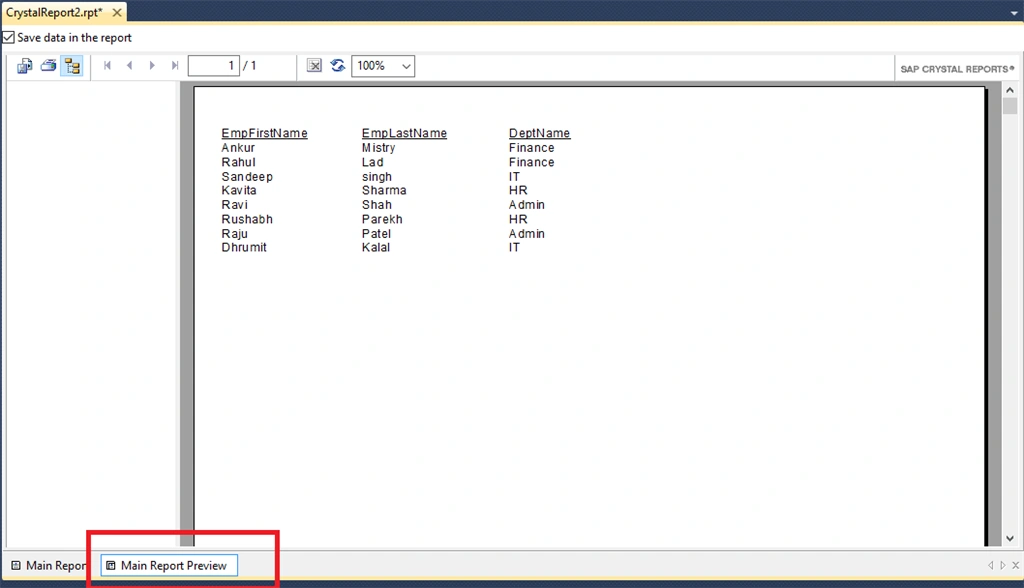
Hope you like the simple steps to create crystal report using Stored Procedure.
Muhamad MirzaPosted Feb 26, 2018, 7:06 PM
THE ERROR : query engine error : 'HY000:[MySql][ODBC 3.51 Driver][mysqld-5.5.47]SELECT command denied to user 'sa'@'118.100.116.49' for table 'proc"
Muhamad MirzaPosted Feb 26, 2018, 7:05 PM
Hey..why i got an error when click next button after select stored procedure?
Suneel JoshiPosted Sep 27, 2017, 2:35 PM
What if i wan to pass id
Santhakumar MunuswamyPosted Dec 4, 2015, 1:51 PM
Nice share
Former memberPosted Dec 3, 2015, 12:27 AM
Good article
Abdulmannan BahelimPosted Dec 3, 2015, 12:26 AM
Good one
Bhalchandra mithbavkarPosted Dec 3, 2015, 12:22 AM
Thanks for share