

In this artcle we will do Insert, Update, Delete and Details of Employee using CRUD operation in MVC.
I've used Visual Studio 2015 and SQL Server 2012.
Database
First we create table t_Employee and also create a below stored procedure.
- CREATE TABLE [dbo].[t_Employee](
- [ID] [int] IDENTITY(1,1) NOT NULL,
- [EmpName] [nvarchar](50) NULL,
- [Address] [nvarchar](50) NULL,
- [Gender] [nvarchar](50) NULL,
- [Active] [bit] NULL,
- CONSTRAINT [PK_t_Employee] PRIMARY KEY CLUSTERED
- (
- [ID] ASC
- )WITH (PAD_INDEX = OFF, STATISTICS_NORECOMPUTE = OFF, IGNORE_DUP_KEY = OFF, ALLOW_ROW_LOCKS = ON, ALLOW_PAGE_LOCKS = ON) ON [PRIMARY]
- ) ON [PRIMARY]
- CREATE PROCEDURE usp_AddEmployee
- @EmpName NVARCHAR(50),
- @Address NVARCHAR(50),
- @Gender NVARCHAR(50),
- @Active NVARCHAR(50)
- AS
- BEGIN
- INSERT INTO t_Employee (EmpName,Address,Gender,Password,ConfirmPassword,Active)
- VALUES (@EmpName,@Address,@Gender,@Active)
- END
- CREATE PROCEDURE usp_GetAllEMployee
- AS
- BEGIN
- SELECT ID, EmpName,Address,Gender,Active from t_Employee
- END
- CREATE PROCEDURE usp_UpdateEmployee
- @ID int,
- @EmpName NVARCHAR(50),
- @Address NVARCHAR(50),
- @Gender NVARCHAR(50),
- @Active bit
- AS
- BEGIN
- UPDATE t_Employee
- SET EmpName=@EmpName,
- Address= @Address,
- Gender= @Gender,
- Active= @Active
- WHERE ID=@ID
- END
- CREATE PROCEDURE usp_DeleteEMployee
- @ID int
- AS
- BEGIN
- Delete From t_Employee
- WHERE ID=@ID
- END
Visual Studio 2015
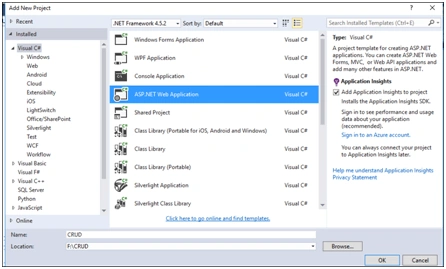
In Visual studio 2015, First Select 'ASP.NET Web Application' And give Na ame and Location of Project As below.
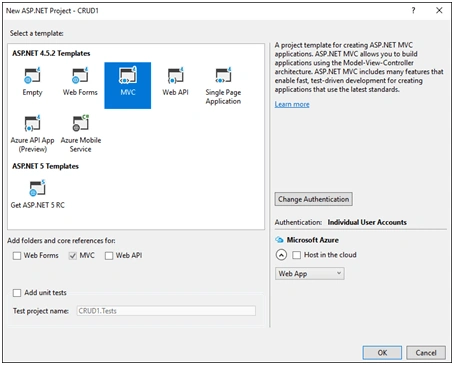
Select MVC and click on Change Authentication. After that select No Authentication becasue we will just focus on CRUD operations in MVC.
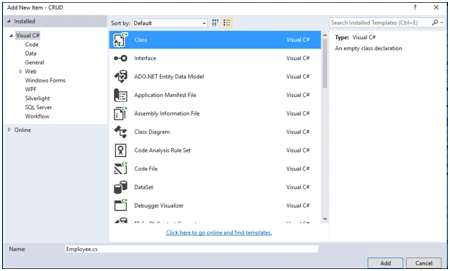
After creating a project, in Solution Explorer, right click on "Model" folder and select "Add New Item". Add one class name "Employee.cs".
And add below code where we can check data annotation which fileld Required, length, Datatype, Password, Confirmpassword etc. See below.
- public class Employee
- {
- [Key]
- public int ID { get; set; }
- [Required(ErrorMessage = "Please Enter Employee Name")]
- public string EmpName { get; set; }
- [Required(ErrorMessage = "Please Enter Employee Address")]
- public string Address { get; set; }
- [Required(ErrorMessage = "Please Enter Gender")]
- public string Gender { get; set; }
- public bool Active { get; set; }
- }
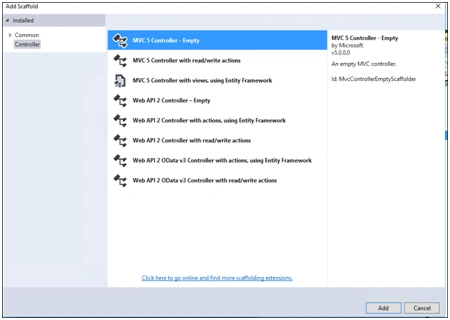
Right click on the Controller class add "MVC Controller -Empty" and give it a name, "EmployeeController".
- public class EmployeeController : Controller
- {
- // GET: Employees
- public ActionResult Index()
- {
- return View();
- }
- }
Remove the above code and replace with the following code in EmployeeController.
- using System;
- using System.Web.Mvc;
- using CRUD.Models;
- using CRUD.Repository;
- using System.Data;
- using Newtonsoft.Json;
- using System.Net;
- using System.Web.Services;
- public class EmployeeController : Controller
- {
- public ActionResult AddEmployee()
- {
- try
- {
- return View();
- }
- catch (Exception ex)
- {
- throw ex;
- }
- }
- [HttpPost]
- public ActionResult AddEmployee(Employee Emp)
- {
- try
- {
- if (ModelState.IsValid)
- {
- EmployeeDbContext emprep = new EmployeeDbContext();
- if (emprep.AddEmployee(Emp))
- {
- ViewBag.Message = "Record Saved Successfully";
- }
- }
- return RedirectToAction("GetAllEmployee");
- }
- catch (Exception ex)
- {
- throw ex;
- }
- }
- public ActionResult EditEmployee(int id)
- {
- try
- {
- EmployeeDbContext emprep = new EmployeeDbContext();
- return View(emprep.GetAllEmployee().Find(Emp => Emp.ID == id));
- }
- catch (Exception ex)
- {
- throw ex;
- }
- }
- [HttpPost]
- public ActionResult EditEmployee(int id, Employee Emp)
- {
- try
- {
- if (ModelState.IsValid)
- {
- EmployeeDbContext emprep = new EmployeeDbContext();
- if (emprep.EditEmployee(id, Emp))
- {
- ViewBag.Message = "Record Updated Successfully";
- }
- }
- return RedirectToAction("GetAllEmployee");
- }
- catch (Exception ex)
- {
- throw ex;
- }
- }
- public ActionResult GetAllEmployee(Employee Emp)
- {
- try
- {
- EmployeeDbContext emprep = new EmployeeDbContext();
- ModelState.Clear();
- return View(emprep.GetAllEmployee());
- }
- catch (Exception ex)
- {
- throw ex;
- }
- }
- public ActionResult GetDetails(int id)
- {
- try
- {
- EmployeeDbContext emprep = new EmployeeDbContext();
- return View(emprep.GetAllEmployee().Find(Emp => Emp.ID == id));
- }
- catch (Exception ex)
- {
- throw ex;
- }
- }
- public ActionResult DeleteEmployee(int? id)
- {
- try
- {
- EmployeeDbContext Emprep = new EmployeeDbContext();
- return View(Emprep.GetAllEmployee().Find(x => x.ID == id));
- }
- catch (Exception ex)
- {
- throw ex;
- }
- }
- [HttpPost]
- public ActionResult DeleteEmployee(int id)
- {
- try
- {
- if (ModelState.IsValid)
- {
- EmployeeDbContext emprep = new EmployeeDbContext();
- if (emprep.DeleteEmployee(id))
- {
- ViewBag.Message = "Record Deleted Successfully";
- }
- }
- return RedirectToAction("GetAllEmployee");
- }
- catch (Exception ex)
- {
- throw ex;
- }
- }
- }
Add one folder repository and create EmployeeDbContext Class . Add the following code to the class.
- using CRUD.Models;
- using System;
- using System.Collections.Generic;
- using System.Configuration;
- using System.Data;
- using System.Data.SqlClient;
- public class EmployeeDbContext
- {
- string constr;
- public EmployeeDbContext()
- {
- try
- {
- constr = ConfigurationManager.ConnectionStrings["Sqlconn"].ToString();
- }
- catch (Exception ex)
- {
- throw ex;
- }
- }
- public List<Employee> GetAllEmployee()
- {
- DataTable dt = new DataTable();
- List<Employee> emp = new List<Employee>();
- try
- {
- using (var con = new SqlConnection(constr))
- {
- using (var cmd = new SqlCommand("usp_GetAllEMployee", con))
- {
- cmd.CommandType = System.Data.CommandType.StoredProcedure;
- SqlDataAdapter ds = new SqlDataAdapter(cmd);
- con.Open();
- ds.Fill(dt);
- foreach (DataRow dr in dt.Rows)
- {
- emp.Add(
- new Employee
- {
- ID = Convert.ToInt32(dr["ID"]),
- EmpName = Convert.ToString(dr["EMPName"]),
- Address = Convert.ToString(dr["Address"]),
- Gender = Convert.ToString(dr["Gender"]),
- Active = Convert.ToBoolean(dr["Active"])
- }
- );
- };
- }
- }
- return emp;
- }
- catch (Exception ex)
- {
- throw ex;
- }
- }
- public bool AddEmployee(Employee Emp)
- {
- bool result = false;
- try
- {
- using (var con = new SqlConnection(constr))
- {
- using (var cmd = new SqlCommand("usp_AddEmployee", con))
- {
- cmd.CommandType = CommandType.StoredProcedure;
- cmd.Parameters.AddWithValue("@EmpName", Emp.EmpName);
- cmd.Parameters.AddWithValue("@Address", Emp.Address);
- cmd.Parameters.AddWithValue("@Gender", Emp.Gender);
- cmd.Parameters.AddWithValue("@Active", Emp.Active);
- con.Open();
- int i = cmd.ExecuteNonQuery();
- con.Close();
- if (i > 0)
- {
- result = true;
- }
- else
- {
- result = false;
- }
- }
- }
- return result;
- }
- catch (Exception ex)
- {
- throw ex;
- }
- }
- public bool EditEmployee(int id, Employee Emp)
- {
- bool result = false;
- try
- {
- using (var con = new SqlConnection(constr))
- {
- using (var cmd = new SqlCommand("usp_UpdateEmployee", con))
- {
- cmd.CommandType = CommandType.StoredProcedure;
- cmd.Parameters.AddWithValue("@ID", id);
- cmd.Parameters.AddWithValue("@EmpName", Emp.EmpName);
- cmd.Parameters.AddWithValue("@Address", Emp.Address);
- cmd.Parameters.AddWithValue("@Gender", Emp.Gender);
- cmd.Parameters.AddWithValue("@Active", Emp.Active);
- con.Open();
- int i = cmd.ExecuteNonQuery();
- if (i > 0)
- {
- result = true;
- }
- else
- {
- result = false;
- }
- }
- }
- return result;
- }
- catch (Exception ex)
- {
- throw ex;
- }
- }
- public bool DeleteEmployee(int id)
- {
- bool result = false;
- try
- {
- using (var con = new SqlConnection(constr))
- {
- using (var cmd = new SqlCommand("usp_DeleteEMployee", con))
- {
- cmd.CommandType = CommandType.StoredProcedure;
- cmd.Parameters.AddWithValue("@ID", id);
- con.Open();
- int i = cmd.ExecuteNonQuery();
- if (i > 0)
- {
- result = true;
- }
- else
- {
- result = false;
- }
- }
- }
- return result;
- }
- catch (Exception ex)
- {
- throw ex;
- }
- }
- public DataSet GetDetails()
- {
- DataSet ds = new DataSet();
- try
- {
- using (var conn = new SqlConnection(constr))
- {
- using (var cmd = new SqlCommand("usp_Get_Employee", conn))
- {
- cmd.CommandType = CommandType.StoredProcedure;
- conn.Open();
- SqlDataAdapter dt = new SqlDataAdapter(cmd);
- dt.Fill(ds);
- conn.Close();
- }
- }
- return ds;
- }
- catch (Exception ex)
- {
- throw ex;
- }
- }
- }
Add below key with databasename, username and password. This connection string will be used to connect with the database.
- <add name="Sqlconn" connectionString="data source=servername;Initial Catalog=Test;Persist Security Info=True;uid=username;pwd=password" providerName="System.Data.SqlClient"/>
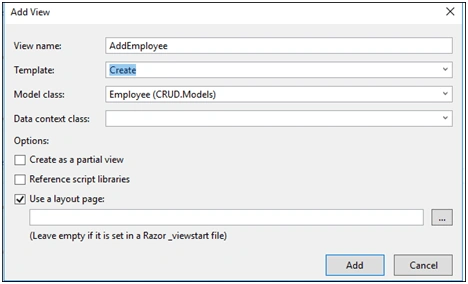
Let's add a view.
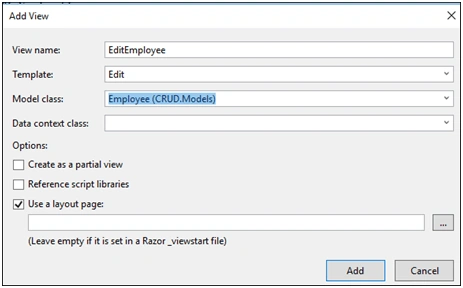
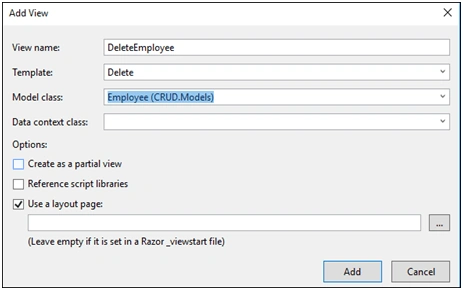
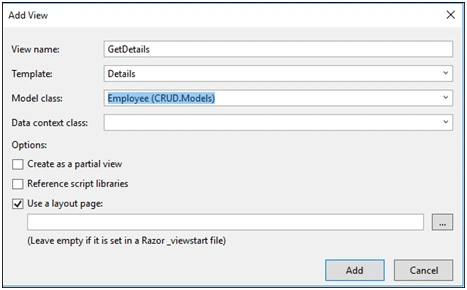
Right click on Controller and add a view using Add View. See below.
AddEmployee.cshtml
- @model CRUD.Models.Employee
- @{
- ViewBag.Title = "AddEmployee";
- }
- <h2>@ViewBag.Message</h2>
- @using (Html.BeginForm())
- {
- @Html.AntiForgeryToken()
- <div class="form-horizontal">
- <h4>Employee</h4>
- <hr />
- @Html.ValidationSummary(true, "", new { @class = "text-danger" })
- <div class="form-group">
- @Html.LabelFor(model => model.EmpName, htmlAttributes: new { @class = "control-label col-md-2" })
- <div class="col-md-10">
- @Html.EditorFor(model => model.EmpName, new { htmlAttributes = new { @class = "form-control" } })
- @Html.ValidationMessageFor(model => model.EmpName, "", new { @class = "text-danger" })
- </div>
- </div>
- <div class="form-group">
- @Html.LabelFor(model => model.Address, htmlAttributes: new { @class = "control-label col-md-2" })
- <div class="col-md-10">
- @Html.EditorFor(model => model.Address, new { htmlAttributes = new { @class = "form-control" } })
- @Html.ValidationMessageFor(model => model.Address, "", new { @class = "text-danger" })
- </div>
- </div>
- <div class="form-group">
- @Html.LabelFor(model => model.Gender, htmlAttributes: new { @class = "control-label col-md-2" })
- <div class="col-md-10">
- @Html.DropDownList("Gender", new List<SelectListItem>
- {
- new SelectListItem{ Text="---Select Gender---", Value = "Select Gender" },
- new SelectListItem{ Text="Male", Value = "Male" },
- new SelectListItem{ Text="Female", Value = "Female" }
- }, new { @class = "textbox" })
- </div>
- </div>
- <div class="form-group">
- @Html.LabelFor(model => model.Active, htmlAttributes: new { @class = "control-label col-md-2" })
- <div class="col-md-10">
- <div class="checkbox">
- @Html.EditorFor(model => model.Active)
- @Html.ValidationMessageFor(model => model.Active, "", new { @class = "text-danger" })
- </div>
- </div>
- </div>
- <div class="form-group">
- <div class="col-md-offset-2 col-md-10">
- <input type="submit" value="Create" class="btn btn-default" />
- </div>
- </div>
- </div>
- }
- <div>
- @Html.ActionLink("Back to List", "GetAllEmployee")
- </div>
- @section Scripts {
- @Scripts.Render("~/bundles/jqueryval")
- }
@html.Actionlink("Text","ControllerName")
In the above @html.Actionlink, add GetAllEmployee as the controller name.
EditEmployee.cshtml
- @model CRUD.Models.Employee
- @{
- ViewBag.Title = "EditEmployee";
- }
- <h2>@ViewBag.Message</h2>
- @using (Html.BeginForm())
- {
- @Html.AntiForgeryToken()
- <div class="form-horizontal">
- <h4>Employee</h4>
- <hr />
- @Html.ValidationSummary(true, "", new { @class = "text-danger" })
- @Html.HiddenFor(model => model.ID)
- <div class="form-group">
- @Html.LabelFor(model => model.EmpName, htmlAttributes: new { @class = "control-label col-md-2" })
- <div class="col-md-10">
- @Html.EditorFor(model => model.EmpName, new { htmlAttributes = new { @class = "form-control" } })
- @Html.ValidationMessageFor(model => model.EmpName, "", new { @class = "text-danger" })
- </div>
- </div>
- <div class="form-group">
- @Html.LabelFor(model => model.Address, htmlAttributes: new { @class = "control-label col-md-2" })
- <div class="col-md-10">
- @Html.EditorFor(model => model.Address, new { htmlAttributes = new { @class = "form-control" } })
- @Html.ValidationMessageFor(model => model.Address, "", new { @class = "text-danger" })
- </div>
- </div>
- <div class="form-group">
- @Html.LabelFor(model => model.Gender, htmlAttributes: new { @class = "control-label col-md-2" })
- <div class="col-md-10">
- @Html.DropDownList("Gender", new List<SelectListItem>
- {
- new SelectListItem{ Text="Male", Value = "Male" },
- new SelectListItem{ Text="Female", Value = "Female" }
- })
- </div>
- </div>
- <div class="form-group">
- @Html.LabelFor(model => model.Active, htmlAttributes: new { @class = "control-label col-md-2" })
- <div class="col-md-10">
- <div class="checkbox">
- @Html.EditorFor(model => model.Active)
- @Html.ValidationMessageFor(model => model.Active, "", new { @class = "text-danger" })
- </div>
- </div>
- </div>
- <div class="form-group">
- <div class="col-md-offset-2 col-md-10">
- <input type="submit" value="Save" class="btn btn-default" />
- </div>
- </div>
- </div>
- }
- <div>
- @Html.ActionLink("Back to List", "GetAllEmployee")
- </div>
- @section Scripts {
- @Scripts.Render("~/bundles/jqueryval")
- }
DeleteEmployee.cshtml
- @model CRUD.Models.Employee
- @{
- ViewBag.Title = "DeleteEmployee";
- }
- <h2>DeleteEmployee</h2>
- <h3>Are you sure you want to delete this?</h3>
- <div>
- <h4>Employee</h4>
- <hr />
- <dl class="dl-horizontal">
- <dt>
- @Html.DisplayNameFor(model => model.EmpName)
- </dt>
- <dd>
- @Html.DisplayFor(model => model.EmpName)
- </dd>
- <dt>
- @Html.DisplayNameFor(model => model.Address)
- </dt>
- <dd>
- @Html.DisplayFor(model => model.Address)
- </dd>
- <dt>
- @Html.DisplayNameFor(model => model.Gender)
- </dt>
- <dd>
- @Html.DisplayFor(model => model.Gender)
- </dd>
- <dt>
- @Html.DisplayNameFor(model => model.Active)
- </dt>
- <dd>
- @Html.DisplayFor(model => model.Active)
- </dd>
- </dl>
- @using (Html.BeginForm()) {
- @Html.AntiForgeryToken()
- <div class="form-actions no-color">
- <input type="submit" value="Delete" class="btn btn-default" /> |
- @Html.ActionLink("Back to List", "GetAllEmployee")
- </div>
- }
- </div>
GetDetails.cshtml
- @model CRUD.Models.Employee
- @{
- ViewBag.Title = "GetDetails";
- }
- <h2>GetDetails</h2>
- <div>
- <h4>Employee</h4>
- <hr />
- <dl class="dl-horizontal">
- <dt>
- @Html.DisplayNameFor(model => model.EmpName)
- </dt>
- <dd>
- @Html.DisplayFor(model => model.EmpName)
- </dd>
- <dt>
- @Html.DisplayNameFor(model => model.Address)
- </dt>
- <dd>
- @Html.DisplayFor(model => model.Address)
- </dd>
- <dt>
- @Html.DisplayNameFor(model => model.Gender)
- </dt>
- <dd>
- @Html.DisplayFor(model => model.Gender)
- </dd>
- <dt>
- @Html.DisplayNameFor(model => model.Active)
- </dt>
- <dd>
- @Html.DisplayFor(model => model.Active)
- </dd>
- </dl>
- </div>
- <p>
- @Html.ActionLink("Edit", "EditEmployee", new { id = Model.ID }) |
- @Html.ActionLink("Back to List", "GetAllEmployee")
- </p>
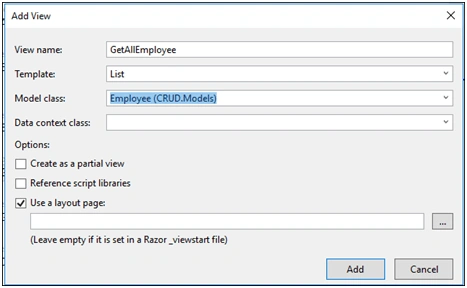
- @model IEnumerable<CRUD.Models.Employee>
- @{
- ViewBag.Title = "GetAllEmployee";
- }
- <h2>@ViewBag.Message</h2>
- <p>
- @Html.ActionLink("Create New", "AddEmployee")
- </p>
- <table class="table">
- <tr>
- <th>
- @Html.DisplayNameFor(model => model.EmpName)
- </th>
- <th>
- @Html.DisplayNameFor(model => model.Address)
- </th>
- <th>
- @Html.DisplayNameFor(model => model.Gender)
- </th>
- <th>
- @Html.DisplayNameFor(model => model.Active)
- </th>
- <th></th>
- </tr>
- @foreach (var item in Model)
- {
- <tr>
- <td>
- @Html.DisplayFor(modelItem => item.EmpName)
- </td>
- <td>
- @Html.DisplayFor(modelItem => item.Address)
- </td>
- <td>
- @Html.DisplayFor(modelItem => item.Gender)
- </td>
- <td>
- @Html.DisplayFor(modelItem => item.Active)
- </td>
- <td>
- @Html.ActionLink("Edit", "EditEmployee", new { id = item.ID }) |
- @Html.ActionLink("Details", "GetDetails", new { id = item.ID }) |
- @Html.ActionLink("Delete", "DeleteEmployee", new { id = item.ID })
- </td>
- </tr>
- }
- </table>
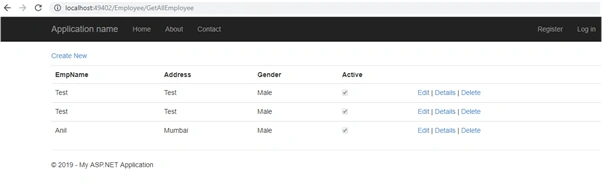
After completion of the project and coding above, when you build and run the app, you will see the page looks like the following where you can add, update, and delete records.
Sourav Kumar DasPosted Oct 24, 2019, 11:46 PM
Awesome Article.