

Downoad the dll for highcharts from this link .. http://www.highcharts.com/download
Introduction
I will explain how to create a report in JSON format using highcharts library. It's fully responsive, that's why I prefer it. Firstly, I have created Employee table in database.
I will explain how to create a report in JSON format using highcharts library. It's fully responsive, that's why I prefer it. Firstly, I have created Employee table in database.
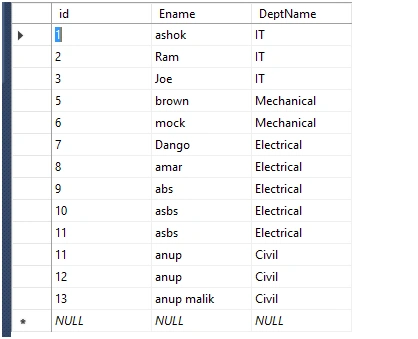
After that, we are moving in C#..
C# Code
Create a separate class or aspx page as per your comfort.
- public class tblentity {
- public string Department {
- get;
- set;
- }
- public int Employee {
- get;
- set;
- }
- }
Create connection string and define web.config.
- <connectionStrings>
- <add name="Conn" connectionString="Data Source=YourServer;Initial Catalog=dbname;User ID=xxxx;Password=xxxxx" providerName="System.Data.SqlClient" />
- </connectionStrings>
After that, create a web method in aspx page.
- [WebMethod]
- public static List < tblentity > abc() {
- List < tblentity > listinfo = new List < tblentity > ();
- DataSet ds = new DataSet();
- try {
- SqlConnection sql = new SqlConnection(ConfigurationManager.ConnectionStrings["Conn"].ConnectionString);
- SqlCommand cmd = new SqlCommand("select DeptName,count(ename) as Employee from Employes group by DeptName", sql);
- SqlDataAdapter adp = new SqlDataAdapter(cmd);
- adp.Fill(ds);
- } catch (Exception ex) {
- throw ex;
- }
- if (ds != null) {
- if (ds.Tables.Count > 0) {
- if (ds.Tables[0].Rows.Count > 0) {
- foreach(DataRow dr in ds.Tables[0].Rows) {
- listinfo.Add(new tblentity {
- Department = dr["DeptName"].ToString(),
- Employee = Convert.ToInt32(dr["Employee"]),
- });
- }
- }
- }
- }
- return listinfo;
- }
And HTML part here. You can design it according to your creativity. Add references to some CSS and JavaScript files in the HTML portion.
- <script src="js/highcharts.js" type="text/javascript"></script>
- <script src="js/modules/exporting.js" type="text/javascript"></script>
- <script src="api/js/jquery-1.11.3.min.js" type="text/javascript"></script>
- <div id="idd1">
- </div>
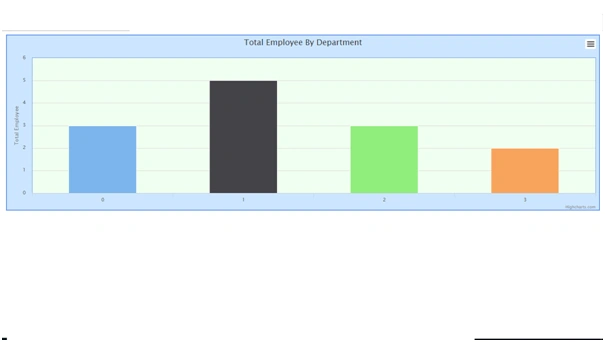
Output
Join the conversation! Your thoughts help the community grow.