

Step 1: Create new windows form application.
Step 2: In solution explorer right click on References and select Add References. Then Add Reference form will open as follows. In that select .Net tab and add "Microsoft.Office.Interop.Excel" reference.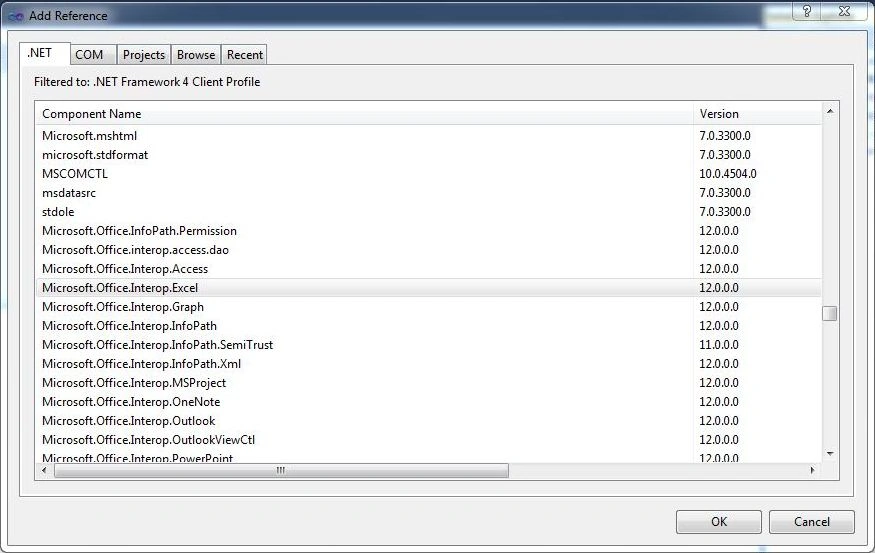
Step 3: Create windows from like below.
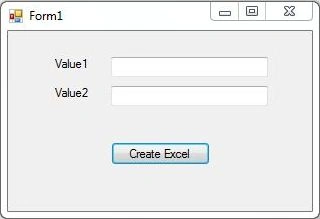
Step 4: Write the following code.
- using System;
- using System.Windows.Forms;
- using Excel = Microsoft.Office.Interop.Excel;
- namespace ExecelWithFormula
- {
- public partial class Form1: Form
- {
- public Form1()
- {
- InitializeComponent();
- }
- private void button1_Click(object sender, EventArgs e)
- {
- Excel.Application excelApp = new Excel.Application();
- Excel.Workbook workbook = null;
- Excel.Workbooks workbooks = null;
- Excel._Worksheet worksheet = null;
- workbooks = excelApp.Workbooks;
- workbook = workbooks.Add(1);
- worksheet = (Excel.Worksheet) workbook.Sheets[1];
- excelApp.Visible = true;
- worksheet.Cells[1, 1] = "Value1";
- worksheet.Cells[1, 2] = "Value2";
- worksheet.Cells[1, 3] = "Addition";
- worksheet.Cells[2, 1] = textBox1.Text;
- worksheet.Cells[2, 2] = textBox2.Text;
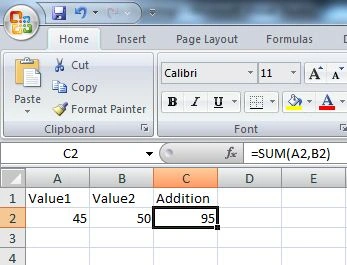
- worksheet.Cells[2, 3].Formula = "=SUM(A2,B2)";
- }
- }
- }
Step 5: Run the application.
Step 6: Enter values of value1 and value2 and click on Create Excel
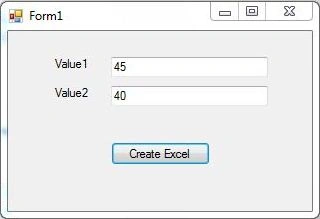
Step 7: Excel will be generated with SUM formula in it.
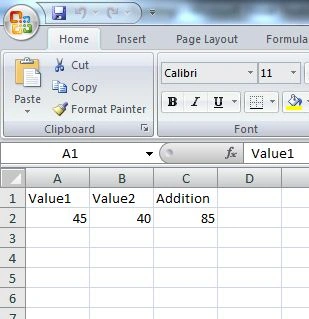
Step 8 : Then change value1 and value2 and check result.
Rinka SaiPosted Feb 1, 2020, 5:20 AM
If you any solution for that , then please suggest. Another tool installed in my PC which allows excel to read write .so I want to generate a formula based excel who should not check open office dependency
Rinka SaiPosted Feb 1, 2020, 5:18 AM
IF Microsoft Office is not installed in my PC then this will not work.
Dharmendra Kumar PanditPosted Feb 6, 2019, 5:26 AM
Good thing.
Rajasekaran BosePosted Dec 30, 2017, 11:52 AM
Can we do this with grid view data?