

In this blog I explain how creates dynamic tabs using Jquery and CSS. Before start this blog I will recommended to read article
Create Tabs Using jQuery and CSS
1. Create Function For Dynamic Tabs:
<script type="text/javascript">
$(document).ready(function()
{
$("#tabs").tabs({
fx:{opacity:"toggle"},
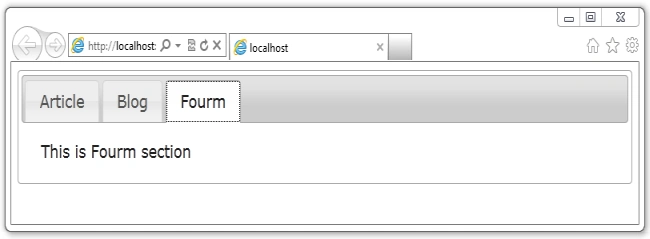
}).tabs("add","#tabFourm","Fourm")
$("#tabFourm").append("This is Fourm section");
});
</script>
Above function represents that there is #tabs is main div container. Here tabs() function contains three argument. Argument description:
1. add : Represents that add the new tab.
2. #tabFourm : Represents id selector for div. This div uses to show content for tab.
3. Fourm : Represents display text on tab.
Here append() method uses to add content on div.
2. Entire Code :
<%@ Page
Language="C#"
AutoEventWireup="true"
CodeBehind="DynamicTabs.aspx.cs"
Inherits="JQueryExample.DynamicTabs"
%>
<!DOCTYPE html
PUBLIC "-//W3C//DTD
XHTML 1.0 Transitional//EN" "http://www.w3.org/TR/xhtml1/DTD/xhtml1-transitional.dtd">
<html xmlns="http://www.w3.org/1999/xhtml">
<head runat="server">
<title></title>
<script src="jquery/js/jquery-1.8.3.js"
type="text/javascript"></script>
<script src="jquery/js/jquery-ui-1.9.2.custom.min.js"
type="text/javascript"></script>
<link href="jqueryui/css/smoothness/jquery-ui-1.9.2.custom.min.css"
rel="stylesheet"
type="text/css"
/>
<script type="text/javascript">
$(document).ready(function()
{
$("#tabs").tabs({
fx:{opacity:"toggle"},
}).tabs("add","#tabFourm","Fourm")
$("#tabFourm").append("This is Fourm section");
});
</script>
</head>
<body>
<form id="form1" runat="server">
<div id="tabs">
<ul>
<li><a href="#tabArticle">Article</a></li>
<li><a href="#tabBlog">Blog</a></li>
</ul>
<div id="tabArticle">
It is Article Section.
</div>
<div id="tabBlog">
It is Blog Section.
</div>
</div>
</form>
</body>
</html>
3. Output:
Join the conversation! Your thoughts help the community grow.