

Introduction
In this blog, I am going to discuss how to create Connection String in simple steps .
Background
Most of the time, if we have to create Connection string or we go for a machine test interview we do not remember Connection string . This blog will show you how to achieve connection string easily.
In this blog, I am going to discuss how to create Connection String in simple steps .
Background
Most of the time, if we have to create Connection string or we go for a machine test interview we do not remember Connection string . This blog will show you how to achieve connection string easily.
Here is the Step by Step Example,
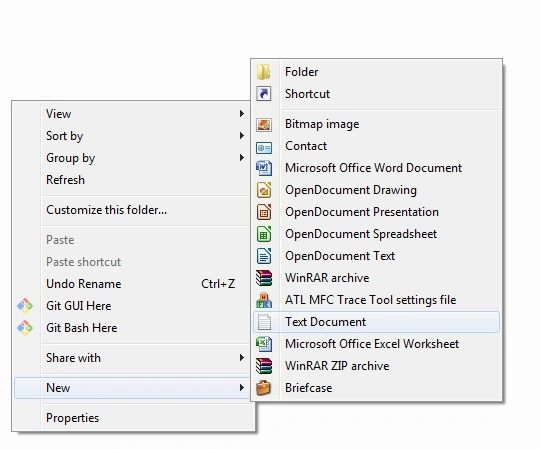
Step 1
Right Click on new and select text document.
Step 2
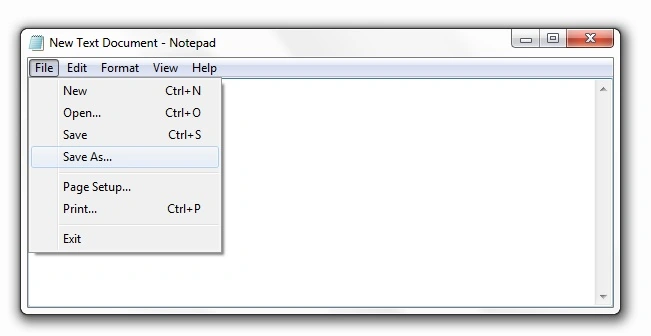
Click on Save As File.
Step 3
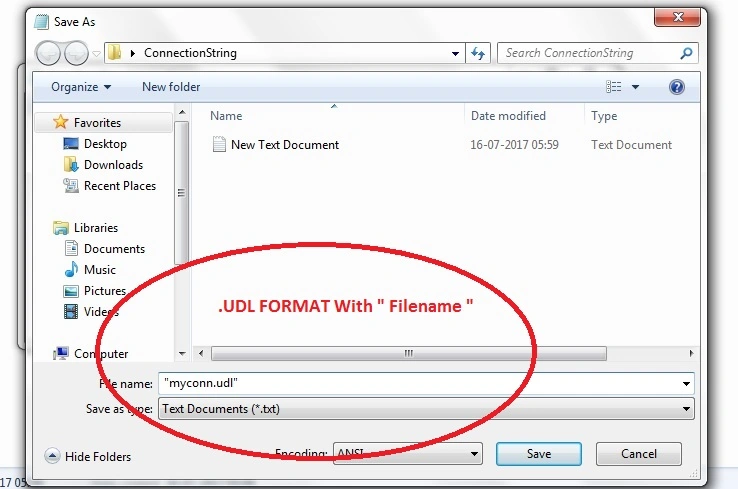
Save in UDL format and use double column " " .
Step 4
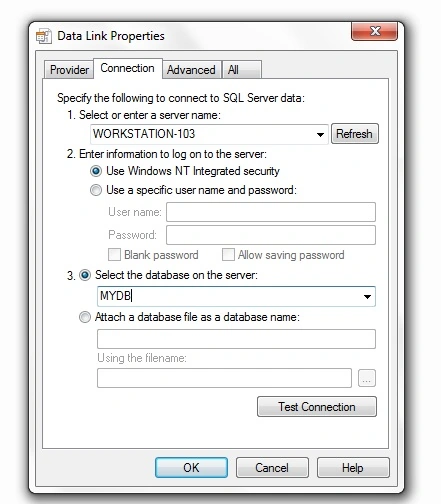
Open the file and Select our server and database then test connection .
Step 5
Open file in notepad

Step 6
Copy and paste the connection string in webconfig file in our project.
Summary
I hope, you understood how to create a connection string step by step.
Virendra VishwakarmaPosted Jul 19, 2017, 5:05 AM
Why we follow this step rather then .net already provide better way..
Virendra VishwakarmaPosted Jul 19, 2017, 5:04 AM
Nice article but i have one qus..
Imtiyaz AnsariPosted Jul 18, 2017, 1:16 PM
Keep it up :) @puneet
Bebins VPosted Jul 17, 2017, 1:59 PM
Developer should know these kind of tricks... nice one