

Introduction
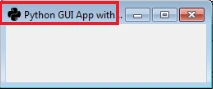
In this blog, I am going to create an application title and set an app icon in a Python GUI application. When a user opens the application it will display the title with the icon on the application screen.
Software requirement
Python 3.5 and IDLE (Python 3.5)
Programming code
- #Create App icon in Python GUI Application
- import tkinter as tk
- from tkinter import ttk
- app = tk.Tk()
- #Application Title
- app.title("Python GUI App with icon")
- #Set App icon
- app.iconbitmap(r'C:\Users\prakashraj\Downloads\py1.ico')
- #Calling Main()
- app.mainloop()
About the code
- First, I am importing the tkinter modules.
- Next, I assign a class and variables.
- Next, I create an application title and set an app icon.
- Finally, I have started the windows event loop by calling the mainloop method then execute the code.
Icon

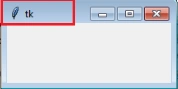
Output(App without title & icon)
Output(App with title & icon)
Nilesh PatilPosted Oct 13, 2017, 6:57 AM
Thanxx Prakashraj for useful info