

Create a comma separated list from column using select statement
In this blog, I am explaining two methods for a comma separated list from column using COALESCE and STUFF function in select statement.
COALESCE is required for non-null values. If there is NULL Value in your string you will have your result set as NULL.
The STUFF a blank string into that resulting string, at point one, for a length of 1 - basically its applying first comma, so you get the list of data as you wanted. And the internal FOR XML path('') selects the list of data for each Row, and make each data with a ',' so you get something like - (A, B).
Suppose we have following data in Employee
table and we need to make a semicolon separated list of 'EmpID' and 'EmpName'
then we can use methods as shown in below.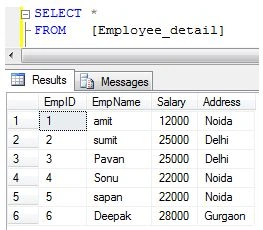
Method-1
DECLARE @EmpID VARCHAR(MAX), @EmpName VARCHAR(MAX)
SELECT @EmpID = COALESCE(@EmpID + ',', '') + CONVERT(VARCHAR(50), EmpID),
@EmpName = COALESCE(@EmpName + ',', '') + EmpName
FROM [Employee_detail]
SELECT @EmpID AS EmpID,
@EmpName AS EmpName
Method-2
SELECT STUFF((SELECT ',' + CONVERT(VARCHAR(50), EmpID)
FROM [Employee_detail]
FOR xml path('')), 1, 1, '') EmpID,
STUFF((SELECT ',' + EmpName
FROM [Employee_detail]
FOR xml path('')), 1, 1, '') EmpName
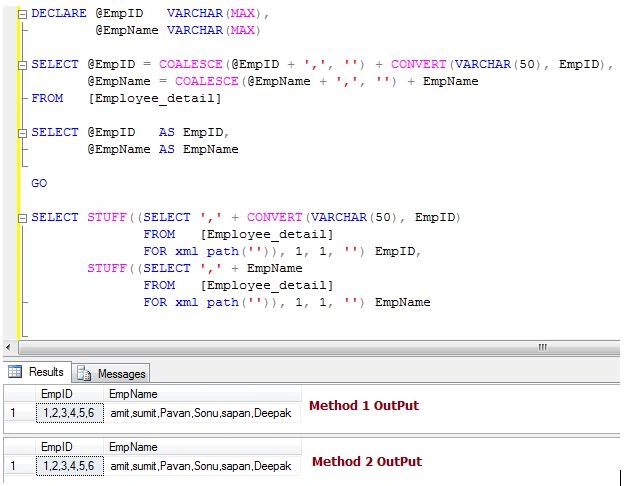
Join the conversation! Your thoughts help the community grow.