

Count the characters while entering in TextBox using Javascript
It explains about the Count the characters while entering in TextBox using Javascript.
Design:
- <table cellpadding="0" cellspacing="0" border="0" width="100%">
- <tr>
- <td>
- <asp:TextBox ID="txtComments" BackColor="Gray" ForeColor="White" runat="server" TextMode="MultiLine" onkeyup="return CountCharacters();" Width="400px" Height="75px"></asp:TextBox>
- </td>
- </tr>
- <tr>
- <td style="padding-top:10px;">
- Characters remaining: <asp:TextBox ID="txtRemain" BackColor="Gray" ForeColor="White" runat="server" Text="200" Width="45px"></asp:TextBox>
- </td>
- </tr>
- </table>
JavaScript:
- <script type="text/javascript">
- function CountCharacters()
- {
- var maxSize = 200;
- if (document.getElementById('<%= txtComments.ClientID %>'))
- {
- var ctrl = document.getElementById('<%= txtComments.ClientID %>');
- var len = document.getElementById('<%= txtComments.ClientID %>').value.length;
- if (len <= maxSize) {
- var diff = parseInt(maxSize) - parseInt(len);
- if (document.getElementById('<%= txtRemain.ClientID %>'))
- {
- document.getElementById('<%= txtRemain.ClientID %>').value = diff;
- }
- }
- else
- {
- ctrl.value = ctrl.value.substring(0, maxSize);
- }
- }
- return false;
- }
- </script>
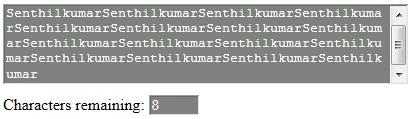
Screenshot:
romeo jamesPosted Oct 29, 2015, 11:53 AM
thanks a lot