

Well there are other ways to achieve the same functionality but with LINQ it becomes a bit easier with minimum piece of code. So let us start with the topic.
Open Visual Studio. Create a new Web Application File. Add a new webpage.
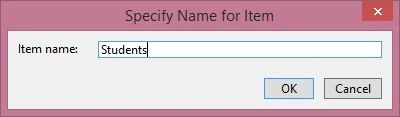
Copy the below code in the code behind of the added page.
- protected void Page_Load(object sender, EventArgs e)
- {
- if(!Page.IsPostBack)
- {
- GenerateXMLString();
- }
- }
- protected void GenerateXMLString()
- {
- DataTable dt = null;
- try
- {
- dt = new DataTable();
- dt.Columns.Add("StudentID", typeof (int));
- dt.Columns.Add("Name", typeof (string));
- dt.Columns.Add("Marks", typeof (int));
- DataRow dr = dt.NewRow();
- dr[0] = 1;
- dr[1] = "John Smith";
- dr[2] = 200;
- dt.Rows.Add(dr);
- DataRow dr1 = dt.NewRow();
- dr1[0] = 2;
- dr1[1] = "Mark Johnson";
- dr1[2] = 300;
- dt.Rows.Add(dr1);
- XDocument stud = new XDocument(new XDeclaration("1.0", "utf-8", "true"), new XElement("STUDENTS", from stu in dt.AsEnumerable() select new XElement("STUDENT", new XElement("StudentID", stu["StudentID"]), new XElement("Name", stu["Name"]), new XElement("Marks", stu["Marks"]))));
- string _encodedXML = string.Format("<pre>{0}</pre>", HttpUtility.HtmlEncode(stud));
- Response.Write(_encodedXML.ToString());
- }
- catch(Exception Ex)
- {
- throw Ex;
- }
- }
When we run the code we get the following output.
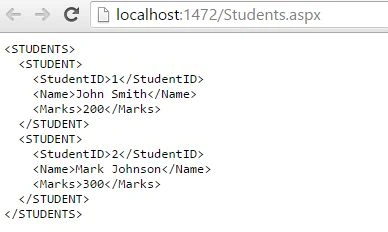
This is how we can convert datatable to XML using LINQ.
r kPosted Apr 14, 2021, 6:00 PM
Hello Please let me know how i can bind this _encodedXML.ToString() to repeater control
Bhuvanesh MohankumarPosted May 6, 2016, 3:55 PM
Good one...
Shuvo SarkerPosted Dec 14, 2015, 5:46 AM
Helpful Article.