

One of the very common requirements in programming is the need of storing CSV data into a database table. Let's see how we can do this.
Let's start by creating a temporary table with two columns - ID and CSVData. ID will contain a random integer value and CSVData will contain the comma separated values. So, our SQL script will look like the following.
- CREATE TABLE #CsvData
- (
- Id INT,
- CSVData VARCHAR(MAX)
- )
- INSERT INTO #CsvData VALUES(1, 'A,B,C')
- INSERT INTO #CsvData VALUES(2, 'D,E')
- Convert the CSV string to XML data.
- Use the XML functions in SQL to retrieve the actual data into SQL table format.
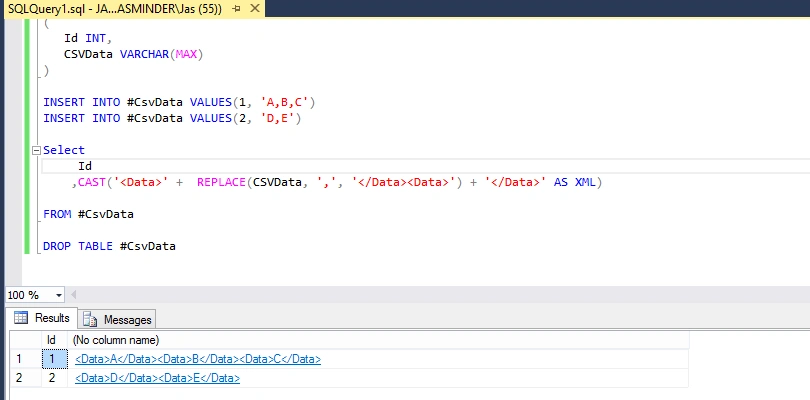
In order to convert this string to XML, we will first replace the ',' with the '</Data><Data>' tags. Then, we append the '<Data>' and the '</Data>' tags with the replaced string. So, our SQL query with output will look like the following.
Now, we use the XML functions named nodes and value, along with the Cross Apply function, to get the values from XML. So, the query will change to the following.
- SELECT ID,
- tbl.csvdata.value('.[1]','VARCHAR(MAX)')
- FROM
- (
- Select
- Id
- ,CAST('<Data>' + REPLACE(CSVData, ',', '</Data><Data>') + '</Data>' AS XML) AS XmlString
- FROM #CsvData
- ) tdata
- CROSS APPLY XmlString.nodes('/Data') tbl(csvdata)
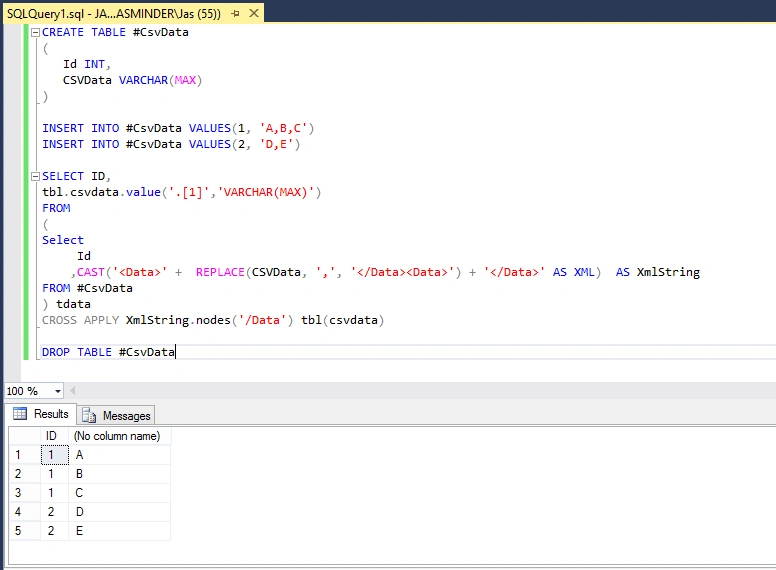
That's it. We have the data in the SQL table format. Hope you enjoyed reading it. Happy querying...!!!
Join the conversation! Your thoughts help the community grow.