

Base64 encoding is commonly used when there is a requirement to convert binary data to string format. Base64 is commonly used in a number of applications, including email via MIME, and storing complex data in XML.
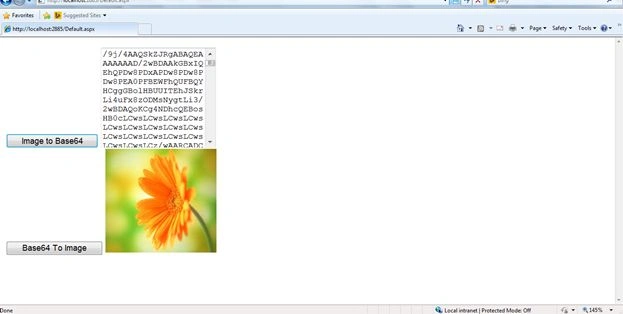
Let see how to convert an Image to Base64 string and Base64 String to Image.
Code Snippet
Default.aspx
- <%@ Page Language="C#" AutoEventWireup="true" CodeFile="Default.aspx.cs" Inherits="_Default" %>
- <!DOCTYPE html>
- <html
- xmlns="http://www.w3.org/1999/xhtml">
- <head runat="server">
- <title></title>
- </head>
- <body>
- <form id="form1" runat="server">
- <asp:Button ID="Button1" runat="server" OnClick="ImageToBase_Click" Text="Image to Base64" />
- <asp:TextBox ID="TextBox1" runat="server" Height="146px" TextMode="MultiLine"></asp:TextBox>
- <br />
- <asp:Button ID="Button2" runat="server" OnClick="BaseToImage_Click" Text="Base64 To Image" />
- <asp:Image ID="Image1" runat="server" Height="157px" style="margin-top: 0px; margin-right: 4px;" Width="168px" />
- </form>
- </body>
- </html>
- static string base64String = null;
- public string ImageToBase64()
- {
- string path = "D:\\SampleImage.jpg";
- using(System.Drawing.Image image = System.Drawing.Image.FromFile(path))
- {
- using(MemoryStream m = new MemoryStream())
- {
- image.Save(m, image.RawFormat);
- byte[] imageBytes = m.ToArray();
- base64String = Convert.ToBase64String(imageBytes);
- return base64String;
- }
- }
- }
- public System.Drawing.Image Base64ToImage()
- {
- byte[] imageBytes = Convert.FromBase64String(base64String);
- MemoryStream ms = new MemoryStream(imageBytes, 0, imageBytes.Length);
- ms.Write(imageBytes, 0, imageBytes.Length);
- System.Drawing.Image image = System.Drawing.Image.FromStream(ms, true);
- return image;
- }
- protected void ImageToBase_Click(object sender, EventArgs e)
- {
- TextBox1.Text = ImageToBase64();
- }
- protected void BaseToImage_Click(object sender, EventArgs e)
- {
- Base64ToImage().Save(Server.MapPath("~/Images/Hello.jpg"));
- Image1.ImageUrl = "~/Images/Hello.jpg";
- }
Vijay AlangaramPosted Oct 25, 2019, 12:36 AM
Saw similar to this ocr tess4j in the below url but in this case i was unable to store the image and text through postman i have issues regarding "deserialize" and" instance of construct". Applied many suggestion but nothing worked anyone helped me to get this solve https://github.com/arun0009/ocr-tess4j-rest
vikas singhPosted Apr 23, 2019, 8:52 AM
Https://www.c-sharpcorner.com/blogs/get-base64-string-from-image-in-c-sharp
Sai TarunPosted Dec 18, 2018, 4:45 AM
Iam getting System.Byte[]; how to overcome it
Vikram RathaurPosted Jun 29, 2017, 4:01 AM
I am getting an error "Parameter is not valid."
Douglas WerePosted Apr 26, 2017, 1:17 PM
Thank you very much
Upendra Pratap ShahiPosted Aug 22, 2016, 4:59 AM
Good one.
Bhuvanesh MohankumarPosted May 4, 2016, 2:46 PM
Good one...
Deepak KumarPosted Oct 17, 2015, 7:27 AM
Greate Akash , I can't say how to greet you.
Akash NaginaPosted Jun 26, 2015, 10:27 AM
Thanks Gopal..
Gopal ChaudharyPosted Jun 11, 2015, 6:23 AM
its nice article