

In AngularJS we have a lot of built-in directives which provide the functionality to our application.
Let's discuss the most commonly used directives to start sample programs.
ng-app (discussed in detail previously):
- It'sa directive that which bootstraps or initializes our application.
- ng-app is the root element of an AngularJS application, under which directives can be used to declare bindings and define behavior.
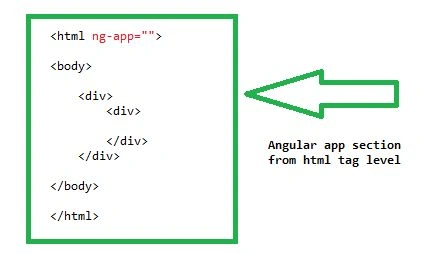
ng-init:
- This directive is used to intialize the data for the application.
- <html>
- <head>
- <script src="https://ajax.googleapis.com/ajax/libs/angularjs/1.3.0-beta.17/angular.min.js"></script>
- </head>
- <body ng-app>
- <div ng-init="a=2"></div>
- <div>{{"it's init "+a}}</div>
- </body>
- </html>
- In the above example double curley braces are called as expressions.
- Expressions are used to bind the applications data to HTML
- Expressions are to be declared inside the {{ expression }} as we can see above example.
- Instead of expression {{ }} we can also provide the ng-bind="a"
- ng-bind or expression {{ }} can be used to bind the data to view.
ng-model:
- This directive povides the binding feature to the other directives as like input, select, textarea.
- Through ng-model we can also achieve two way binding, which is one of the main features of Angular JS.
Example:
- <html>
- <head>
- <script src="https://ajax.googleapis.com/ajax/libs/angularjs/1.3.0-beta.17/angular.min.js"></script>
- </head>
- <body ng-app> <input type="text" ng-model="propname" /> {{propname}} </body>
- </html>
In the above example, we have used the ng-model with name "Propname" and that name we have used in regular expression as {{propname}}.
So, whenever the user provides the text, automatically the expression also comes with the typing text.
Module:
- Module is a container that which contains the controllers, services, filters etc.
- To declare a module we need to take the help of the Angular instance as follows.
- Tecnical term is we can say the module is a method of the Angular object.
- angular.module("module name",["servicename","..",".." ]);
- The module requires two parameters; of them one is "Name of the module" and another is dependencies related to the application which can be services or controllers etc.
Controller:
- In Angular JS, the controller creates the model which can be passed to the view.
- We can treat the controller as a JavaScript anonymous function.
Declaration of controller,
- function ($scope) { //code }
- In the declaration we can find the anonymous function, we can also see a special word as $scope.
- $scope is one of the object of angular application.
- The purpose of $scope is to carry the model to the view.
- To the scope object we can provide the properties in the controller and these properties can be used in the view.
Let's have a combined theme of both module and Controller:
- var tabmodule = angular.module("tabmodule", []);
- var tabcontroller = tabmodule.controller("tabcontoller", function ($scope) {
- $scope.id="123";
- $scope.name="abc"
- })
- In the above example we can see the module with named as "tabmodule" taken to a variable, var tabmodule.
- In Line 2, we had registered the controller named "tabcontroller" to the module.
- We can observe the $scope object, which containstwo values, id and name,
- So here the $scope object carries these two values to the view.
- <html>
- <head>
- <script src="https://ajax.googleapis.com/ajax/libs/angularjs/1.3.0-beta.17/angular.min.js"></script>
- </head>
- <body ng-app="tabmodule">
- <div ng-controller="tabcontoller">
- <div>
- Hello your Id is: <span ng-bind="id"></span><br />
- Hello your name is : <span ng-bind="name"></span>
- </div>
- </div>
- </body>
- </html>
- In the above example you can observe I used ng-app="tabmodule".
- tabmodule is the name of the module, so here we had related the name of the module to the ng-app directive.
- We had also related our controller name "tabcontroller" to the parent div section, which is accessible to its child tags too.
- Our $scope object having two properties as id and name are registered to the spans by the help of ng-bind directive (which also can be done by expressions as {{id}} & {{name}}).
In short, I can describe it as, the ng-controller will provide the information to Angular js, which the controller needs to be called in the view.
In our example, ng-controller="tabcontroller." so, ng-controller passes the name of the controller as "tabcontroller" to be called in that particular HTML section.
sai chandPosted Mar 5, 2016, 8:10 AM
this is nice explanation ... i have got lot of knowledge and so much interest regarding ur way of expressing.
shashidhar chPosted Mar 5, 2016, 7:35 AM
Good for Learning basic concepts....
Vignesh ManiPosted Mar 4, 2016, 11:50 AM
NIce