

Introduction
Comments are the description of the code which will be helpful to memorize the code in the future.
Refer - Why Comments Are Important While Writing Code
There are two ways to comment in PowerApps Code,
- Line
- Block
Line Comments
Line comments are added at the end of the formula and then it takes up till the end of the line.
It starts with a double forward slash and continuous with text.
Example
// This is a line comment


Block Comments
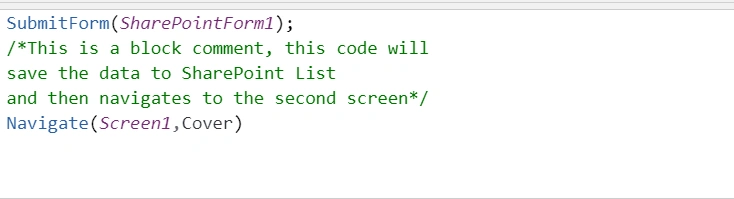
It can be used when there are multiple lines of text to be commented on.
It starts with a forwarding slash and an asterisk and will continue until the asterisk and forward slash.
Example
/* Here is a block line comment
for the example purpose and used for
multiline comments*/
Note
Block comment can also be at the end of the line.

Summary
In this blog, we learned to add PowerApps Comments.
Join the conversation! Your thoughts help the community grow.