
Sounds interesting!!!
Basically it is all about changing the color of entity in designer so that it would be easy for us to identify related groups of entities in the Visual Studio designer.
This enhancement to Entity Framework was done in version 5.0.
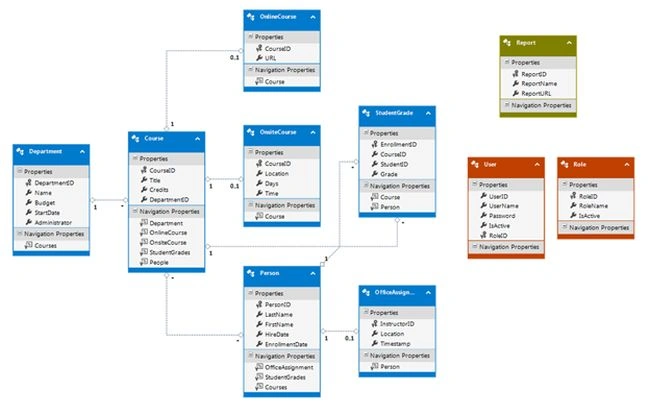
If you are working with edmx files and you have opened it in designer then to change the color of an entity, right click on the entity in the designer → go to properties (or press F4) → Change the Fill Color property. For example:
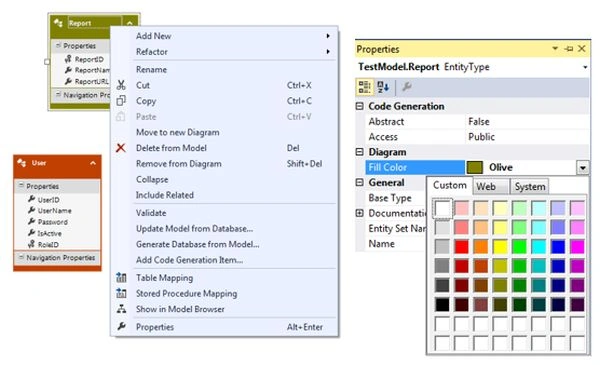
To change color of multiple entities in one go, select multiple entities and change Fill Color for all of them using property window.
This feature has nothing to do with performance aspects as people are asking questions in terms of performance improvement.
When you have a large scale projects and many entities in one edmx file, I am sure this feature will definitely help you to segregate your entities in different modules.
Keep learning …………………. Cheers !!!

Colored Entity in Entity Framework
Join the conversation! Your thoughts help the community grow.
Sign in to leave a comment
It is the same account you read, post and publish with — and you will come straight back to this page.
Elina RomanPosted Jan 28, 2015, 3:47 AM
well,it is pretty good.
Vithal WadjePosted Jan 27, 2015, 10:32 AM
another nice contribution ,keep it up
Manish Kumar ChoudharyPosted Jan 27, 2015, 6:25 AM
Nice..