

This blog defines code for DropDownList in Android.
Steps
- Start Eclipse IDE.
- Create a new project.
- Create a MainActivity.java file.
- Create an activity_main.xml for layout design.
MainActivity.java
package com.example.dropdownlist;
import android.app.Activity;
import android.os.Bundle;
import android.view.View;
import android.widget.AdapterView;
import android.widget.AdapterView.OnItemSelectedListener;
import android.widget.ArrayAdapter;
import android.widget.RelativeLayout;
import android.widget.Spinner;
import android.widget.TextView;
import android.widget.Toast;
public class MainActivity extends Activity {
Spinner spnr;
RelativeLayout rl;
String[] str={"Select","Yellow","red","Green","White"};
@Override
protected void onCreate(Bundle savedInstanceState) {
super.onCreate(savedInstanceState);
setContentView(R.layout.activity_main);
spnr=(Spinner)findViewById(R.id.sss);
rl=(RelativeLayout)findViewById(R.id.rrr);
ArrayAdapter<String> adap = new ArrayAdapter<String>(this,android.R.layout.simple_selectable_list_item,str);
spnr.setAdapter(adap);
spnr.setOnItemSelectedListener(new OnItemSelectedListener() {
@Override
public void onItemSelected(AdapterView<?> arg0, View arg1, int arg2,
long arg3) {
// TODO Auto-generated method stub
String ss =((TextView)arg1).getText().toString();
Toast.makeText(getApplicationContext(),ss,40000).show();
}
@Override
public void onNothingSelected(AdapterView<?> arg0) {
// TODO Auto-generated method stub
}
});
}
}
Code - activity_main.xml
<RelativeLayout xmlns:android="http://schemas.android.com/apk/res/android"
xmlns:tools="http://schemas.android.com/tools"
android:layout_width="match_parent"
android:layout_height="match_parent"
tools:context=".MainActivity"
android:id="@+id/rrr">
<Spinner
android:layout_width="wrap_content"
android:layout_height="wrap_content"
android:id="@+id/sss" />
</RelativeLayout>
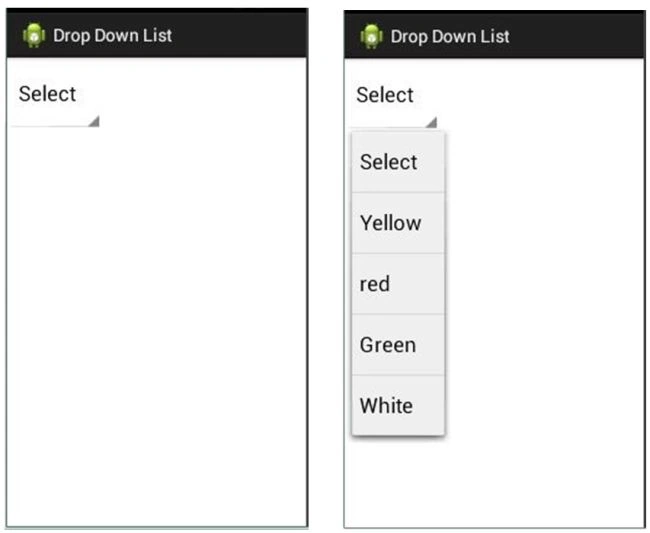
Output
Join the conversation! Your thoughts help the community grow.