

The simplest way for the model validating is just by using data annotation, but if you want your domain to be clean the fluent validation is the best preference.
Let's start now.
Step 1 - Create new Web Application, select MVC template, install entity framework and fluent validation from the nuggets.
Step 2 - In the Model folder, add Student class.
- public class Student
- {
- public int ID {
- get;
- set;
- }
- public string FirstName {
- get;
- set;
- }
- public string LastName {
- get;
- set;
- }
- public string Phone {
- get;
- set;
- }
- public string Email {
- get;
- set;
- }
- }
- namespace MvcModelValidation.DAL
- {
- public class StudentContext: DbContext
- {
- public StudentContext(): base("stddb")
- {
- Database.SetInitializer < StudentContext > (null);
- }
- public DbSet < Student > Students
- {
- get;
- set;
- }
- }
- }
- namespace MvcModelValidation.Validations
- {
- public class StudentValidation: AbstractValidator < Student >
- {
- public StudentValidation() {
- RuleFor(c => c.FirstName).NotEmpty().Length(0, 10);
- RuleFor(c => c.LastName).NotEmpty().Length(0, 10);
- RuleFor(c => c.Phone).Length(10).WithMessage("Enter valid number");
- RuleFor(c => c.Email).EmailAddress();
- }
- }
- }
- <connectionStrings>
- <add name="stdb" providerName="System.Data.SqlClient" connectionString="Data Source= MMC-PC\SQLEXPRESS;Initial Catalog=stdb;Integrated Security=True;" />
- </connectionStrings>
- namespace MvcModelValidation.Controllers {
- public class StudentsController: Controller {
- private StudentContext db = new StudentContext();
- //Get Students
- public ActionResult Index() {
- return View(db.Students.ToList());
- }
- // GET: Students/Create
- public ActionResult Create() {
- return View();
- }
- [HttpPost]
- [ValidateAntiForgeryToken]
- public ActionResult Create([Bind(Include = "ID,FirstName,LastName,Phone,Email")] Student student) {
- StudentValidation val = new StudentValidation();
- ValidationResult model = val.Validate(student);
- if (model.IsValid) {
- db.Students.Add(student);
- db.SaveChanges();
- return RedirectToAction("Index");
- } else {
- foreach(ValidationFailure _error in model.Errors) {
- ModelState.AddModelError(_error.PropertyName, _error.ErrorMessage);
- }
- }
- return View(student);
- }
- }
- }
enable-migrations
add-migration "initial-migration"
update-database -verbose
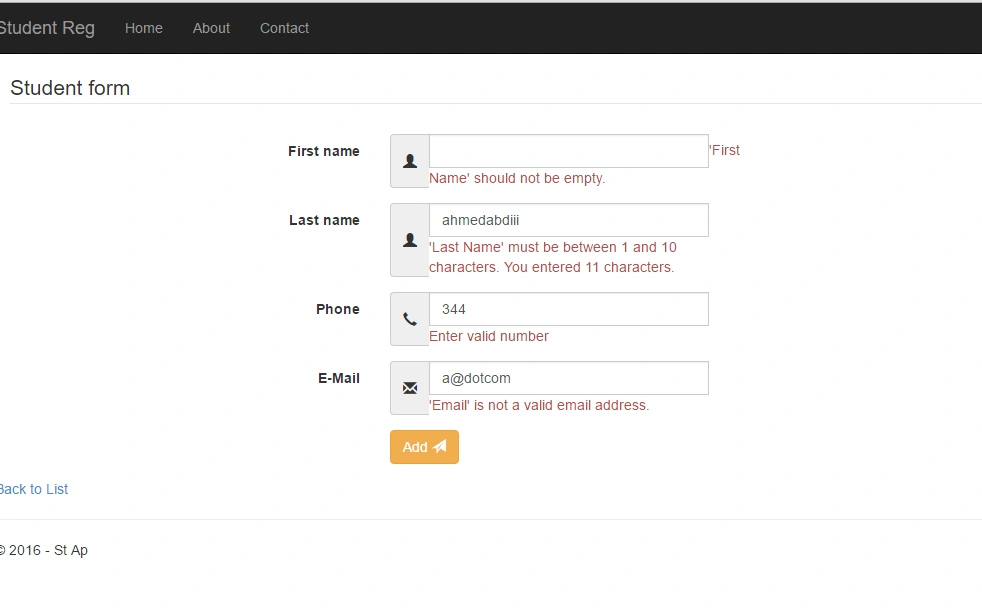
Now, insert some valid data.

Chris LPosted May 20, 2019, 2:40 PM
I know this is an old post but worth a try. Does fluent validation configure your database such as not null fields etc with code first approach.