

Hey folks, with the recent update from Microsoft Power Apps team, we can now create code components with the React JS and Fluent UI library directly without any custom project setup using the latest Microsoft Power Platform CLI for model-driven apps, canvas apps, and portals.
Prerequisite
- Microsoft Power Platform CLI (If you have already installed the Microsoft Power Platform CLI so you can run command pac install latest to get the latest CLI.)
- Node.js (recommended LTS version)
- Visual Studio Code IDE
- Visual Studio 2019 (to build and package the solution)
Implementation
To create the code component with React JS and Fluent UI platform library, you can use following command,
pac pcf init --name ReactSample --namespace SampleNamespace --template field --framework React
Let’s talk about each parameter in the above command.
- --name ReactSample
This represents the name of the code component solution
- --namespace SampleNamespace
This represents the namespace for the code component which will be used to uniquely identify our code component across code components library in power apps.
- --template Field.
This represents the template of the solution either we can pass “field” or “dataset”.
- --framework React.
This represents we are using React to create the code component.
After successful execution of the above command, you have the run "npm install" to download the dependencies which will allow us to run the solution.
Project Structure
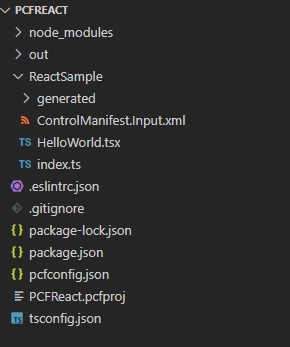
Open the index.ts file.
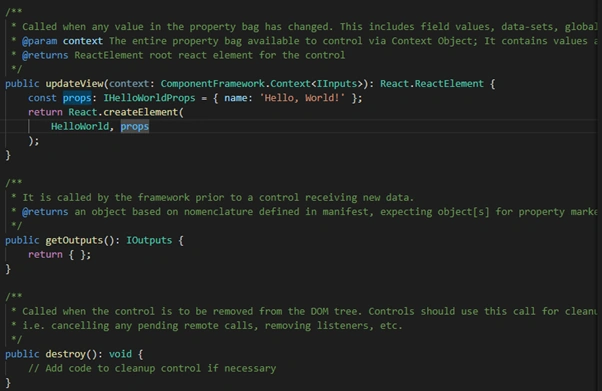
In the index.ts file we have updateView() method where we are initializing the React component where you can pass your own component as an entry point for the other React Component.
Open the HelloWorld.tsx file.
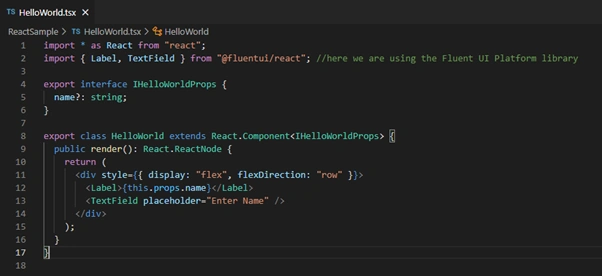
Here we have imported the Label and TextField component from the @fluentui/react library which is the Fluent UI platform library. Likewise Label Component we can use more component from the Fluent UI library.
To learn more about Fluent UI: Fluent UI - Controls - React (microsoft.com)
At last, run the “npm run-start build” and after successful execution of this you can run “npm start” to test the code component inside browser.
Final Result
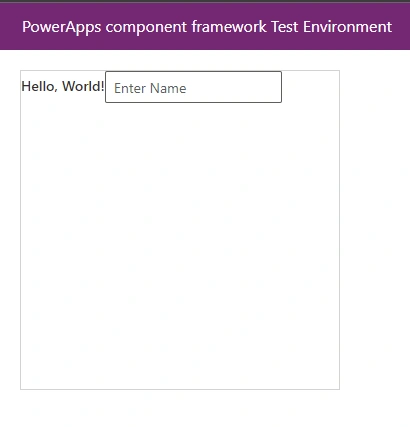
Hurrah, here we have created our first code component.
Jochen BartlauPosted Apr 20, 2022, 10:59 AM
Cool, thanks for sharing :)!
Harshad TretiyaPosted Apr 18, 2022, 11:20 AM
Very helpful