

The CHARINDEX function finds the position of the expression in another expression.
Syntax:
select charindex(Exptofind ,Exptosearch ,[Start_Position])
Example 1:
- select charindex('a','Rakesh') [Position] -- Here 'a' position is 2
- select charindex('H','Hello World') [Position] -- Here 'H' position is 1
- select charindex(' ','C# corner') [Position] -- Here [Space] position is 3
- select charindex('W','C# corner') [Position]--Here 'W' position is 0 beacuse there no char 'W' in search Exp
- select charindex('a', NULL) -- if any of the exp is null then result also null
- select charindex(NULL,'Rakesh') -- if any of the exp is null then result also null
- select charindex('o','Hello World',6)--Here 6 is the start postion of char to find the Exp
- create table Employee
- (
- EmpId int identity(1,1) primary key,
- Empname varchar(100),
- Salary int not null,
- Deptid int constraint Dept_Fk references Department(DeptId)
- )
- insert into Employee
- select 'Rakesh',8000,1
- union all
- select 'raju',1000,2
- union all
- select 'Naresh',5000,1
- union all
- select 'Venkatesh',5800,3
- select * from Employee
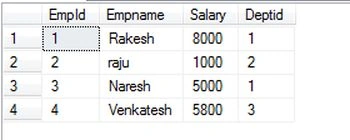
Query 1:
To find the CHARINDEX position of "R" in the Empname column of the Employee table.
- select Empname,charindex('R',Empname) as [Position] from Employee
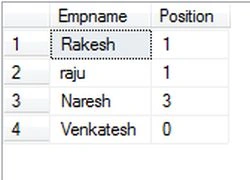
Query 2:
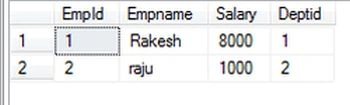
To find whose Empname(s) start with "R" using CHARINDEX.
- select * from Employee
- where charindex('R',Empname)=1
Jaygovind ChauhanPosted Mar 31, 2016, 3:07 AM
wow it helpd me