

Introduction
In this blog, I have described, how to create a simple count down of days (business days alone) in a page with minimal use of JavaScript and HTML.
JavaScript, given below, has three parts-
- The actual timer, which is triggered every 7 milliseconds, so that you can change as per your wish.
- myTimerFn() is a function, which sets the start and end dates to get the count down of the business days in between.
- The actual function, which provides the count of business days for the given start and end dates.
Code
- <html>
- <head>
- <script type="text/JavaScript">
- //To call a javascript function using timer (part 1)
- var myVar = setInterval(myTimerFn, 7000);
- // To call the pass the start and end date to function calculating the business days in between (part 2)
- function myTimerFn() {
- var d = new Date();
- var enDate = new Date("09/28/2016");
- //alert (d.toISOString() + " | " +enDate.toISOString());
- document.getElementById("demo").innerHTML = workingDaysBetweenDates(d.toISOString(),enDate.toISOString());
- }
- //Function for finding business days between two dates (part 3)
- function workingDaysBetweenDates(stDate, enDate)
- {
- var startDate = new Date(stDate);
- var endDate = new Date(enDate);
- // Validate input
- if (endDate < startDate)
- return 0;
- // Calculate days between dates
- var millisecondsPerDay=8 6400 * 1000;
- // Day in milliseconds
- startDate.setHours(0);
- // Start just after midnight
- startDate.setMinutes(0);
- startDate.setSeconds(0);
- endDate.setHours(23);
- // End just before midnight
- endDate.setMinutes(59);
- endDate.setSeconds(59);
- var diff=e ndDate - startDate;
- // Milliseconds between datetime objects
- var days=M ath.ceil(diff / millisecondsPerDay);
- // alert ( "Days Diff:" + days);
- // Subtract two weekend days for every week in between
- var weeks=M ath.floor(days / 7);
- days=d ays - (weeks * 2);
- // Handle special cases
- var startDay=s tartDate.getDay();
- var endDay=e ndDate.getDay();
- // Remove weekend not previously removed.
- if (startDay - endDay> 1)
- days = days - 2;
- // Remove start day if span starts on Sunday but ends before Saturday
- if (startDay == 0 && endDay != 6)
- days = days - 1
- // Remove end day if span ends on Saturday but starts after Sunday
- if (endDay == 6 && startDay != 0)
- days = days - 1 return days;
- }
- </script>
- </head>
- <div id="demodiv" style="border:1px solid black;background-color:yellow;height:50px;"><strong><span id="demo"></strong> </span>
- day(s) left </div>
- </html>
Output
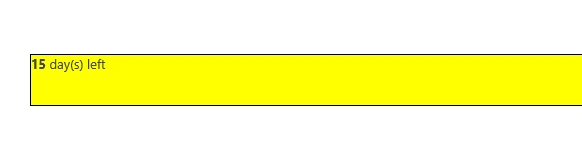
Please let me know, if you have any issues implementing it.
Join the conversation! Your thoughts help the community grow.