

In this article, we will learn about Bootstrap 4 utility classes or Helper classes. This is the second part of this article series of Bootstrap 4 utility classes. In this part, we will discuss the height and width classes, shadow classes and visibility classes. Utility classes are extremely useful to add a style quickly without writing the CSS classes.
In this article, we will discuss the following classes,
- Bootstrap 4 height and width
- Shadow classes
- Visibility classes
Bootstrap 4 height and width
Width
- .w-25
To set width to 25% - .w-50
To set width to 50% - .w-75
To set width to 75% - .w-100
To set width to 100% - .mw-100
To set max width to 100%
Height
- .h-25
To set height to 25% - .h-50
To set height to 50% - .h-75
To set height to 75% - .h-100
To set height to 100% - .mh-100
To set max height to 100 %
- <link rel="stylesheet" href="https://maxcdn.bootstrapcdn.com/bootstrap/4.1.3/css/bootstrap.min.css" />
- <script src="https://ajax.googleapis.com/ajax/libs/jquery/3.3.1/jquery.min.js"></script>
- <script src="https://cdnjs.cloudflare.com/ajax/libs/popper.js/1.14.3/umd/popper.min.js"></script>
- <script src="https://maxcdn.bootstrapcdn.com/bootstrap/4.1.3/js/bootstrap.min.js"></script>
Now, add 5 divs in the body section and add each width classe to each div respectively.
- <div class="w-25 bg-success">Width 25%</div>
- <div class="w-50 bg-success ">Width 50%</div>
- <div class="w-75 bg-success">Width 75%</div>
- <div class="w-100 bg-success">Width 100%</div>
- <div class="mw-100 bg-success">Max Width 100%</div>
- <!DOCTYPE html>
- <html xmlns="http://www.w3.org/1999/xhtml">
- <head runat="server">
- <title>Bootstrap 4 </title>
- <link rel="stylesheet" href="https://maxcdn.bootstrapcdn.com/bootstrap/4.1.3/css/bootstrap.min.css" />
- <script src="https://ajax.googleapis.com/ajax/libs/jquery/3.3.1/jquery.min.js"></script>
- <script src="https://cdnjs.cloudflare.com/ajax/libs/popper.js/1.14.3/umd/popper.min.js"></script>
- <script src="https://maxcdn.bootstrapcdn.com/bootstrap/4.1.3/js/bootstrap.min.js"></script>
- </head>
- <body>
- <form id="form1" runat="server">
- <div class="container">
- <div class="w-25 bg-success">Width 25%</div>
- <div class="w-50 bg-success ">Width 50%</div>
- <div class="w-75 bg-success">Width 75%</div>
- <div class="w-100 bg-success">Width 100%</div>
- <div class="mw-100 bg-success">Max Width 100%</div>
- </div>
- </form>
- </body>
- </html>
Run the project and check the result.

- <!DOCTYPE html>
- <html xmlns="http://www.w3.org/1999/xhtml">
- <head runat="server">
- <title>Bootstrap 4 </title>
- <link rel="stylesheet" href="https://maxcdn.bootstrapcdn.com/bootstrap/4.1.3/css/bootstrap.min.css" />
- <script src="https://ajax.googleapis.com/ajax/libs/jquery/3.3.1/jquery.min.js"></script>
- <script src="https://cdnjs.cloudflare.com/ajax/libs/popper.js/1.14.3/umd/popper.min.js"></script>
- <script src="https://maxcdn.bootstrapcdn.com/bootstrap/4.1.3/js/bootstrap.min.js"></script>
- </head>
- <body>
- <form id="form1" runat="server">
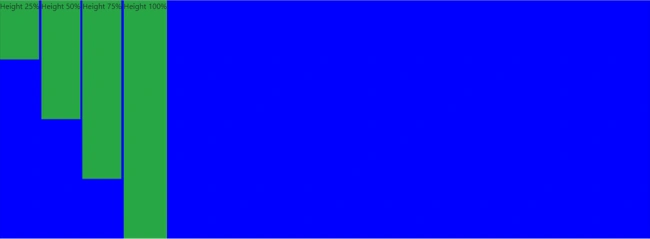
- <div style="height:500px;background-color:blue">
- <div class="h-25 d-inline-block bg-success">Height 25%</div>
- <div class="h-50 d-inline-block bg-success">Height 50%</div>
- <div class="h-75 d-inline-block bg-success">Height 75%</div>
- <div class="h-100 d-inline-block bg-success">Height 100%</div>
- </div>
- </form>
- </body>
- </html>
Run the project and check the result.
Bootstrap Shadow classes
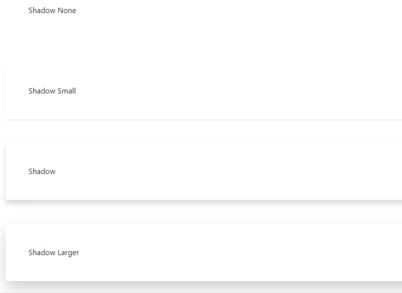
Add 4 div elements and add all 4 shadow classes to them one by one.
- <div class="shadow-none p-5 mb-5 rounded">Shadow None</div>
- <div class="shadow-sm p-5 mb-5 rounded">Shadow Small</div>
- <div class="shadow p-5 mb-5 rounded">Shadow</div>
- <div class="shadow-lg p-5 mb-5 rounded">Shadow Larger</div>
- <!DOCTYPE html>
- <html>
- <head>
- <meta charset="utf-8" />
- <title>Bootstrap 4</title>
- <link rel="stylesheet" href="https://maxcdn.bootstrapcdn.com/bootstrap/4.1.3/css/bootstrap.min.css">
- <script src="https://ajax.googleapis.com/ajax/libs/jquery/3.3.1/jquery.min.js"></script>
- <script src="https://cdnjs.cloudflare.com/ajax/libs/popper.js/1.14.3/umd/popper.min.js"></script>
- <script src="https://maxcdn.bootstrapcdn.com/bootstrap/4.1.3/js/bootstrap.min.js"></script>
- </head>
- <body>
- <div class="container">
- <div class="shadow-none p-5 mb-5 rounded">Shadow None</div>
- <div class="shadow-sm p-5 mb-5 rounded">Shadow Small</div>
- <div class="shadow p-5 mb-5 rounded">Shadow</div>
- <div class="shadow-lg p-5 mb-5 rounded">Shadow Larger</div>
- </div>
- </body>
- </html>
- .visible
- .invisible
Add two divs and add visible and invisible classes to those.
- <div class="visible p-4 bg-primary">Visible</div>
- <div class="invisible bg-primary">Invisible</div>
- <!DOCTYPE html>
- <html>
- <head>
- <meta charset="utf-8" />
- <title>Bootstrap 4</title>
- <link rel="stylesheet" href="https://maxcdn.bootstrapcdn.com/bootstrap/4.1.3/css/bootstrap.min.css">
- <script src="https://ajax.googleapis.com/ajax/libs/jquery/3.3.1/jquery.min.js"></script>
- <script src="https://cdnjs.cloudflare.com/ajax/libs/popper.js/1.14.3/umd/popper.min.js"></script>
- <script src="https://maxcdn.bootstrapcdn.com/bootstrap/4.1.3/js/bootstrap.min.js"></script>
- </head>
- <body>
- <div class="container">
- <div class="visible p-4 bg-primary">Visible</div>
- <div class="invisible bg-primary">Invisible</div>
- </div>
- </body>
- </html>

Summary
Sreekanth ReddyPosted Dec 5, 2018, 4:54 AM
Very simple & Clean explanation.
Rushi MehtaPosted Dec 4, 2018, 10:52 PM
NiceArticle
Jignesh KumarPosted Dec 4, 2018, 8:36 AM
Nice artilce